This is the multi-page printable view of this section.
Click here to print.
Return to the regular view of this page.
Aura common utilities
Aura common utilities
Description of aura-common-utilities
Introduction
aura-common-utilities is a multipackage repository with all the libraries provided by Aura team to make development easier.
aura-common-utilities repository is organized into four packages:
Additionally, there are certain utilities that have not been migrated to these packages yet and are documented outside the packages sections.
1 - Aura Bot utilities
Aura Bot utilities
Description of aura-bot-utilities
Introduction
aura-bot-utilities is a package belonging to aura-common-utilities that includes utilities for handling different tasks over aura-bot.
Find more information in the Github repository:
https://github.com/Telefonica/aura-common-utilities/tree/master/packages/aura-bot-utilities/
How to install aura-bot-utilities package
$ git clone https://github.com/Telefonica/aura-common-utilities.git

$ cd aura-common-utilities/packages/aura-bot-utilities
How to import an utility from this package
To import an utility from the aura-bot-utilities package, execute the following command:
import { ... } from '@telefonica/aura-bot-utilities/lib/[*utility-name*]';
For example:
import { generateAttachment, getReference, getTextFromResolution } from '@telefonica/aura-bot-utilities/lib/aura-bot-library-util';
Available utilities
List of utilities in the aura-bot-utilities package:
1.1 - aura-bot-kpis
aura-bot-kpis utility
aura-bot-kpis utility allows managing KPI entities in aura-bot and aura-groot.
Introduction
The aura-bot-kpis utility contains the necessary utilities to manage KPI entities in aura-bot and aura-groot.
Find more information in the Github repository:
https://github.com/Telefonica/aura-common-utilities/tree/master/packages/aura-bot-utilities/src/aura-bot-kpis/
These guidelines will allow you to get a copy of the project running on your local machine for development and testing purposes.
Run tests
This project uses Jest for BBDD testing.
Unit tests
$ npm run test
Style tests
These tests perform the validation coding rules defined in Aura using the eslint tool.
You can validate the code using:
$ npm run lint
Coverage tests
You can run the coverage tests using:
$ npm run test
The threshold established to validate the coverage is as follows:
- lines: 90%
- functions: 90%
- statements: 90%
- branches: 70%
Versioning
We use [SemVer] (http://semver.org/) for versioning.
More information regarding latest versions:
$ npm show @telefonica/aura-bot-kpis
1.2 - aura-bot-library-util
aura-bot-library-util utility
aura-bot-library-util utility contains different utility files for aura-bot libraries
Introduction
aura-bot-library-util utility is an NPM library with utility functions provided by the Aura Bot Global Team to make it easier the development of dialogs in aura-bot.
Find more information in the Github repository:
https://github.com/Telefonica/aura-common-utilities/tree/master/packages/aura-bot-utilities/src/aura-bot-library-util/
This library only contains utilities used in the dialogs, not needed by the bot itself.
To use it, just define the dependency with @telefonica/aura-bot-library-util in your package.json file. It is published as a private library in NPM, so request a valid NPM token to access it.
The utility files included in aura-bot-library-util utility are described in the following sections.
CurrencyUtils
aura-bot-library-util/currency-util.ts
getLocalizedCurrency
It returns money amounts formatted with country specific settings.
| param |
type |
description |
mandatory |
| locale |
string |
Country locale code |
yes |
| amount |
number |
Total amount to be formatted |
yes |
| currency |
string |
Country currency code |
yes |
    const amount: string = getLocalizedCurrency('es-es', 460.56, 'EUR');

    /* 460.56 € */

    const amount: string = getLocalizedCurrency('es-uy', 460.56, 'UYU');

    /* $ 461 */
Datautils
aura-bot-library-util/data-unit-util.ts
getDataAndUnit
It returns converted internet data amount and unit from bytes quantity, following the country specific settings.
| param |
type |
description |
mandatory |
| content |
TurnContext |
Step context |
yes |
| configuration |
Configuration |
Dialog config variables |
yes |
| data |
number |
Data amount |
yes |
| forcePoint |
boolean |
It indicates if the decimals will be separated by points |
no |
    const [dataQt, dataUnit] = getDataAndUnit(context, config, 1536)
    const [dataQt, dataUnit] = getDataAndUnit(context, config, 1536, true)

    /*
     * Result depending on AURA_DEFAULT_LOCALE env var
     * pt-br - ['1,5', 'GB']
     * en-gb - ['1.50', 'GB']
    */
LocaleUtils
aura-bot-library-util/locale-util.ts
getLiteral
This intermediate method generates a getText function ready to receive resources keys and sequential params.
| param |
type |
description |
mandatory |
| context |
TurnContext |
step context |
yes |
| library |
string |
libraryName |
no |
    /* If we need to convert only one text in function scope, we can use it as one line function */

    const text: string = getLiteral(context, 'services')('services.find.moreinfo', param1, param2);
    const text: string = getLiteral(context)('services:services.find.moreinfo', param1, param2);

    /* When we need to convert several texts in function scope for the same library,
    we can preassign result function to variable and proceed all along dialog step */

    const getServicesText: Function = getLiteral(context, 'services');

    const text: string = getServicesText('services.find.moreinfo', param1, param2);

    /* if we need to convert several texts in function scope for several libraries */

    const getText: Function = getLiteral(context);

    const text: string = getText('services:services.find.moreinfo', param1, param2);
    const errorText: string = getText('errors:error.notFound');
getTextByKeys
Factory function used mainly in graphs to retrieve converted text objects, avoiding redundancy.
| param |
type |
description |
mandatory |
| context |
TurnContext |
step context |
yes |
| libraryName |
string |
libraryName |
yes |
    const getGraphText: Function = getTextByKeys(context, 'graphics');

    const texts: any = getGraphTexts(['of', 'remaining'], { unit: 'data.gb' })

    /* Output
        {
            of: 'graphics:of', // converted text,
            remaining: 'graphics:remaining', // converted text,
            unit: graphics:data.gb, // converted text
        }
    */
withLocale
It encapsulates all data we need to call LocaleManager instance getText method.
| param |
type |
description |
mandatory |
| context |
TurnContext |
step context |
yes |
| fn |
Function |
function to be executed at the end |
yes |
| library |
string |
libraryName |
no |
For instance, getLiteral function passes an inline arrow function to simply receive the params that the result function was invoked with:
    /**
     * handy method to retrieve text.
     *
     * @param  {TurnContext} context The dialog step context.
     * @param  {string} libraryName? Library name.
     */
    export function getLiteral(context: TurnContext, libraryName?: string) {
        return withLocale(
            context,
            ({ getText, library }: any, literal: string, ...args: any[]) => getText(`${library ? library + ':' : ''}${literal}`, args),
            libraryName
        );
    }
This way, we can compose any method that fits our dialog text composition specific needs. A trivial working code sample could be:
    const _getText: Function = withLocale(stepContext.context, intermediateFunc)

    function intermediateFunc({ getText }, obj: any, params: string[], isError?: boolean) {
        const finalTextKey: string = isError ? obj.error : obj.text;
        return getText(finalTextKey, params);
    }

    const obj = {
        text: 'services:services.some.text',
        error: 'errors:error.message.error'
    }

    const text: string = _getText(obj, ['first', 'second']);
    const errorText: string = _getText(obj, [], true);
getErrorMessage
It composes a full error message with fallback text when required.
| param |
type |
description |
mandatory |
| context |
TurnContext |
step context |
yes |
| statusCode |
number |
request code, if existing |
nullable |
| objErr |
StatusCodeMessagesMap |
Custom error messages |
no |
    export interface StatusCodeMessagesMap {
        default: string;
        code400?: string;
        code404?: string;
    }
    try {
        //Do stuff
    } catch (error) {
        const messageMap: StatusCodeMessageMap = {
            default: 'services:services.custom.error',
            code400: 'services:services.error.badRequest',
            code404: 'services:services.error.notFound'
        }

        const errorMessage: string = getErrorMessage(stepContext.context, error.code, messageMap)
    }
sendLoggerErrorAndActivity
It sends full logged error message activity.
| param |
type |
description |
mandatory |
| context |
TurnContext |
step context |
yes |
| logger |
any |
log function |
yes |
| objErr |
StatusCodeMessagesMap |
Custom error messages |
yes |
| dialogId |
string |
Current dialog ID |
yes |
| error |
any |
error to print |
yes |
    try {
        /* [...] */
    }  catch (error ) {

        const messageMap: StatusCodeMessageMap = {
            default: 'services:services.custom.error',
            code400: 'services:services.error.badRequest',
            code404: 'services:services.error.notFound'
        }


        sendLoggerErrorAndActivity(
            context,
            this.logger,
            messageMap,
            ServicesFindDialog.id,
            error
        )
    }
LibraryUtil
aura-bot-library-util/library-util.ts
excludeDialogs
It excludes dialogs provided in an array.
| param |
type |
description |
mandatory |
| dialogNames |
string[] |
Array with dialog’s ids |
yes |
| options |
any |
Options to customize function behavior |
yes |
excludeDialogs(dialogNames: string[], options: any);
readLocaleFolder
Ir returns an object with locale name as key and file content as value.
| param |
type |
description |
mandatory |
| localePath |
string |
localePath Base path where locale files are looked for |
yes |
readLocaleFolder(localePath: string);
readEnv
It returns an object with env variables from current environment.
| param |
type |
description |
mandatory |
| configuration |
any |
Object with configuration information |
yes |
| envPath |
string |
Path pointing to environment configuration |
yes |
readEnv(configuration: any, envPath: string);
readDialogConfig
It returns an object with dialog config from current environment.
| param |
type |
description |
mandatory |
| configuration |
any |
Object with configuration information |
yes |
| configPath |
string |
Path pointing to dialog configuration |
yes |
readDialogConfig(configuration: any, configPath: string);
replaceToDialogByIntent
Given an intent, it replaces the current dialog by the intent that matches with it. This method triggers the main dialog and keeps the context-filter functionality in the replaced one.
| param |
type |
description |
mandatory |
| stepContext |
WaterfallStepContext |
step context |
yes |
| intent |
string |
intent which the dialog will be triggered |
yes |
await replaceToDialogByIntent(stepContext: WaterfallStepContext, intent: string);
generateSasUrl
It generates and returns the URL of the blob resource, applying expiration.
| param |
type |
description |
mandatory |
| fileName |
string |
Blob file name |
yes |
| remoteContainerPath |
string |
Full container’s path |
yes |
| expiration |
number |
Expiration time in minutes |
no |
| configuration |
Configuration |
Environment configuration |
yes |
| correlator |
string |
Correlator |
no |
await generateSasUrl(fileName: string, remoteContainerPath: string,
    configuration: Configuration, corr?: string, expiration?: number);
uploadFileUrl
It uploads a file to Azure Storage from an URL.
| param |
type |
description |
mandatory |
| sourceUrlFile |
string |
URL that contains the file |
yes |
| remoteFilePath |
string |
Blob remote path |
yes |
| configuration |
Configuration |
Environment configuration |
yes |
| correlator |
string |
Correlator |
no |
| containerName |
string |
Storage container name |
no |
await uploadFileUrl(sourceUrlFile: string, remoteFilePath: string,
    configuration: Configuration, corr?: string, containerName?: string) ;
ResourcesUtils
aura-bot-library-util/resources-util.ts
getImageUrl
It intercalates supported resolution folder path into image path, following channel image resolution settings.
| param |
type |
description |
mandatory |
| context |
TurnContext |
step context |
yes |
| libraryName |
string |
Library proper name |
yes |
| url |
string |
Full path of the image default version in the library root folder |
yes |
| configuration |
Configuration |
Env variables |
yes |
    // Current supported resolutions.
    enum SupportedResolutions {
        HDPI = 'hdpi',
        XHDPI = 'xhdpi',
        XXHDPI = 'xxhdpi',
        XXXHDPI = 'xxxhdpi'
    }

    // Taking channelData imageSettings resolution == xxxhdpi

    getImageUrl(context, 'services', 'images/default/imageName.png', configuration);

    // https://<storageUrl>/libraries/services/images/xxxhdpi/imageName.png?<params>
getResourcePath
It gets the whole resource path uploaded to blob-storage, that is accessible, to be included in cards.
| param |
type |
description |
mandatory |
| configuration |
any |
Env variables |
yes |
| libraryName |
string |
Library proper name |
yes |
| baseFilePath |
string |
Base file access path |
yes |
const uri: string = DialogUtils.getResourcePath('generic', resource, this.configuration);
1.3 - aura-minibot-service
aura-minibot-service utility
aura-minibot-service simplifies how aura-mini-bot and aura-mini-groot are generated.
Introduction
The aura-minibot-service utility contains the common elements needed by aura-bot and aura-groot to generate their mini versions: scripts, mock classes and templates, etc.
Find more information in the Github repository:
https://github.com/Telefonica/aura-common-utilities/tree/master/packages/aura-bot-utilities/src/aura-mini-bot-service/
These guidelines will allow you to get a copy of the project running on your local machine for development and testing purposes.
Run tests
This project uses Jest for BBDD testing.
Unit tests
$ npm run test
Style tests
These tests perform the validation coding rules defined in Aura using the eslint tool.
You can validate the code using:
$ npm run lint
Coverage tests
You can run the coverage tests using:
$ npm run test
The threshold established to validate the coverage is as follows:
- lines: 90%
- functions: 90%
- statements: 90%
- branches: 70%
Versioning
We use [SemVer] (http://semver.org/) for versioning.
More information regarding latest versions:
$ npm show @telefonica/aura-minibot-service
1.4 - aura-movistar-libraries
aura-movistar-libraries utility
aura-movistar-libraries utility contains utilities to use with dialogs in Movistar channels
Introduction
aura-movistar-libraries utility is an NPM library that contains utility functions provided by Aura Global Team to be used with dialogs in Movistar channels:
- Movistar Home
- Movistar Plus
- Set-top-box (STB)
Find more information in the Github repository:
https://github.com/Telefonica/aura-common-utilities/tree/master/packages/aura-bot-utilities/src/aura-movistar-libraries-utilities/
To use it, just define the dependency with @telefonica/aura-movistar-libraries-utilities in your package.json. It is published as a private library in npm, so request a valid NPM token to access it.
models/intent-models
It contains all the necessary classes and interfaces for Movistar use cases. Some of these classes and interfaces are:
MovistarPlusResolution, MovistarStatus, SuggestionAction, etc.
utils/movistar-payload-utils
It contains the functions executed to fill the payload of the message depending on the settings/payloadType in the intent configuration.
The principal functions are: getPayloadDefault, getPayloadCommunications, getPayloadTV and getPayloadWifi.
utils/movistar-resolution-utils
It contains the function to make a query to the Movistar plus resolution API. This query returns a MovistarPlusResolution object that contains suggestions, actions, sound, payload, etc.
Object example returned by getMovistarPlusResolution with intent intent.common.greetings in the STB channel:
{
      "intent":"intent.common.greetings",
      "entities":[

      ],
      "resources":[
         {
            "type":"title",
            "name":"tv.notUnderstand",
            "params":{

            }
         }
      ],
      "status":"ok",
      "payload":{
         "type":"",
         "data":{

         },
         "data_additional":{

         },
         "action":"NONE",
         "status":{
            "code":"470",
            "message":"Intent not Supported Error - General Code",
            "info":{

            }
         }
      },
      "user_action":{

      },
      "suggestions":[
         {
            "intent":"intent.tv.display",
            "entities":[
               {
                  "entity":"Canal Cocina",
                  "type":"ent.audiovisual_channel",
                  "score":1,
                  "canon":"Canal Cocina",
                  "label":""
               }
            ],
            "resources":[
               {
                  "type":"title",
                  "name":"tv.switchToChannel.suggestion.title",
                  "params":{
                     "channels":"Canal Cocina"
                  }
               },
               {
                  "type":"button",
                  "name":"tv.switchToChannel.suggestion.button",
                  "params":{
                     "channels":"Canal Cocina"
                  }
               }
            ]
         }
        /// More suggestions were returned but are ommited in this example object
      ],
      "sound":"none"
   }
utils/movistar-utils
A compendium of utilities which formats activity’s channelData to be compatible with Movistar channels.
The principal function of this file is getMovistarMessage. It returns a properly formed channelData message for the Movistar channels, depending on the input parameters and the settings field in the configuration of the intent. All other functions are auxiliary of this principal.
Example of object returned by getMovistarMessage with input params:
- Context: Context of the dialog
- Text:
null
- MovistarConfig:
{
   "type":"common",
   "action":"COMMON.GREETINGS",
   "locales":{
      "success":[
         "common:common.greetings.main"
      ],
      "error":[
         "common:common.error.main"
      ]
   },
   "needTvResolution":true
}
Output message
{
   "text":"Hola, buenas",
   "channelData":{
      "intent":{
         "id":"intent.common.greetings",
         "name":"intent.common.greetings",
         "entities":[

         ]
      },
      "content":{
         "text":"Hola, buenas",
         "speak":"Hola, buenas",
         "sound":"positive",
         "actions":[

         ]
      },
      "dialogContext":[
         {
            "text":"Quiero ver Canal Cocina",
            "value":{
               "intent":"intent.tv.display",
               "entities":[
                  {
                     "entity":"Canal Cocina",
                     "type":"ent.audiovisual_channel",
                     "score":1,
                     "canon":"Canal Cocina",
                     "label":""
                  }
               ]
            }
         }
         /// More suggestions were returned but are ommited in this example object
      ],
      "customData":{
         "type":"common",
         "action":"COMMON.GREETINGS",
         "data":{

         },
         "data_additional":{

         },
         "status":{
            "code":"200",
            "message":"Success - General Code",
            "info":{

            }
         }
      },
      "fullScreen":false,
      "version":"1.0.0"
   },
   "inputHint":"acceptingInput",
   "attachments":[
      {
         "contentType":"application/vnd.microsoft.card.hero",
         "content":{
            "buttons":[
               {
                  "type":"postBack",
                  "title":"Quiero ver Canal Cocina",
                  "value":{
                     "name":"Quiero ver Canal Cocina",
                     "text":"Ver Canal Cocina",
                     "type":"suggestion",
                     "intent":"intent.tv.display",
                     "entities":[
                        {
                           "entity":"Canal Cocina",
                           "type":"ent.audiovisual_channel",
                           "score":1,
                           "canon":"Canal Cocina",
                           "label":""
                        }
                     ],
                     "inputIntent":"intent.common.greetings",
                     "inputEntities":[

                     ]
                  }
               }
               /// More suggestions were returned but are ommited in this example object
            ]
         },
         "name":"SUGGESTIONS"
      }
   ]
}
suggestionType
Formerly, there was a differentiation between channels based on their prefix. This implementation was quite strict and to parameterize this behavior a new configuration variable has been developed.
SuggestionType must be configured for channels Movistar-Plus, Set-on-Box and Set-on-Box-Haac and its value can be either actions or attachments describing where suggestions must be placed in activity’s channelData.
- ‘actions’:
Movistar-Plus
- ‘attachment’:
Set-on-Box, Set-on-Box-Haac
1.5 - Aura Bot Common library
Aura Bot Common library
Aura Bot common is a core library that contains utilities for the integration of different components with Aura
Introduction
Aura Bot common is a helper library published in NPM that includes useful utilities to handle conversations both in aura-bot and in the dialogs.
Find more information in the Github repository:
https://github.com/Telefonica/aura-common-utilities/tree/master/packages/aura-bot-utilities/src/aura-bot-common
The Aura Bot common library holds models and utility code shared between aura-bot and the libraries. It contains two different types of methods: external and internal, which are described in the following sections.
1.5.1 - Aura utils
Aura utils
Aura utils is an utility found in Aura Bot common library to manage dialogs and prompts
Introduction
Aura utils utility allows managing Aura dialogs and prompts.
Find more information in the Github repository:
https://github.com/Telefonica/aura-common-utilities/tree/master/packages/aura-bot-utilities/src/aura-bot-common/utils
It contains different methods, described in the following sections.
DialogUtils
Generic tools for any dialog.
setDataActiveDialog
It saves data between steps of a waterfall. Only valid in the same dialog.
| param |
type |
description |
mandatory |
| context |
WaterfallStepContext |
Context in a step of a Waterfall |
yes |
| keyData |
string |
Key to recover data saved |
yes |
| data |
any |
Data to be saved |
yes |
DialogUtils.setDataActiveDialog(stepContext, KEY_DESCRIPTION, description);
getDataActiveDialog
It gets data between the steps of a Waterfall through an identifier.
| param |
type |
description |
mandatory |
| context |
WaterfallStepContext |
Context in a step of a Waterfall |
yes |
| keyData |
string |
Key to recover data saved |
yes |
const description = DialogUtils.getDataActiveDialog(stepContext, KEY_DESCRIPTION);
getResourcePath
It gets the whole resource path uploaded to blob-storage to be included in cards.
| param |
type |
description |
mandatory |
| libraryName |
string |
Original file name, that was uploaded to the blob-storage. |
yes |
| baseFilePath |
string |
Path in Azure Storage from library name (static-resources/libraries/library_name) to resource name. |
yes |
| configuration |
Configuration |
Set of of configuration variables. |
yes |
const uriGenericRaw= DialogUtils.getResourcePath('generic', `${this.configuration.GENERIC_RESOURCES_BASE_PATH}/config/${this.configuration.GENERIC_RAW_NAME}`, this.configuration)
If we need a full URL image path including device resolution, getImageUrl method from @telefonica/aura-bot-library-util should be used instead.
isDeeplink
It returns true if the passed URL is a deeplink, and false otherwise.
| param |
type |
description |
mandatory |
| url |
string |
URL to check. |
yes |
const isDeepLink = DialogUtils.isDeeplink('http://movistar.es/campain/ahora.html')
PromptUtils
getRetriesValidator
It gets a validator function that will be called each time the user responds to the prompt. In this function, it controls the number of retries to show the prompt.
If attempt is allowed, it is the recognizer that will let an attempt (when there are not results) or the dialog the will manage the result found.
If the retries exceed to maxRetries parameter, the control will be returned to dialog, managing results or not.
If an attempt is shown, the configured retryPrompt (or the same prompt as default) will be shown.
| param |
type |
description |
mandatory |
| maxRetries |
number |
Number of retries to show the prompt |
yes |
// Create a ChoicePrompt without retries
const myPrompt = new ChoicePrompt(ID_PROMPT,PromptUtils.getRetriesControl(0));
getRetriesValidatorAndOverwriteRecognizerResult
This validator function is similar to getRetriesValidator but also overwrites the recognizer result obtained by the prompt recognizer with a previous stored value.
This recognizer result value can be set with the function ContextUtils.setPromptRecognizedResult. By default, the result is: prompt-check-recognizer-middleware.
| param |
type |
description |
mandatory |
| maxRetries |
number |
Number of retries to show the prompt |
yes |
// Create a ChoicePrompt with 3 retries and use of ordinals control overwriting promptRecognizedResult with the value of aura-bot.
const myPrompt = new ChoicePrompt(ID_PROMPT,PromptUtils.getRetriesValidatorAndOverwriteRecognizerResult(3));
getAbsolutePath
It returns an absolute normalized file path.
| param |
type |
description |
mandatory |
| filePath |
string |
File path to convert |
yes |
const path: string = getAbsolutePath('/test/demo_path.txt');
1.5.2 - Bridge utils
Bridge utils
Bridge utils is a utility found in Aura Bot common library to manage aura-bridge
Introduction
Bridge utils utility includes methods for managing aura-bridge.
Find more information in the Github repository:
https://github.com/Telefonica/aura-common-utilities/tree/master/packages/aura-bot-utilities/src/aura-bot-common/utils
It contains different methods, described in the following sections.
getAsyncCallbackUrl
This method is used for use cases that use asynchronous APIs and have to send a callback URL. It builds the URL with the parameters expected by the end point of aura-bridge, which will be the one that receives the event.
This returns the URL to send as callback parameter.
    function getAsyncCallbackUrl(context: TurnContext,
        configuration: Configuration, callbackId?: string, apiKeyHeader: boolean = false): string
| param |
type |
description |
mandatory |
| context |
TurnContext |
Context where the channel data will be taken from |
yes |
| configuration |
Configuration |
Environment configuration |
yes |
| callbackId |
string |
Request identifier |
no |
| apiKeyHeader |
boolean |
Flag to indicate if APIKey is in header (true) or as parameter (false). By default, true |
no |
Example of use:
const callbackUrl = getAsyncCallbackUrl(stepContext.context, this.configuration, callbackId);
getAsyncCallbackUrlDataEncrypt
This method builds the URL with the parameters expected by the endpoint for async-callbacks in aura-bridge.
function getAsyncCallbackUrlDataEncrypt(auraId: string, channelId: string, conversationId: string, corr: string, configuration: Configuration, version: string, messageId: string, callbackId?: string, apiKeyHeader: boolean = false): string
| param |
type |
description |
mandatory |
| auraId |
string |
Aura identifier |
yes |
| channelId |
string |
Channel identifier |
yes |
| conversationId |
string |
Conversation identifier |
yes |
| corr |
string |
Correlator |
yes |
| configuration |
Configuration |
Environment configuration |
yes |
| version |
string |
Request version |
yes |
| messageId |
string |
Original request version |
yes |
| callbackId |
string |
Request identifier |
no |
| apiKeyHeader |
boolean |
Flag to indicate if APIKey is in header (true) or as parameter (false). By default, true |
no |
Example of use:
const callbackUrl = getAsyncCallbackUrlDataEncript( auraId, channelId, conversationId, corr, configuration, version, messageId, callbackId, true);
1.5.3 - Aura channelData utils
Aura channelData utils
channelData utils Aura utils is an utility found in Aura Bot common library in charge of managing Aura Bot channelData
Introduction
channelData utils utility allows managing Aura channelData.
Find more information in the Github repository:
https://github.com/Telefonica/aura-common-utilities/tree/master/packages/aura-bot-utilities/src/aura-bot-common/utils
It contains different methods, described in the following sections.
getAuraModality
It returns the modality associated to a context. Otherwise, it returns an error if the channel could not be retrieved and injected into the message.
| param |
type |
description |
mandatory |
| context |
TurnContext |
Context where the channel data will be taken from |
yes |
Types of AuraModality:
export enum AuraModality {
    text = 'text',
    voice = 'voice',
    form = 'form'
}
Example of use:
const modality = ChannelDataUtils.getAuraModality(context);
getFullAura
It returns fullAura object from auraMode.
| param |
type |
description |
mandatory |
| context |
TurnContext |
Context where the channel data will be taken from |
yes |
Example of use:
const fullAura = ChannelDataUtils.getFullAura(context);
getAppContext
It gets AppContext from client and returns an structure with certain information about the client such as: device, application, location, channel, etc.
| param |
type |
description |
mandatory |
| context |
TurnContext |
Context where the channel data will be taken from |
yes |
Example of use:
const appContext = ChannelDataUtils.getAppContext(context);
getCustomContent
It returns a boolean if it is a custom content.
| param |
type |
description |
mandatory |
| context |
TurnContext |
Context where the channel data will be taken from |
yes |
Example of use:
const isCustomContent: boolean = ChannelDataUtils.getCustomContent(context);
getAuraId
It gets Aura id from the activiy.
| param |
type |
description |
mandatory |
| context |
TurnContext |
Context where the channel data will be taken from |
yes |
| channelsConfig |
AuraChannelsConfiguration |
Channels configuration to obtain channelUserSeparator in case the function needs it |
no |
Example of use:
const auraId: string = ChannelDataUtils.getAuraId(context);
getAuraCommandIntent
It gets the auraCommand intent.
| param |
type |
description |
mandatory |
| context |
TurnContext |
Context where the channel data will be taken from |
yes |
Example of use:
const auraCommandIntent: string = ChannelDataUtils.getAuraCommandIntent(context);
getChannelConfiguration
It gets the complete channel configuration from id or name.
| param |
type |
description |
mandatory |
| channelsConfiguration |
AuraChannelsConfiguration |
Channels configuration. |
yes |
| channelId |
string |
Channel identifier. |
yes |
| channelName |
string |
Channel name. |
yes |
Example of use:
const channel: ChannelConfiguration = ChannelDataUtils.getChannelConfiguration(channelsConfiguration, channelId, channelName);
getChannelId
It gets the channel Id.
| param |
type |
description |
mandatory |
| context |
TurnContext |
Context where the channel data will be taken from |
yes |
Example of use:
const channelId: string = ChannelDataUtils.getChannelId(context);
getChannelName
It gets the channel name.
| param |
type |
description |
mandatory |
| context |
TurnContext |
Context where the channel data will be taken from |
yes |
Example of use:
const channelName: string = ChannelDataUtils.getChannelName(context);
getChannelPrefix
It gets the channel prefix.
| param |
type |
description |
mandatory |
| context |
TurnContext |
Context where the channel data will be taken from |
yes |
Example of use:
const channelPrefix: string = ChannelDataUtils.getChannelPrefix(context);
getDeviceId
It gets the device Id.
| param |
type |
description |
mandatory |
| context |
TurnContext |
Context where the channel data will be taken from |
yes |
Example of use:
const deviceId: string = ChannelDataUtils.getDeviceId(context);
getAccountNumber
It gets the account number from userContext.
| param |
type |
description |
mandatory |
| context |
TurnContext |
Context where the channel data will be taken from |
yes |
Example of use:
const accountNumber: string = ChannelDataUtils.getAccountNumber(context);
getRequestVersion
It returns the channelData version. If it is not found, AURA_CHANNELDATA_DEFAULT_VERSION will be returned.
| param |
type |
description |
mandatory |
| context |
TurnContext |
Context where the channel data will be taken from |
yes |
Example of use:
const version: string = ChannelDataUtils.getRequestVersion(context);
setAppContext
It sets AppContext in channelData. In certain scenarios, it will be necessary to overwrite it to keep the track of changes that have occurred (e.g., in the applied contextFilters).
| param |
type |
description |
mandatory |
| context |
TurnContext |
Context where the channel data will be taken from |
yes |
| appContext |
any |
New appContext to overwrite |
yes |
Example of use:
ChannelDataUtils.setAppContext(context, appContext);
getActions
It gets actions from channelData. If exists, target will only extract actions for this target.
| param |
type |
description |
mandatory |
| context |
TurnContext |
Context where the channel data will be taken from |
yes |
| target |
string |
Optional parameter to filter the actions by target |
no |
Example of use:
const actions = ChannelDataUtils.getActions(context);
getStatusFromMessage
It gets status to message activity.channelData.status.
| param |
type |
description |
mandatory |
| activity |
Partial |
Activity. |
yes |
Example of use:
const status: AuraResponseStatus = ChannelDataUtils.getStatusFromMessage(activity): ;
getPayloadEvent
It gets the payload event.
| param |
type |
description |
mandatory |
| context |
TurnContext |
Context where the channel data will be taken from. |
yes |
Example of use:
const payload: ChannelDataPayload.PayloadEvent = ChannelDataUtils.getPayloadEvent(context);
getPayloadAsyncCallback
It gets the payload asyncCallback.
| param |
type |
description |
mandatory |
| context |
TurnContext |
Context where the channel data will be taken from. |
yes |
Example of use:
const payload = ChannelDataUtils.getPayloadAsyncCallback(context);
getPayloadBridgeUser
It gets the bridge user.
| param |
type |
description |
mandatory |
| context |
TurnContext |
Context where the channel data will be taken from. |
yes |
Example of use:
const payload: ChannelDataPayload.PayloadEvent = ChannelDataUtils.getPayloadBridgeUser(context);
Methods to be used only by Aura Bot
setAuraCommad
It sets an auraCommand, adding to the channelData attribute the auraCommand object with the type and value attributes.
| param |
type |
description |
mandatory |
| context |
TurnContext |
Context where the channel data will be taken from |
yes |
| auraCommand |
AuraCommand |
AuraCommand to be set |
yes |
Example of use:
ChannelDataUtils.setAuraCommad(this.context, new AuraCommand(AuraCommandType.TYPE, commandValue))
setResponseVersion
It sets the channelData version.
| param |
type |
description |
mandatory |
| target |
TurnContext |
|
Partial |
| configuration |
Configuration |
Set of of configuration variables. |
yes |
| version |
string |
Version to be set |
no |
Example of use:
const currentResponseVersion: string = ChannelDataUtils.setResponseVersion(activity, ConfigurationManager.instance.environmentConfiguration);
checkRequestVersion
It determines whether the version is major than AURA_RESPONSE_VERSION or not.
| param |
type |
description |
mandatory |
| context |
TurnContext |
Context where the channel data will be taken from |
yes |
| configuration |
Configuration |
Set of configuration variables. |
yes |
Example of use:
const check: boolean = ChannelDataUtils.checkRequestVersion(context, ConfigurationManager.instance.environmentConfiguration);
setStatusToMessage
It sets status to message activity.channelData.status.
| param |
type |
description |
mandatory |
| activity |
Partial |
Activity |
yes |
| status |
status |
status to set |
yes |
Example of use:
ChannelDataUtils.setStatusToMessage(activity, status): ;
1.5.4 - Conversational context utils
Conversational context utils
Conversational context utils is an utility found in Aura Bot common library in charge of managing BotFramework TurnContext
Introduction
Conversational context utils utility allows managing BotFramework TurnContext.
Find more information in the Github repository:
https://github.com/Telefonica/aura-common-utilities/tree/master/packages/aura-bot-utilities/src/aura-bot-common/utils
It contains different methods, described in the following sections.
getAuraUser
It gets the AuraUser with the minimum BaseModel attributes and, optionally, more specific attributes of the authenticator.
| param |
type |
description |
mandatory |
| context |
TurnContext |
Context where the channel data will be taken from |
yes |
Minimum BaseModel attributes:
export interface AuraUserBaseModel<T> {
    auraId: string;
    auraIdGlobal: string;
    type: AuraUserType;
    userId: string;
    authData: T;
    channel: ChannelConfiguration;
    timestamp: number;
    deviceId?: string;
    accountNumber?: string;
    phoneNumber?: string;
    authorizationId?: string;
    redirectIntent?: string;
    originalAddress?: MessageUserInfo;
    sessionId?: string;
    idTokenHint?: string;
}
Example of use:
const auraUser = ContextUtils.getAuraUser(context);
getAuraPersistentData
It gets persistent data including information about: conversationData, userData and dialogData.
export interface AuraPersistentData {
    conversationData: any;
    userData: any;
    dialogData: any;
}
| param |
type |
description |
mandatory |
| context |
TurnContext |
Context where the channel data will be taken from |
yes |
Example of use:
const persistentData = await ContextUtils.getAuraPersistentData(stepContext.context);
if (persistentData.conversationData.orderPizza) {
    orderPizza = persistentData.conversationData.orderPizza;
}
...
getCorrelator
It gets the correlator (identifier to track the request).
| param |
type |
description |
mandatory |
| context |
TurnContext |
Context where the channelData will be taken from |
yes |
const corr: string = ContextUtils.getCorrelator(stepContext.context);
this.logger.info({ msg: 'App GenericFaq Closed', corr });
getRecognitionResult
It gets the result of the recognition process.
⚠️ In some cases, the recognition process has been altered to avoid the execution of other recognizers and the result might not be as expected.
| param |
type |
description |
mandatory |
| context |
TurnContext |
Context where the channel data will be taken from |
yes |
export interface RecognizerResult {
    /**
     * Utterance sent to recognizer
     */
    readonly text: string;
    /**
     * If original text is changed by things like spelling, the altered version.
     */
    readonly alteredText?: string;
    /**
     * Intents recognized for the utterance.
     *
     * @remarks
     * A map of intent names to an object with score is returned.
     */
    readonly intents: {
        [name: string]: {
            score: number;
        };
    };
    /**
     * (Optional) entities recognized.
     */
    readonly entities?: any;
    /**
     * (Optional) other properties
     */
    [propName: string]: any;
}
Example of use:
const recognitionResult: RecognizerResult = ContextUtils.getRecognitionResult(stepContext.context);
const entities = recognitionResult.entities;
getTopIntentResult
Among all the recognized intents, it gets the topIntent with the highest score and the utm information.
⚠️ In some cases, the recognition process has been altered to avoid the execution of other recognizers and the result might not be as expected.
| param |
type |
description |
mandatory |
| context |
TurnContext |
Context where the channel data will be taken from |
yes |
export interface AuraIntentResult extends RecognizerResult {
    topIntent: Intent;
    utm: Utm;
}
Example of use:
const auraIntentResult: AuraIntentResult = ContextUtils.getAuraIntentResult(stepContext.context);
const utmInfo: Utm = auraIntentResult.utm;
getTopIntent
Among all the recognized intents, it gets the topIntent with the highest score directly.
⚠️ In some cases, the recognition process has been altered to avoid the execution of other recognizers and the result might not be as expected.
| param |
type |
description |
mandatory |
| context |
TurnContext |
Context where the channel data will be taken from |
yes |
export interface Intent {
    intent: string;
    entities?: IEntity[];
    score?: number;
    type?: IntentType;
}
Example of use:
const auraIntentResult: Intent = ContextUtils.getTopIntent(stepContext.context);
getTopIntentValue
Among all the recognized intents, it gets the topIntent value in string format. For example: intent.balance.check.
⚠️ In some cases, the recognition process has been altered to avoid the execution of other recognizers and the result might not be as expected.
| param |
type |
description |
mandatory |
| context |
TurnContext |
Context where the channel data will be taken from |
yes |
Example of use:
const intent : string = ContextUtils.getTopIntentValue(stepContext.context);
getUserChannel
It gets the user’s channel.
| param |
type |
description |
mandatory |
| context |
TurnContext |
Context where the channel data will be taken from |
yes |
export interface ChannelConfigurationPartial {
    auraBotCacheTTL?: number;
    id: string;
    brand?: string;
    dialogLibraries?: DialogLibraryConfiguration[];
    name?: string;
    nlp?: NlpConfig;
    actions?: ChannelActions;
    prefix?: string;
    requestOptions?: RequestOptionsModel;
    responseOptions?: ResponseOptions;
    security?: Security;
    whatsapp?: WhatsAppModel;
    type?: BridgeType;
    metadata?: DocumentMetadata;
}
export interface ChannelConfiguration extends ChannelConfigurationPartial {
    brand: string;
    name: string;
    prefix: string;
    nlp: NlpConfig;
}
Example of use:
const userChannel: ChannelConfiguration = ContextUtils.getUserChannel(stepContext.context);
getPromptRecognizedResult
It gets the recognizerResult from turnState to retrieve the value in the validator function.
This function is currently used in getRetriesValidatorAndOverwriteRecognizerResult function, used for overwrite the default recognizerResult with the result got in the prompt recognizer.
| param |
type |
description |
mandatory |
| context |
TurnContext |
Context where the channel data will be taken from |
yes |
Example of use:
const userChannel: PromptRecognizerResult<any> = ContextUtils.getPromptRecognizedResult(context);
setPromptRecognizedResult
It saves the recognizerResult in the turnState to retrieve the value later in the validator function.
This function is currently used in the prompt recognizer where a custom recognizeChoices is performed (including number and ordinal recognition).
| param |
type |
description |
mandatory |
| context |
TurnContext |
Context where the channel data will be taken from |
yes |
| promptRecognizedResult |
PromptRecognizerResult |
Result of prompt recognition |
yes |
Example of use:
const result: PromptRecognizerResult<FoundChoice> = { succeeded: false };
if (matched.length > 0) {
	result.succeeded = true;
    result.value = matched[0].resolution;
}
// Save personalized recognizer result
ContextUtils.setPromptRecognizedResult(context, result);
existError
It checks if an error exist and returns a boolean. (Mainly, it is designed for middlewares)
| param |
type |
description |
mandatory |
| context |
TurnContext |
Context where the channel data will be taken from |
yes |
Example of use:
 if (!ContextUtils.existError(context)) {
 ...
 }
setError
It sets an error without warning the user at that time, allowing the execution of remaining middlewares. (Mainly designed for middlewares)
| param |
type |
description |
mandatory |
| context |
TurnContext |
Context where the channel data will be taken from |
yes |
| error |
Error |
Error got from catch (for example) |
yes |
| localMessage |
string |
Specific error message for logger |
no |
| activityMessage |
string |
Specific error message for activity show to user |
no |
Example of use:
try {
} catch (error) {
	await ContextUtils.setError(context, error);
}
setErrorAndSendActivity
It sets an error and immediately sends a message to the user. (Mainly designed for dialogs).
| param |
type |
description |
mandatory |
| context |
TurnContext |
Context where the channel data will be taken from |
yes |
| error |
Error |
Error got from catch (for example) |
yes |
| localMessage |
string |
Specific error message for logger |
no |
| activityMessage |
string |
Specific error message for activity show to user |
no |
Example of use:
try {
} catch (error) {
	await ContextUtils.setErrorAndSendActivity(context, error);
}
setHistoryConversation
It stores in Conversation Data the request and response messages.
This method is deprecated.
| param |
type |
description |
mandatory |
| context |
TurnContext |
Context where the channel data will be taken from |
yes |
| activity |
Partial |
Activity requested to the channel |
yes |
| maxHistorySize |
number |
Maximum number of messages in the history |
yes |
Example of use:
await ContextUtils.setHistoryConversation(
     context,
     activity,
     ConfigurationManager.instance.environmentConfiguration.AURA_MAX_HISTORY_CHAT_ITERATIONS
);
addToHistoryConversation
It stores in Conversation Data the request and response messages.
⚠️ This method is deprecated.
| param |
type |
description |
mandatory |
| context |
TurnContext |
Context where the channel data will be taken from |
yes |
| activity |
Partial |
Activity requested to the channel |
yes |
| maxHistorySize |
number |
Maximum number of messages in the history |
yes |
| isRequest |
boolean |
If is request |
no |
Example of use:
this.addToHistoryConversation(context, activity, maxHistorySize, false);
getHistoryConversation
It returns the history conversation stored in Conversation Data.
| param |
type |
description |
mandatory |
| context |
TurnContext |
Context where the channel data will be taken from |
yes |
| loadFromRemote |
boolean |
Force to load the history from remote storage |
yes |
| formatter |
(DialogChatHistory) => string |
Formatter function |
no |
Example of use:
const history = await ContextUtils.getHistoryConversation(context, true,
        (item: DialogChatHistory) =>
            `(${getLocalFormattedIsoTime(item.date)})` +
            `[${(item.type === 'request') ? User : AURA}]:${item.message}`
    )
Result:
2021-3-15 15:55:02 User:  Que ponen en la cuatro
2021-3-15 15:55:04 AURA:  Ok, estarei aqui sempre que você precisar.
2021-3-15 15:55:08 User:  Hola?
2021-3-15 15:55:09 AURA:  Ok, estarei aqui sempre que você precisar.
2021-3-15 15:55:15 User:  Bye
2021-3-15 15:55:16 AURA:  Ok, estarei aqui sempre que você precisar.
setConversationState
It stores the conversation state in turnState.
| param |
type |
description |
mandatory |
| context |
TurnContext |
Context where the channel data will be taken from |
yes |
| conversationState |
ConversationState |
Conversation state to store |
yes |
Example of use:
ContextUtils.setConversationState(context, this.conversationState);
saveConversationState
It saves the cached state object if it has been changed. If the force flag is passed in the cached state, the object will be saved regardless of whether it has been changed or not. If no object has been cached, an empty object will be created and then saved.
| param |
type |
description |
mandatory |
| context |
TurnContext |
Context for current turn of conversation with the user |
yes |
| force |
boolean |
If true, the state will always be written, out regardless of its change state. By default, false. |
no |
Example of use:
await ContextUtils.saveConversationState(context, true);
loadConversationState
It reads and caches the backing state object for a turn. Subsequent readings will return the cached object, unless the force flag is passed, in which the state object to be re-read will be forced.
| param |
type |
description |
mandatory |
| context |
TurnContext |
Context for current turn of conversation with the user |
yes |
| force |
boolean |
If true, the cache will be bypassed and the state will always be read directly from storage. By default, false. |
no |
Example of use:
await ContextUtils.loadConversationState(context, loadFromRemote);
getInternalSuggestions
It gets Aura suggestions.
| param |
type |
description |
mandatory |
| context |
TurnContext |
Context |
yes |
Example of use:
const internalSuggestions: InternalSuggestions = ContextUtils.getInternalSuggestions(stepContext.context);
setInternalSuggestions
It sets Aura suggestions.
| param |
type |
description |
mandatory |
| context |
TurnContext |
Context |
yes |
| internalSuggestions |
InternalSuggestions |
Suggestions to store |
yes |
Example of use:
getUserAuthPersistentData
It gets the user’s authentication state for login/logout.
export interface IUserAuthState {
    refreshCache?: boolean; // Deprecated in Vortex release
    accountRemovalTimestamp?: number;
}
| param |
type |
description |
mandatory |
| context |
TurnContext |
Context where the channel data will be taken from |
yes |
Example of use:
const userAuthState = await ContextUtils.getUserAuthPersistentData(stepContext.context);
getCorrelatorFromChannelData
It gets the correlator from channelData, if exists there, or creates a new one.
| param |
type |
description |
mandatory |
| context |
TurnContext |
Context where the channel data will be taken from |
yes |
Example of use:
const correlator = ContextUtils.getCorrelatorFromChannelData(context);
setStatus
It sets status to the response channelData object.
| param |
type |
description |
mandatory |
| context |
TurnContext |
Current Context |
yes |
| status |
AuraResponseStatus |
Aura Response object with the error status |
yes |
| errorInfo |
Error |
Extra info of error. Used when the error has been triggered by another component |
no |
| logAsError |
boolean |
Force to log the error info as logger.error. By default, false. It logs only in debug level mode |
no |
Example of use:
ContextUtils.setStatus(context, new AuraResponseStatus(AURA_STATUS.ERROR.OTHER.GENERAL));
getError
It gets the error from context.
| param |
type |
description |
mandatory |
| context |
TurnContext |
Context where the channel data will be taken from |
yes |
Example of use:
const error = ContextUtils.getError(context);
getRecognizer
It gets the recognizer.
| param |
type |
description |
mandatory |
| context |
TurnContext |
Context where the channel data will be taken from |
yes |
Example of use:
const error = ContextUtils.getRecognizer(context);
setRecognizer
It sets the recognizer.
| param |
type |
description |
mandatory |
| context |
TurnContext |
Context where the |
|
channelData will set |
yes |
|
|
| recognizer |
string |
Recognizer |
yes |
Example of use:
const error = ContextUtils.getSecognizer(context, recognizer);
1.5.5 - Ai service
AI Service
AI Service is an utility found in Aura Bot common library in charge of managing calls to external AI services.
Introduction
AI Service allows you to manage calls to external AI services through generative APIs. The service is responsible for abstracting the details of the API calls and providing a simple interface for recognizing intents using different recognizers.
Creating an instance of the service
To create an instance of the service, you need to provide a AiRecognizerServiceConfiguration object with the following parameters:
| Parameter |
Type |
Description |
Mandatory |
| AURA_GATEWAY_API_ENDPOINT |
string |
URL of the Aura Gateway API |
yes |
| AURA_AUTHORIZATION_HEADER |
string |
Authorization header |
yes |
| AURA_GATEWAY_API_ISSUER_URL |
string |
Issuer URL for token info |
yes |
Example of use:
import { AuraBotCommon } from '@telefonica/aura-bot-utilities';

const aiService = new AuraBotCommon.AiRecognizerService({
    AURA_AUTHORIZATION_HEADER: process.env.AURA_AUTHORIZATION_HEADER!,
    AURA_GATEWAY_API_ENDPOINT: process.env.AURA_GATEWAY_API_ENDPOINT!,
    AURA_GATEWAY_API_ISSUER_URL: process.env.AURA_GATEWAY_API_ISSUER_URL!
});
Recognizing intents. The recognize method
The recognize method allows you to recognize intents from a TurnContext using a specific intent configuration. The method takes the following parameters:
| Parameter |
Type |
Description |
Mandatory |
| context |
TurnContext |
Turn context |
yes |
| intentConfiguration |
AuraConfigurationApiClient.AtriaIntentConfiguration |
Intent configuration |
yes |
Example of use:
const intentConfiguration = AiRecognizerService.getConfigurationByRecognizer(
    context, AiRecognizerService.TRIAGE_RECOGNIZER
);

const intent = await aiService.recognize(context, intentConfiguration);
This method uses the generative API to send the message and receive the response. It also manages the session ID by storing it in the TurnContext for future requests.
Recognizing intents using triage. The recognizeUsingTriage method
The recognizeUsingTriage method allows you to recognize intents from a TurnContext using the triage recognizer. The method takes the following parameter:
| Parameter |
Type |
Description |
Mandatory |
| context |
TurnContext |
Turn context |
yes |
Example of use:
const intent = await aiService.recognizeUsingTriage(context);
Getting configurations
The AI Service provides two static methods to retrieve intent configurations from the TurnContext:
getConfigurationByRecognizer: Retrieves the configuration for a specific recognizer by its name.getConfigurationByDialog: Retrieves the configuration for a specific dialog by its intent name.
2 - Aura utilities
Aura utilities
Description of aura-utilities
Introduction
aura-utilities is a package belonging to aura-common-utilities that includes utilities used by other Aura components.
Find more information in the Github repository:
https://github.com/Telefonica/aura-common-utilities/tree/master/packages/aura-utilities/
How to install aura-utilities package
$ git clone https://github.com/Telefonica/aura-common-utilities.git

$ cd aura-common-utilities/packages/aura-utilities
How to import an utility from this package
To import an utility from the aura-utilities package, execute the following command:
import { ... } from '@telefonica/aura-utilities/lib/[*utility-name*]';
For example:
import { ... } from '@telefonica/aura-utilities/lib/aura-channel-data-handler';
Available utilities
List of utilities in the aura-utilities package:
2.1 - aura-channel-data-handler
aura-channel-data-handler utility
aura-channel-data-handler utility allows managing channelData content
Introduction
The aura-channel-data-handler utility contains the necessary utilities to manage the content of []channelData](/docs/components/request-response-model/) for the input/output response to aura-bot.
Find more information in the Github repository:
https://github.com/Telefonica/aura-common-utilities/tree/master/packages/aura-utilities/src/aura-channel-data-handler/
These guidelines will allow you to get a copy of the project running on your local machine for development and testing purposes.
Run tests
This project uses Mocha for BBDD testing.
Unit tests
$ npm run test
Style tests
These tests perform the validation coding rules defined in Aura using the eslint tool.
You can validate the code using:
$ npm run lint
Coverage tests
You can run the coverage tests using:
$ npm run test
The threshold established to validate the coverage is as follows:
- lines: 90%
- functions: 90%
- statements: 90%
- branches: 70%
Use aura-channel-data-handler utility
The mapper will try to obtain the correct mapper based on the version indicated in version field. If the request does not contain a version, it will try to map using version 1.0.0:
import { ChannelData, ChannelDataRequestMapper } from '@telefonica/telefonica/aura-channel-data-handler';
...
const channelData: ChannelData = ChannelDataRequestMapper.getNormalized(context.activity.channelData);
Continuing with the previous example, the channelData obtained from the normalization can also be used as a helper to perform predefined operations:
// You can get the original request (example v1)
...
import { ChannelDataRequestHelper } from '@telefonica/telefonica/aura-channel-data-handler';
...

const helper: ChannelDataRequestHelper = channelData as unknown as ChannelDataRequestHelper;
const channelDataOriginal = helper.getOriginalRequest();
Versioning
We use [SemVer] (http://semver.org/) for versioning.
More information regarding latest versions:
$ npm show @telefonica/aura-channel-data-handler
2.2 - aura-server-common
aura-server-common utility
aura-server-common utility allows code sharing between Aura server applications
Introduction
The aura-server-common utility is a library for sharing code between Aura server applications.
Find more information in the Github repository:
https://github.com/Telefonica/aura-common-utilities/tree/master/packages/aura-utilities/src/aura-server-common/
For this component, SemVer is used for versioning.
Tests running
This project uses tslint to validate the coding style.
Unit tests
To execute the tests, use the following command:
Coding style tests
These tests perform the validation coding rules defined in Aura using the tslint tool.
You can validate the code using:
Developer notes
The folder structure used for development is:
.
├── __test__            // Folder for test in jest
└── src                 // Shared code between APIs and modules.
    ├── handlers        // Expressjs handlers folder
    ├── middlewares     // Expressjs middlewares folder
    ├── models          // Models
    ├── modules         // Modules to be loaded by orchestrator
    ├── routes          // Expressjs routes folder
    └── utils           // Common utilities
Handlers
validate-auth-apiKey: To get or create the correlator and validate the APIKey of the request.validate-google-auth: To validate the Google x-goog-signature of the request.
Middlewares
error-handler: Global error handler.incoming-request: To register metrics for incoming requests.set-correlator: To get the correlator from several places.set-not-cache: To set Cache-Control and ETag headers to prevent caching.validate-apiKey: To get or create the correlator and validate the APIKey of the request.validate-token: To validate the token.
Modules
async-hooks-blocking: To manage async hooks and capture stack traces.configuration-manager: To manage config and load environment variables.oas-manager: To register security handlers, for example openAPIBackend.plugin-manager: To manage plugins to add different services.prometheus-manager: To manage Prometheus metrics.
Routes
generic: To manage generic routes such us: healthz, favicon and shutdown.metrics: To manage metrics routes.
Utils
aura-error-factory: Collection of functions to manage conversion errors.oas-utils: Collection of functions to manage token, validation failures and error responses.time-utils: Collection of functions to manage time.token-validations: Collection of functions to validate tokens.
Plugins
2.2.1 - dapr-pubsub-service plugin
dapr-pubsub-service plugin
Description of the dapr-pubsub-service plugin
Introduction
The dapr-pubsub-service allows the interaction with the Dapr PubSub Service.
Consumes components (IOC)
| Name |
Type |
Description |
| configurationManager |
PluginType.Service |
Configuration manager |
Provides components (IOC)
| Name |
Type |
Description |
| daprPubSubApi |
PluginType.API |
Endpoints for the communication with Dapr |
| daprPubSubService |
PluginType.Service |
Manages the subscriptions of Dapr |
2.2.2 - API definition
API definition for Aura Server Common
Description of API Swagger for aura-server-common
APIs index
2.2.2.1 - Dapr PubSub API
Dapr PubSub API
Description of Dapr PubSub API
Download swagger file
2.3 - aura-configuration
aura-configuration utility
aura-configuration utility allows loading Aura configuration and using models related to channels
Introduction
aura-configuration utility is a library designed to load Aura configuration (channels, etc.) and use models (classes and interfaces) related to channels.
Find more information in the Github repository:
https://github.com/Telefonica/aura-common-utilities/tree/master/packages/aura-utilities/src/aura-configuration/
Aura current channels configuration
AuraCurrentChannelsConfiguration is a singleton class that contains some utils to obtain information about the channels.
This module is initialized at server start-up like other singleton modules. To use it, you should use the instance already created:
const configuration = {
    AURA_CHANNELS_CONFIGURATION_API_ENDPOINT: 'http://...', // Mandatory.
    AURA_AUTHORIZATION_HEADER: 'APIKEY xxx' // Mandatory.
};

AuraCurrentChannelsConfiguration.init(configuration);
Configuration
| Name |
Description |
| AURA_CHANNELS_CONFIGURATION_API_ENDPOINT |
URL to access aura-configuration-api service. |
| AURA_AUTHORIZATION_HEADER |
Complete authorization header to be sent to aura-authentication-api, with the following format: APIKEY xxxxxx. |
getChannelByName
Get channel configuration value by name of channel.
AuraCurrentChannelsConfiguration.instance.getChannelByName('channelName');
getChannelsBySecurityChannelId
Get channel configuration value by security.channelId.
AuraCurrentChannelsConfiguration.instance.getChannelsBySecurityChannelId('channelSecurityId');
getChannelByPrefix
Get channel configuration value by prefix of channel.
AuraCurrentChannelsConfiguration.instance.getChannelByPrefix('channelPrefix');
getChannelById
Get channel configuration value by id of channel.
AuraCurrentChannelsConfiguration.instance.getChannelById('channelId');
getChannels
Get all channels configuration.
AuraCurrentChannelsConfiguration.instance.getChannels();
Aura Channels Configuration - Deprecated
⚠️ AuraChannelsConfiguration is deprecated. Use AuraCurrentChannelsConfiguration in new modules instead.
AuraChannelsConfiguration is a singleton class that contains some utils to obtain information about the channels.
This module is initialized at server startup like other singleton modules. To use it, you should use the instance already created:
const configuration = {
    AURA_CHANNELS_CONFIGURATION_API_ENDPOINT: 'http://...', // Mandatory.
    AURA_AUTHORIZATION_HEADER: 'APIKEY xxx' // Mandatory.
};

AuraChannelsConfiguration.init(configuration);
Configuration
| Name |
Description |
| AURA_CHANNELS_CONFIGURATION_API_ENDPOINT |
URL to access aura-configuration-api service. |
| AURA_AUTHORIZATION_HEADER |
Complete authorization header to be sent to aura-authentication-api, with the following format: APIKEY xxxxxx. |
getChannelByName
Get channel configuration value by name of channel.
AuraChannelsConfiguration.instance.getChannelByName('channelName');
getChannelByPrefix
Get channel configuration value by prefix of channel.
AuraChannelsConfiguration.instance.getChannelByPrefix('channelPrefix');
getChannelById
Get channel configuration value by id of channel.
AuraChannelsConfiguration.instance.getChannelById('channelId');
getChannels
Get all channels configuration.
AuraChannelsConfiguration.instance.getChannels();
filterChannelsWithProperty
Filter all channels has a property with name element value.
AuraChannelsConfiguration.instance.filterChannelsWithProperty('element');
filterChannelsByType
Filter all channels with property type equal to param.
AuraChannelsConfiguration.instance.filterChannelsByType('type');
Configuration
| Name |
Description |
| AURA_CHANNELS_CONFIGURATION_API_ENDPOINT |
Contains the URL to access aura-configuration-api service |
| AURA_AUTHORIZATION_HEADER |
Complete authorization header to be sent to aura-authentication-api, with the following format: APIKEY xxxxxx. |
Aura Skill Configuration
AuraSkillConfiguration is a singleton class that contains some utils to obtain information about the skills.
This module is initialized at server start-up like other singleton modules. To use it, you should use the instance already created:
const configuration = {
    AURA_CHANNELS_CONFIGURATION_API_ENDPOINT: 'http://...', // Mandatory.
    AURA_AUTHORIZATION_HEADER: 'APIKEY xxx' // Mandatory.
};

AuraSkillConfiguration.init(configuration);
Configuration
| Name |
Description |
| AURA_CHANNELS_CONFIGURATION_API_ENDPOINT |
URL to access aura-configuration-api service. |
| AURA_AUTHORIZATION_HEADER |
Complete authorization header to be sent to aura-authentication-api, with the following format: APIKEY xxxxxx. |
getSkillByName
Get skill configuration value by name of skill.
AuraSkillConfiguration.instance.getSkillByName('skillName');
getSkillById
Get skill configuration value by id of skill.
AuraSkillConfiguration.instance.getSkillById('skillId');
getSkills
Get all skills configuration.
AuraSkillConfiguration.instance.getSkills();
loadSkills
Load all skills configuration. By default, only active skills are returned.
AuraSkillConfiguration.instance.loadSkills(correlator);
To get all skills:
AuraSkillConfiguration.instance.loadSkills(correlator, false);
addSkill
Add new skill configuration.
AuraSkillConfiguration.instance.addSkill(newSkill, correlator);
deleteSkill
Delete skill configuration with id skillId.
AuraSkillConfiguration.instance.deleteSkill('skillId', correlator);
Aura Application Configuration
AuraApplicationConfiguration is a singleton class that contains some utils to obtain information about the applications.
This module is initialized at server start-up like other singleton modules. To use it, you should use the instance already created:
const configuration = {
    AURA_CHANNELS_CONFIGURATION_API_ENDPOINT: 'http://...', // Mandatory.
    AURA_AUTHORIZATION_HEADER: 'APIKEY xxx' // Mandatory.
};

AuraApplicationConfiguration.init(configuration);
Configuration
| Name |
Description |
| AURA_CHANNELS_CONFIGURATION_API_ENDPOINT |
URL to access aura-configuration-api service. |
| AURA_AUTHORIZATION_HEADER |
Complete authorization header to be sent to aura-authentication-api, with the following format: APIKEY xxxxxx. |
getApplicationByName
Get application configuration value by name of application.
AuraApplicationConfiguration.instance.getApplicationByName('name');
getApplicationById
Get application configuration value by id of application.
AuraApplicationConfiguration.instance.getApplicationById('id');
getApplications
Get all applications configuration.
AuraApplicationConfiguration.instance.getapplications();
loadApplications
Load all applications configuration. By default, only active applications are returned.
AuraApplicationConfiguration.instance.loadApplications(correlator);
To get all applications(disabled too):
AuraApplicationConfiguration.instance.loadApplications(correlator, false);
Models
Channel
Set of interfaces and enums necessary to work with the channel configuration.
Import example:
import { ChannelConfiguration } from '@telefonica/aura-configuration-api-client';
Common
Import example:
import {
} from '@telefonica/aura-configuration';
2.4 - aura-crypto-adapter
aura-crypto-adapter utility
aura-crypto-adapter utility provide methods for encrypting and decrypting data.
Introduction
aura-crypto-adapter is a utility that provides methods for encrypting and decrypting data using a specified encryption algorithm and managing vectors associated with the encryption process. It also includes a method for generating checksums using different algorithms.
Find more information in the Github repository:
https://github.com/Telefonica/aura-common-utilities/tree/master/packages/aura-utilities/src/aura-crypto-adapter/
Configuration
The following variables are required for the configuration of aura-crypto-adapter. They belong to aura-bot environment variables.
AURA_ENCRYPTION_KEY - MandatoryAURA_ENCRYPTION_IV_LENGTH - MandatoryAURA_ENCRYPTION_ALGORITHM - Mandatory
Basic usage
-
Import the CryptoAdapter class:
import { CryptoAdapter } from '@telefonica/aura-crypto-adapter';
-
Create an instance of cryptoAdapter by providing the required configuration variables.
const cryptoAdapter = new CryptoAdapter(configuration);
-
To encrypt information, call the encrypt method of the cryptoAdapter instance, passing the information and an optional key (if it is needed to use a different one than the given on configuration).
const encryptedToken = cryptoAdapter.encrypt(information);
-
To decrypt information, use the decrypt method of the cryptoAdapter instance, again providing an optional key.
const decryptedInformation = cryptoAdapter.decrypt(encryptedToken);
-
Checksum Verification: If you need to verify the integrity of the data, you can use the checksum method of the CryptoAdapter class. Store or transmit the checksumValue along with the encrypted data. When decrypting, calculate the checksum again and compare it with the stored value to ensure data integrity.
const checksumValue = CryptoAdapter.checksum(data);
Run tests
You can validate run jest testing tools with the script:
$ npm run test
Linter
You can validate the code using the eslint tool with the script:
$ npm run lint
Versioning
We use SemVer for versioning.
For all available versions, look at the tags in this repository.
2.5 - aura-locale-manager
aura-locale-manager utility
aura-locale-manager utility allows Aura Bot to manage text resources
Introduction
aura-locale-manager is a utility that allows aura-bot to manage text resources, that means, to use custom i18n per environment and channel.
This library provides two functionalities:
LocaleManager class to handle i18n texts resolution.LocaleRemoteLoader class that runs before LocaleManager starts in order to get a fresh version of the locale files from the configured Azure Storage blob container. If an error occurs when uploading the remote files, the former set of locale files will be used.
Find more information in the Github repository:
https://github.com/Telefonica/aura-common-utilities/tree/master/packages/aura-utilities/src/aura-locale-manager/
Configuration
The following variables are required for the configuration of aura-locale-manager. They belong to aura-bot environment variables.
AURA_DEFAULT_LOCALE - MandatoryAURA_SERVICE_ENVIRONMENT - MandatoryAURA_LOCALE_REMOTE_CONTAINER - MandatoryAURA_VERSION - MandatoryAURA_LOCALE_REMOTE_CONTAINER_PREFIX - MandatoryAURA_MICROSOFT_AZURE_STORAGE_ACCOUNT - MandatoryAURA_MICROSOFT_AZURE_STORAGE_ACCESS_KEY - MandatoryAURA_LOCALE_REMOTE_BACKUP - OptionalAURA_LOCALE_FORCE_IMPORT – Optional
Create an instance
ℹ️ This step is not required when developing a use case, as the locale manager instance is provided by aura-bot. Take it only for descriptive purposes.
A new instance can be created by calling getInstance() method, passing config object as parameter (mandatory in the first call). Subsequent calls to getInstance will return the same instance (singleton).
When creating the instance, the folder specified in the config var AURA_LOCALE_FOLDER is read and looks for JSON files. All those files are loaded once, during the start-up stage.
The environment can be specified in AURA_SERVICE_ENVIRONMENT config variable.
Use of aura-locale-manager utility
After getting the instance, translations can be got by using getText method (using the default locale specified in AURA_DEFAULT_LOCALE) or by using getTextByLocale (specifying the desired locale).
getText
const localizer = await LocaleManager.getInstance();
const myMessage = localizer.getText('common:greeting', auraUser, correlator);
getTextByLocale
const localizer = await LocaleManager.getInstance();
const myMessage = localizer.getTextByLocale(this.configuration.AURA_DEFAULT_LOCALE, 'common:greeting', auraUser, correlator);
getTextByLocaleAndPrefixes
This method gathers the translation for the given term key, locale and user’s configuration. It allows getting the texts without a full AuraUser instance.
const localizer = await LocaleManager.getInstance();
const myMessage = localizer.getTextByLocaleAndPrefixes('es-es ', 'common:greeting', channelPrefix, userSubscriptionType, correlator);
loadRemoteLocales
⚠️ This method is only used during aura-bot start-up to get the fresh version of the locales stored in Azure Storage. Do not use it within a dialog.
It allows loading remote resources:
const localeRemote = await LocaleRemoteLoader.getInstance();
localeRemote.loadRemoteLocales();
getAllText
This method returns an array with all the translations for the given term key, locale and user’s context.
const cancelKey = LocaleManager.instance.getAllText('core:login.loa2.cancel.keywords', userData, corr)
2.6 - aura-models
aura-models utility
aura-models utility stores common interfaces in Aura projects
Introduction
aura-models utility is a library to store the common interfaces used in Aura projects.
Find more information in the Github repository:
https://github.com/Telefonica/aura-common-utilities/tree/master/packages/aura-utilities/src/aura-models/
Run tests
Style tests
These tests perform the validation coding rules defined in Aura using the eslint tool.
You can validate the code using:
$ npm run lint
Models summary
src
├── channel-data
│   └── payload.ts
├── genesys
│   └── userdata.ts
Versioning
We use [SemVer] (http://semver.org/) for versioning.
For all available versions, look at the [tags in this repository] (https://github.com/Telefonica/aura-mocks-server/tags).
2.7 - aura-mongo-handler
aura-mongo-handler utility
aura-mongo-handler utility is a tool to handle the MongoDB database
Introduction
aura-mongo-handler utility is the connector and cache for MongoDB.
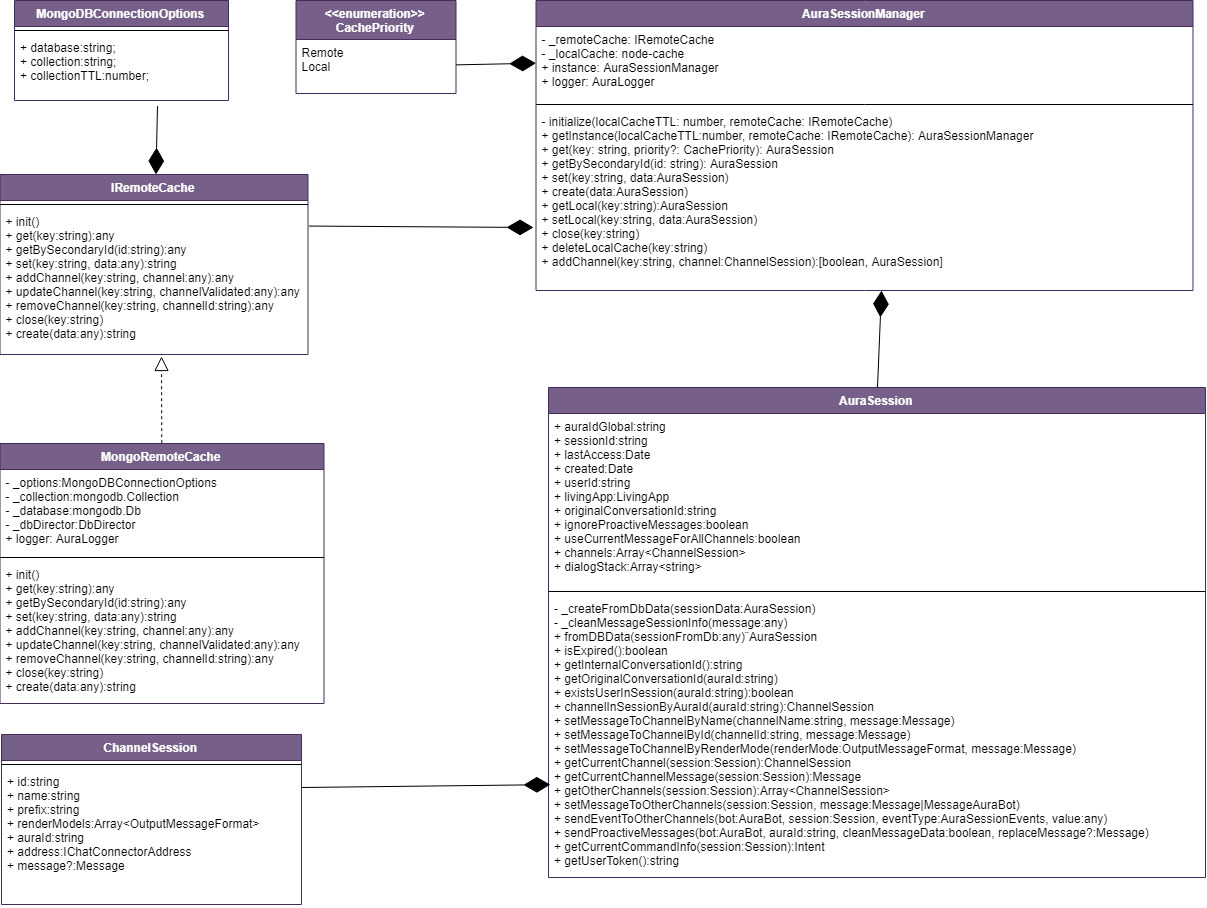
Find more information in the Github repository:
https://github.com/Telefonica/aura-common-utilities/tree/master/packages/aura-utilities/src/aura-mongo-handler/
Steps to Create a Two Level Cache
- First, initialize the MongoDB Connector
- Instantiate a new
TwoLevelCache Object
Initialize MongoDB Connector
To initialize the Singleton of MongoDB connector, you need these variables in your configuration object:
-
AURA_MONGODB_URI
-
AURA_MONGODB_POOL_SIZE
-
AURA_MONGODB_SSL
-
AURA_MONGODB_USERNAME
-
AURA_MONGODB_PASSWORD
-
BRIDGE_MESSAGE_CACHE_TTL -> Time in miliseconds
-
BRIDGE_MONGODB_DATABASE_CACHE -> Database name in MongoDB for Cache
-
BRIDGE_MONGODB_COLLECTION_DL_CACHE -> Collection name in MongoDB for Cache
-
BRIDGE_MONGODB_INDEX_DL_CACHE -> Index field name in MongoDB Collection
To initialize, use the following command:
Connector.init(configuration);
Instantiate a new TwoLevelCache Object
To instantiate a TwoLevelCache object, the following elements are needed:
- A Mongo DataBase Name
- A collection name
- The property in the model to be saved in the cache to use as index in MongoDB. This index must be created by deploy scripts.
Constructor:
(name: string, localTTlMiliseconds: number, databaseName: string, collectionName: string, indexId?: string)
- name: Name inside the logs generated by this instance.
- localTTlMiliseconds: Local cache lifetime in in miliseconds.
- databaseName: Name of the database in MongoDB.
- collectionName: Name of the collection in MongoDB database.
const tlCache = new TwoLevelsCache<CustomModel>('LogName',30000, 'collectionName', 'DataBaseName', 'customId');
If you need more than one cache and use an instance for each of them, you can do this:
export class AppCaches {
    public static auraBotCache: TwoLevelsCache<AuraBotModel>;
    public static userDataCache:TwoLevelsCache<UserModel>;

    public static init(configuration: any) {
        AppCaches.auraBotCache = new TwoLevelsCache('AuraBotCache', 30000, 'AuraCacheDB','AuraCacheCollection', 'auraId');
        AppCaches.userDataCache = new TwoLevelsCache('AuraUserCache', 30000, 'UserCacheDB','UserCacheCollection''userId');
        return this;
    }
}
2.8 - aura-orchestrator
aura-orchestrator utility
aura-orchestrator utility allows Aura Bot to manage text resources by environment and channel
Introduction
aura-orchestrator utility contains the orchestrator used in aura-bot and aura-bridge based on the strategy design pattern. It is based on @telefonica/event-bus dependency.
Find more information in the Github repository:
https://github.com/Telefonica/aura-common-utilities/tree/master/packages/aura-utilities/src/aura-orchestrator/
Start Orchestrator module
The orchestrator handles an array of classes (with certain required elements), that aura-bot may receive configuration if necessary. Modules are then initialized asynchronously. For example:
const orderedModules = [ModuleA, ModuleB, ModuleC];

// Instantiate the Service App.
const appOrchestrator = new Orchestrator();

// Add configuration, that will be required by almost all other modules
appOrchestrator.setConfigurationManager(Configuration);

// Add the dependent modules in order.
appOrchestrator.addModules(sortedModules);

// Initiate the App.
await appOrchestrator.init();
Creation of singleton modules
In order to develop a new singleton module that will be used by aura-bot both itself and during the plugins execution, developers should keep in mind the following issues:
-
All modules added to the orchestrator need and publish a static variable called instance, that will hold the singleton instance of that module.
-
Modules must have a public and static method init, that could be async or not, and that will create the singleton instance (and setting it to the instance variable). This method should only be called once by module or must throw an exception. It is only called by the orchestrator.
An example implementation is shown below:
export class Class1 {

    public static instance: Class1;

    private constructor() {
        // Stuff here...
    }

    public static async init(config: Configuration): Promise<Class1 > {
        if (!Class1 .instance) {
            Class1 .instance = new Class1 ();

            // More stuff here

            return Class1 .instance;
        } else {
            throw new Error('An instance of Class1  already exists');
        }
    }
}
2.9 - aura-storage-file-manager
aura-storage-file-manager utility
aura-storage-file-manager utility is in charge of uploading / downloading remote files
Introduction
aura-storage-file-manager is an utility to manage local and remote resources. At the moment, remote files are arranged using Azure Storage.
Find more information in the Github repository:
https://github.com/Telefonica/aura-common-utilities/tree/master/packages/aura-utilities/src/aura-storage-file-manager/
StorageCredentials
| Property |
Type |
Description |
| storageName |
string |
Storage name |
| storageKey |
string |
Storage key |
Initialization example:
const config = {
    storageName: 'storageName',
    storageKey: 'storageKey',
    AURA_KPIS_STORE_CONTAINER: 'aura-kpis',
};
this.storageFileManager = new StorageFileManager({ storageName: 'storageName', storageKey: 'storageKey' }, 'correlator');
Models
FileConfiguration
| Property |
Type |
Description |
| containerName |
string |
Name of the Container in Azure Storage |
| remotePath |
string |
Relative path in remote file system |
| localPath |
string |
Relative path in local file system |
| files |
FileToDownload[] |
Array of FileToDownload structure. If FileToDownload.name is equal to ‘*’, the file manager will download or upload all files |
FileToDownload
| Property |
Type |
Description |
| name |
string |
Name of File. is equal to ‘*’ the file manager download or upload all files |
| mimeType |
string |
Mime type is optional, if not specified it is inferred from the file. Optional: example ‘application/json’ |
DownloadFileModel
| Property |
Type |
Description |
| fileName |
string |
Name of downloaded file |
| data |
any |
Data of file |
| mimeType |
string |
Mime type of the file |
Methods
downloadFiles
This method downloads one or more files.
| Property |
Type |
Description |
| files |
FileConfiguration |
Configuration file with the information to download files |
| saveToLocal |
boolean |
Boolean value to indicate if files are downloaded to local or not |
Example:
 const fileConfiguration = {
            containerName: 'aura-configuration',
            localPath: 'settings/makeup',
            remotePath: '',
            files: [{ name: 'aura-bot-mongodb-indexes.json'}]
        };
 const storageFileManager = new StorageFileManager({storageName: 'storageName', storageKey: 'secret'} );
 const filesDownloaded:DownloadFileModel[] = await storageFileManager.downloadFiles(fileConfiguration, false, true);
Example download all files:
 const fileConfiguration = {
            containerName: 'aura-configuration',
            localPath: 'settings',
            remotePath: 'settings',
            files: [{ name: '*'}]
        };
 const storageFileManager = new StorageFileManager({storageName: 'storageName', storageKey: 'secret'} );
 const filesDownloaded:DownloadFileModel[] = await storageFileManager.downloadFiles(fileConfiguration, false, true);
uploadStringAsBlob
This method gets the string passed as parameter and modifies blob’s content with it.
| Property |
Type |
Description |
| containerName |
string |
Name of the Container in Azure Storage |
| remoteFilePath |
string |
File’s relative path in Azure Storage container |
| stringToUpload |
string |
String to add to remoteFilePath file |
getRemoteContainer
This method gets a remote container’s object which contains an instance to work with.
| Property |
Type |
Description |
| containerName |
string |
Name of the Container in Azure Storage |
downloadFile
This method downloads a file locally.
| Property |
Type |
Description |
| sourceFilePath |
string |
Remote file’s path |
| containerName |
string |
File’s relative path in Azure Storage container |
| saveToLocalPath |
string |
Path to save the downloaded file, undefined to not download the file |
| ignoreErrors |
boolean |
Ignore if an error occurs |
| versionField |
string |
File’s versioning |
| mimeType |
string |
Mimetype of file. Needed if a conversion is needed after download |
| containerClient |
ContainerClient |
Container’s handler |
uploadFile
This method uploads a file to Azure Storage container.
| Property |
Type |
Description |
| sourceFilePath |
string |
Remote file’s path |
| remoteFilePath |
string |
File’s remote path |
| containerName |
string |
Azure container’s name |
| ignoreErrors |
boolean |
Ignore if an error occurs |
| containerClient |
ContainerClient |
Container’s handler |
uploadLogs
This method uploads logs as stream or string to Azure Storage container.
| Property |
Type |
Description |
| blob |
string |
Remote file’s path |
| containerName |
string |
Container name |
| logAsStream |
stream |
Logs as stream |
| logAsString |
string |
Logs as string |
| fileHeader |
string |
File header as string |
| containerClient |
ContainerClient |
Container’s handler |
Example to upload logs
const config = {
    storageName: 'storageName',
    storageKey: 'storageKey',
    AURA_KPIS_STORE_CONTAINER: 'aura-kpis',
};
const storageFileManager = new StorageFileManager({ storageName: config.storageName, storageKey: config.storageKey });
this.containerClient = await this.storageFileManager.getRemoteContainer(config.AURA_KPIS_STORE_CONTAINER);
this.storageFileManager.uploadLogs(blobPath, config.AURA_KPIS_STORE_CONTAINER, logAsStream, logAsString,
    headerAsString, this.containerClient);
2.10 - aura-validate-apikey
aura-validate-apikey utility
aura-validate-apikey utility validates an APIKey of an incoming request
Introduction
aura-validate-apikey utility is used for the validation of an APIKey of an incoming request
Find more information in the Github repository:
https://github.com/Telefonica/aura-common-utilities/tree/master/packages/aura-utilities/src/aura-validate-apikey/
Initialization
aura-validate-apikey utility is a singleton module prepared to be used with orchestrator.
(async () => {
    try {
        // Sorted modules initialization
        const sortedModules = [AuthenticationApiKey, ...];
        // Instantiate the Service App.
        const appOrchestrator = new Orchestrator();
        // Add configuration, that will be required by almost all other modules
        appOrchestrator.setConfigurationManager(ConfigurationManager);
        // Add the dependent modules in order.
        appOrchestrator.addModules(sortedModules);
        // Initiate the App.
        await appOrchestrator.init();
    } catch (error) {
        logger.error({ error: error.message, msg: 'Server cannot start', stck: error, corr: CorrelatorUtil.auraSystem });
    }
})();
Use aura-validate-apikey utility
After initialising the AuthenticationApiKey instance (calling static init method once), the APIKey could be validated by different methods:
-
Middleware use
APIKey Authorization for the swagger tools middleware use. This function lets us send a callback when the validation has finished. (Not used yet).
AuthenticationApiKey.instance.validateApiKeySwaggerTool(request, securityDefinition, scopes, callback);
-
Without callback
It validates APIKey from header and URL.
AuthenticationApiKey.instance.validateApiKey(authHeader, requestUrl, correlator);
It exposes a method that only receives request and a correlator. All necessary parameters are extracted from the request:
AuthenticationApiKey.instance.validateApiKeyAuthorization(request, correlator);
Aura APIKey model
Each externally available API endpoint in Aura is authenticated by an APIKey that should have been generated independently for each environment.
These APIKeys contain an encrypted data model that allows both checking that the key was encrypted with the environment ENCRYPTION_KEY and that it granted the access to the given API endpoint and method.
The APIKey model is described below:
| Field |
Type |
Description |
| i |
string |
id autogenerated unique identifier (UUID) of the APIKey. Added to be able to invalidate individually one APIKey.
⚠️ Future use. |
| s |
string |
scope that will be accessible with this APIKey. Currently, it contains part of the path of the endpoint.
- To access all endpoints of Aura Services, it contains aura-services.
- To access only one of the endpoints, for instance, to access only /token in authentication-api, it should contain aura-services:token. To access /token and /ping, its content should be aura-services:token,ping.
It is used in all modules. |
| a |
string |
authorized. It should contain the name of the client that is authorized by this APIKey: Kernel, Novum, etc. Currently, it is not checked, meaning that this field is not taken into account for accessing or not to an endpoint. |
| v |
string |
version. Version of Aura where it has been created.
⚠️ Future use, it will be used in case of changing the internal model. |
| e |
string |
environment where this APIKey applies.
⚠️ Future use.
Currently, it is checked by having a different ENCRYPTION_KEY per environment. |
| m |
string |
mode. API access mode granted by this APIKey: r (read), w (write), rw (read and write). |
| t |
Date |
date of creation of the APIKey. Used to invalidate already created APIKeys. |
| c |
string |
checksum of the APIKey to validate that the APIKey is encrypted with the defined ENCRYPTION_KEY. It is used in all modules. |
API Key validation is applied in:
- aura-bot to validate requests coming from aura-bridge
- aura-authentication-api
- aura-bridge
- channel-communications-manager
2.11 - aura-file-validator
aura-file-validator utility
aura-file-validator is an utility to validate files
Introduction
aura-file-validator is a small utility capable of validating files type and size.
It can make three actions:
- Validate file type.
- Validate file size.
- Validate file type and size.
Find more information in the Github repository:
https://github.com/Telefonica/aura-common-utilities/tree/master/packages/aura-utilities/src/aura-file-validator/
File type validation
aura-file-validator uses mmmagic library to determine the real mime type and extension of a file, reading its bytes. Once determined the type/mime type, it will be compared against a list of valid types.
File size validation
aura-file-validator reads file data length and check it. Three types of size validations are defined:
- File is bigger than a given size.
- File is smaller than a given size.
- File size is between a minimum and maximum size.
File type and size validation
aura-file-validator checks file type.
- If it passes the validation, then a size validation is done.
- If the type is not supported, then size validation is not executed.
Complete file validation flowchart
graph LR
    A(start) --> B[Validate type]
    B --> C{Valid type?}
    C --> |Yes| D[Validate max size]
    C --> |No| G(Validation result)
    D --> E{Valid max size?}
    E --> |Yes| F(Validate min size)
    E --> |No| G
    F --> G
2.12 - aura-redis-handler
aura-redis-handler utility
aura-redis-handler utility suitable for the connection and use of Redis
Introduction
aura-redis-handler is a utility to connect and use methods from Redis.
Find more information in the Github repository:
https://github.com/Telefonica/aura-common-utilities/tree/master/packages/aura-utilities/src/aura-redis-handler/
Initialization example:
const config = {
    AURA_REDIS_MODE: 'SINGLE', // SENTINEL, CLUSTER or SINGLE
    AURA_REDIS_HOSTS: 'localhost:6379,127.0.0.1:6379', // {host}:{port},{host}:{port} ... n
    AURA_REDIS_PASSWORD: '',
    AURA_REDIS_DATABASE: '',
    AURA_REDIS_MAX_RECONNECT_RETRIES: 25,
    AURA_REDIS_MAX_RECONNECT_INTERVAL: 5000, // ms
    AURA_REDIS_SENTINEL_INSTANCE_NAME: '',
    AURA_REDIS_USE_CONNECTION_POOL: true,
    AURA_REDIS_CONNECTION_POOL_MAX: 2,
    AURA_REDIS_CONNECTION_POOL_MIN: 100,
};
this.client = await RedisConnector.init(config);
Models
ZRangeWithScoresOptions
| Property |
Type |
Description |
| BY |
string |
Option key |
| LIMIT |
Object |
Object with properties offset and count |
Methods
zRangeWithScores
This method returns all the elements in the sorted set at key with a score between min and max. The elements are considered to be ordered from low to high scores.
| Property |
Type |
Description |
| key |
string |
Unique key for Redis |
| min |
number |
Min index to search |
| max |
number |
Max index to search |
| options |
ZRangeWithScoresOptions |
Object with options |
| corr |
string |
Unique request id |
Example:
await this.client.zRangeWithScores('test-key', 0, 10, { BY: '', LIMIT: { offset: 0, count: 10 }}, 'test-correlator');
zRevRangeWithScores
This method returns all the elements in the sorted set at key with a score between min and max. Unlike the default ordering of sorted sets, for this command the elements are considered to be ordered from high to low scores.
| Property |
Type |
Description |
| key |
string |
Unique key for Redis |
| min |
number/string |
Min index to search |
| max |
number/string |
Max index to search |
| options |
ZRangeWithScoresOptions |
Object with options |
| corr |
string |
Unique request id |
Example:
await this.client.zRevRangeWithScores('test-key', '-inf', '+inf', { BY: '', LIMIT: { offset: 0, count: 10 }}, 'test-correlator');
lPush
This method inserts all the specified values at the head of the list stored at key. If key does not exist, it is created as an empty list before performing the push operations. When key holds a value that is not a list, an error is returned.
| Property |
Type |
Description |
| key |
string |
Unique key for Redis |
| value |
string |
Value to save |
| corr |
string |
Unique request id |
Example:
await this.client.lpush('test-key', 'test-value', 'test-correlator');
lRange
This method returns the specified elements of the list stored at key. The offsets from and to are zero-based indexes, with 0 being the first element of the list, 1 being the next element and so on.
| Property |
Type |
Description |
| key |
string |
Unique key for Redis |
| from |
number |
Start index |
| to |
number |
End index |
| corr |
string |
Unique request id |
Example:
await this.client.lRange('test-key', 0, 10, 'test-correlator');
sAdd
This method adds the specified members to the set stored at key. Specified members that are already a member of this set are ignored. If key does not exist, a new set is created before adding the specified members.
| Property |
Type |
Description |
| key |
string |
Unique key for Redis |
| value |
string |
Value to save |
| corr |
string |
Unique request id |
Example:
await this.client.sAdd('test-key', 'test-value', 'test-correlator');
sInter
This method returns the members of the set resulting from the intersection of all the given sets.
| Property |
Type |
Description |
| keys |
string[] |
Unique keys for Redis |
| corr |
string |
Unique request id |
Example:
await this.client.sInter(['test-key-1', 'test-key-2'], 'test-correlator');
sRem
This method returns the specified members from the set stored at key. Specified members that are not a member of this set are ignored. If key does not exist, it is treated as an empty set and this command returns 0.
| Property |
Type |
Description |
| keys |
string[] |
Unique key for Redis |
| corr |
string |
Unique request id |
Example:
await this.client.sRem('test-key', 'test-value', 'test-correlator');
withLock
This method locks keys from Redis to avoid overwriting data.
| Property |
Type |
Description |
| fn |
() => Promise |
Callback function |
| keys |
string |
Unique key for Redis |
| retries |
number |
Number of retries |
| timeBetweenRetries |
number |
Time between retries in ms |
| expireAt |
number |
Expire time in ms |
| corr |
string |
Unique request id |
Example:
await this.client.withLock<T>(async () => {}, 'test-key', 5, 5000, 5, 'test-correlator');
3 - Aura develop utilities
Aura develop utilities
Description of aura-develop-utilities
Introduction
aura-develop-utilities is a package belonging to aura-common-utilities that includes utilities used for different development purposes.
Find more information in the Github repository:
https://github.com/Telefonica/aura-common-utilities/tree/master/packages/aura-develop-utilities/
How to install aura-develop-utilities package
$ git clone https://github.com/Telefonica/aura-common-utilities.git

$ cd aura-common-utilities/packages/aura-develop-utilities
Available utilities
List of utilities in the aura-develop-utilities package:
4 - Aura Clients
Aura Clients
Description of aura-clients
Introduction
aura-clients is a package belonging to aura-common-utilities that includes tools that make easier to call APIs.
Find more information in the Github repository:
https://github.com/Telefonica/aura-common-utilities/tree/master/packages/aura-clients/
How to install aura-clients package
$ git clone https://github.com/Telefonica/aura-clients.git

$ cd aura-common-utilities/packages/aura-clients
How to import an utility from this package
To import an utility from the aura-clients package, execute the following command:
import { ... } from '@telefonica/aura-clients/lib/[*client-name*]';
For example:
import { ChannelConfiguration } from '@telefonica/aura-clients/lib/aura-configuration-api-client';
Available aura-clients
Find the current aura-clients, both internal or external ones in Aura API clients.
5 - aura-http-monkey-patcher
aura-http-monkey-patcher utility
aura-http-monkey-patcher utility is in charge of HTTP monkey patching
Introduction
aura-http-monkey-patcher utility is designed as a common place to do activities in HTTP monkey patching.
It is placed in the Github repository:
aura-bot-libraries/packages/aura-http-monkey-patcher/.
Use of aura-http-monkey-patcher utility
When loading the modules in the app orchestrator (or any other method), the methods startMetricsTimer and kpiApiRequest could be overriden.
(both are optional).
        // Initiate the App.
        await appOrchestrator.init();
        // Sets required methods in HttpMonkeyPatcher
        HttpMonkeyPatcher.instance.startMetricsTimer = startPrometheusTimer;
        HttpMonkeyPatcher.instance.kpiApiRequest = KpiHandler.instance.apiRequest.bind(KpiHandler.instance);
6 - aura-json-schema-generator
aura-json-schema-generator utility
aura-json-schema-generator utility is a tool to generate Typescript classes
Introduction
aura-json-schema-generator utility is a tool to generate Typescript classes from JSON schema file(s). It provides a command that generates Typescript interface files from one or more schema files.
It is placed in the Github repository:
aura-bot-libraries/packages/aura-json-schema-generator/.
The input file(s) is mandatory. The output directory is optional (./types by default). In it, a directory is created for every schema including the schema version, and inside that directory, another one is created with the schema name that will contain the typescript interfaces.
Installation
Although it is possible to install the package locally, it is recommended to install it globally, in order to allow the execution of the generator binary anywhere.
$ npm install -g @telefonica/aura-json-schema-generator
Once installed globally, a new command aura-json-schema-generator will be available in the PATH, so we can generate Typescript interface files from one or more schema files.
Run aura-json-schema-generator utility
aura-json-schema-generator
Two other names for this command are available: aura-jsg and aujsg
Arguments
There are two arguments that can be passed in the command line when running:
- The first argument (mandatory) is the path of a JSON Schema file or a directory that contains JSON Schema files.
- The second argument (optional) is the path where the Typescript files will be created.
types is the default value. This information can be found when running the command without arguments:
$ aura-json-schema-generator

ERROR Argument missing. Use: aura-json-schema-generator <input file or dir> [<output dir>]
This command will create the Typescript interfaces from a JSON Schema file named simple.json in the default output directory types within current directory:
$ aura-json-schema-generator ./simple.schema.json

DEBUG Reading json schema ./simple.schema.json
INFO  Output path will be './types'
INFO  Writing ./types/1.0.0/simple/simple.d.ts
This command will create all the Typescript interfaces from channelData schemas in the directory resources/channel-data/3.0.0 in a specified output directory src/channel-data/:
$ aura-json-schema-generator resources/channel-data/3.0.0/ src/channel-data/

DEBUG Reading json schema ./resources/channel-data/3.0.0/request/channeldata-3.0.0-request.schema.json
DEBUG Reading json schema ./resources/channel-data/3.0.0/response/channeldata-3.0.0-response.schema.json
INFO  Output path will be './src/channel-data'
INFO  Writing ./src/channel-data/3.0.0/request/request-channel-data.d.ts
INFO  Writing ./src/channel-data/3.0.0/response/response-channel-data.d.ts
The following example shows the execution of the aura-json-schema-generator in the happening of an error in any of the provided schemas. As can be seen, an error is shown indicating both the file that contains the error and thus cannot be processed and the specific error or errors in the schema.
In this case, the error is in the file request/channeldata-3.0.0-request-wrong.schema.json and the problems are that neither ApplicationWrong nor AuraCommandWrong cannot be found, so the schema for this file cannot be generated. The rest of the files in the folder resources/channel-data/3.0.0/ will be processed and their schemas will be generated correctly.
$ aura-json-schema-generator resources/channel-data/3.0.0/ src/channel-data/

DEBUG Reading json schema ./resources/channel-data/3.0.0/request/channeldata-3.0.0-request-wrong.schema.json
ERROR Object ApplicationWrong not found
ERROR Object AuraCommandWrong not found
ERROR Error reading file ./channel-data/3.0.0/request/channeldata-3.0.0-request-wrong.schema.json
DEBUG Reading json schema ./channel-data/3.0.0/response/channeldata-3.0.0-response.schema.json
INFO  Output path will be './src/channel-data'
INFO  Writing ./src/channel-data/3.0.0/response/response-channel-data.d.ts
aura-types-from-swagger-generator
Two other names for this command are available: aura-tfsg and autfsg
Arguments
There are three arguments that can be passed in the command line when running:
- The first argument (mandatory) is the path of a JSON/YAML Schema file or a directory that contain JSON/YAML Schema files.
- The second argument (optional) is the path where the Typescript files will be created.
types is the default value.
- The third argument (optional) is an array of strings with options:
- –unique-file: Create all the models data in a single file by swagger.
- –unify-enumerated: Unify the generated enums.
- –particularize-enumerated: Particularize the generated enums.
This command will create the typescript interfaces, enums and types from a Swagger file named swagger.json in the default output directory types within current directory:
$ aura-types-from-swagger-generator ./swagger.json
Using swagger with this info:
{
   "openapi": "3.0.0",
   "info": {
      "title": "Aura Bridge",
      "description": "Set of endpoints that support the aura bridge",
      "version": "1.1.0"
   },
   ...
}
The result has the following structure:
types
└── 1.1.0
    └── aura-bridge.ts
aura-markdown-from-json-schema-generator
The execution of the following command will create the markdown documentation from a JSON schema file:
$ aura-markdown-from-json-schema-generator aura-models/resources/channel-data/payload.schema.json payload-types.md
For example, using a JSON schema with this info:
{
   ...
   "Payload": {
         "description": "Channel data payload information",
         "title": "Payload",
         "type": "object",
         "additionalProperties": false,
         "properties": {
            "bridge": {
               "$ref": "#/definitions/channel-data/Bridge",
               "description": "Information sent from the bridge",
               "title": "bridge"
            },
            "handover": {
               "$ref": "#/definitions/channel-data/Handover",
               "description": "Information sent from Handover",
               "title": "handover"
            },
            "event": {
               "$ref": "#/definitions/channel-data/PayloadEvent",
               "description": "Information sent as an event",
               "title": "event"
            }
         },
         "required": [
            "bridge"
         ]
   },
   ...
}
The outcome of the execution of the previous command will generate:
-
The input JSON schema (in the example, aura-models/resources/channel-data/payload.schema.json)
-
A markdown output file, in the example: payload-types.md:
### Payload

Channel data payload information

| Property        | Type         | Description                                        |
| --------------- | ------------ | -------------------------------------------------- |
| **bridge**      | Bridge       | Information sent from the bridge                   |
| *handover*      | Handover     | Information sent from Handover                     |
| *event*         | PayloadEvent | Information sent as an event                       |
Components
Enums
Particularize Enumerated
For this flow, enums are generated as follows:
- Enums are generated from the properties of models that have the
isEnumerated and enums flags.
- Enums are generated from types, checking if it is a type with an array, a type with different types, etc.
- The enums that are not being used are filtered out to avoid generating them.
oneOf
oneOf is a property used to indicate that a component can have one of the types it receives as options. For example:
   Component1:
      properties:
         property1:
            type: array
            items:
               oneOf:
                  - $ref: '#/components/schemas/Item1'
                  - $ref: '#/components/schemas/Item2'
                  - $ref: '#/components/schemas/Item3'
If the items within oneOf do not have the title field filled, by default it will be name + Type + incr_counter:
   {
      "paths": {},
      "components": {
         "schemas": {
               "Component_Property_1": {
                  "type": "string",
                  "enum": [
                     "none",
                     "auto"
                  ]
               },
               "Component_Property_2": {
                  "type": "object",
                  "properties": {
                     "name": {
                           "type": "string"
                     }
                  },
                  "required": [
                     "name"
                  ]
               },
               "Component_1": {
                  "oneOf": [
                     {
                           "type": "string",
                           "enum": [
                              "none",
                              "auto"
                           ]
                     },
                     {
                           "$ref": "#/components/schemas/Component_Property_1"
                     },
                     {
                           "type": "object",
                           "properties": {
                              "name": {
                                 "type": "string"
                              }
                           },
                           "required": [
                              "name"
                           ]
                     },
                     {
                           "type": "string",
                           "enum": [
                              "none",
                              "auto"
                           ]
                     },
                     {
                           "type": "object",
                           "properties": {
                              "name": {
                                 "type": "string"
                              }
                           },
                           "required": [
                              "name"
                           ]
                     },
                     {
                           "$ref": "#/components/schemas/Component_Property_2"
                     }
                  ]
               }
         }
      }
   }
The result would be as follows:
   /**
    * Enum for Component_Property_1
    *
    * @enum {string}
    */
   export enum ComponentProperty1 {
      None = 'none',
      Auto = 'auto'
   }

   /**
    * Enum for Component_1
    *
    * @enum {string}
    */
   export enum Component_1Enum {
      None = 'none',
      Auto = 'auto'
   }

   /**
    * Enum for Component_1
    *
    * @enum {string}
    */
   export enum Component_1Enum1 {
      None = 'none',
      Auto = 'auto'
   }

   /**
    * Type for Component1
    */
   export type Component1 = Component_1Enum | ComponentProperty1 | Component1Type | Component_1Enum1 | Component1Type1 | ComponentProperty2;

   /**
    * @interface ComponentProperty2
    */
   export interface ComponentProperty2 {

      name: string;
   }

   /**
    * @interface Component1Type
    */
   export interface Component1Type {

      name: string;
   }

   /**
    * @interface Component1Type1
    */
   export interface Component1Type1 {

      name: string;
   }
7 - aura-kpis
aura-kpis utility
aura-kpis utility allows the generation of KPIs entity files
Introduction
aura-kpis utility is a library used by all Aura apps to generate KPIs entity files equally in all of them.
It is placed in the Github repository:
aura-bot-libraries/packages/aura-kpis/.
It has two working modes:
file: Entity files will be stored locally on the current server instance. For development purposes.blob: Entity files will be stored remotely on an Azure Blob Container with aura-storage-file-manager uploadLogs.
Configuration
These configuration variables MUST be set in the server using the library.
- KPIs environment variables:
AURA_VERSION: mandatory, Aura release.AURA_DEFAULT_LOCALE: mandatory, string with the default locale to be used in the server. It uses two letter codes both for country and culture, for example: es-es, en-gb.AURA_DEFAULT_TIME_ZONE: mandatory, timezone where the service is running.AURA_KPI_TO_DSV_CACHE_TTL: optional, number of milliseconds to cache existing requests to calculate their duration. By default, 1800.AURA_KPI_TO_DSV_DELIMITER: optional, string with the delimiter to be used in KPIs entities files. By default, |.AURA_KPI_TO_DSV_EXTENSION: optional, string with the extension to be used in KPIs entities files. By default, txt.AURA_KPI_FILE_PREFIX: mandatory, string with the prefix used in the KPIs entities files of this service. Usually its format is component/prefix. For CSV files it is used as is, so files are stored in Azure Storage in that path, meaning a virtual folder named component and that the files will start by prefix. But for Avro files, the value of the variable is split into 2 by / and only the prefix part is used to name the files, that are store together with files generated by all components in the same virtual folder.AURA_KPI_STORE_MODE: optional, string to indicate what is the destination of the KPIs entities files. By default, blob.
- If
file, they will be stored locally on the instance, in the folder shown in KPI_TO_DSV_LOCAL_FILES_DIRECTORY. For development purposes.
- If
blob, they will be stored remotely on the Azure blob container shown in KPIS_STORE_CONTAINER. Mandatory in environments running on k8s.
AURA_KPI_TO_DSV_LOCAL_FILES_DIRECTORY: optional, string with the local directory to store KPIs entities files. By default, ./kpis-dsv. It MUST be the same than the one configured in KPIS_UPLOADER module. Only needed if AURA_KPI_STORE_MODE==file.AURA_MICROSOFT_AZURE_STORAGE_ACCESS_KEY: optional, string with the Azure Storage Access Key to be able to write files in KPIS_STORE_CONTAINER. Only needed if AURA_KPI_STORE_MODE==blob.AURA_MICROSOFT_AZURE_STORAGE_ACCOUNT: optional, string with the Azure Storage Account name to be able to write files in KPIS_STORE_CONTAINER. Only needed if AURA_KPI_STORE_MODE==blob.AURA_KPIS_STORE_CONTAINER: optional, string with the name of the Azure Blob container to store KPIs entities files. By default, aura-kpis. It MUST be the same than the one configured in KPIS_UPLOADER module. Only needed if AURA_KPI_STORE_MODE==blob.AURA_KPIS_BLOB_STORE_INTERVAL: optional, number with the time interval in milliseconds to upload asynchronously logs to the KPIS_STORE_CONTAINER. By default, 60000. Only needed if AURA_KPI_STORE_MODE==blob.AURA_SOURCE_PATH_AVRO_ADAPTERS: optional, string containing the adapters to transform data, '/schemas/aura-csv-adapter.json' for CSV transform and '/schemas/aura-avro-adapter.json' to transform in CSV and AVRO. By default: '/schemas/aura-csv-adapter.json'.
Use aura-kpis utility
aura-kpis utility needs to add a dedicated events emitter that handles KPI events.
- Initialize the specific KPI writer, based on your service configuration:
// Start Kpis Writer
const kpisWriterFactory: KPIWriterFactory = KPIWriterFactory.getInstance();
const kpisWriter: KPIEntityWriter = await kpisWriterFactory.createKpiWriter();
- Use the classes and utilities provided by the library:
import { KPIEventBody, KPIEmittersEvents, KPIActionEmitter } from '@telefonica/aura-kpis';
const kpisLogger = new KPIActionEmitter('MyModule');
- Fill the corresponding event with the data available in every moment. Update this data on each step, before emitting the event.
let kpisEvent: KPIEventBody = {
    request: {
        correlator: correlator,
        requestId: requestId
    },
    user: {
        auraId: auraId,
        channelId: channelId
    },
    channel: {
        channelId: channelId
    }
};
-
If the name of the environment variables of your service do not match with the library names, the configuration can be also be passed as an object of type KPIWriterConfiguration.
-
Depending on the value of AURA_KPI_STORE_MODE a different set of properties is validated.
-
In those meaningful steps, emit the corresponding event. The basic approach is to emit one event (KPIEmittersEvents.REQUEST_STARTED) when the request lands on the server and another when the response is returned (for instance, KPIEmittersEvents.KPIS_USER_REQUEST_FINISHED, in the case of a user request):
kpisLogger.emit(KPIEmittersEvents.KPIS_USER_REQUEST_FINISHED, kpisEvent);
Events
-
API entity filling: this case just needs a couple of events to handle incoming and outgoing steps.
KPIS_API_REQUEST_STARTED: event that shows that a new request to one external API is started. It adds to a cache a time mark, so the duration of the request can be calculated.KPIS_API_REQUEST_FINISHED: last event of a new request to one external API has finished, emitted when the response is returned.
-
MESSAGE entity filling: this case just needs a couple of events to handle incoming and outgoing steps.
KPIS_MESSAGE_REQUEST_STARTED: event that shows that a new message goes in aura-bot. It adds a time mark to a cache, so the duration of the request can be calculated.KPIS_MESSAGE_REQUEST_FINISHED: event to write the KPI of the given message being handled by aura-bot. It is emitted when a new message comes in and when its response is returned.
-
EXTENDED_MESSAGE entity filling: this case just needs a couple of events to handle incoming and outgoing steps.
KPIS_EXTENDED_MESSAGE_REQUEST_STARTED: event that shows that a new message enters aura-bot. It adds a time mark to a cache, so the duration of the request can be calculated. It is an extended logic made from MESSAGE entity.KPIS_EXTENDED_MESSAGE_REQUEST_FINISHED: event to write the KPI of the given message being handled by aura-bot. It is emitted when a new message comes in and when its response is returned. It is an extended logic made from MESSAGE entity.
-
NOTIFICATION entity filling: this case just needs a couple of events to handle incoming and outgoing steps.
KPIS_NOTIFICATION_REQUEST_STARTED: event that shows that a new notification request has arrived. It adds a time mark to a cache, so the duration of the request can be calculated.KPIS_NOTIFICATION_REQUEST_FINISHED: last event of a notification request, emitted when the response is returned in the corresponding controller.
-
RECOGNIZER entity filling: this case just needs a couple of events to handle incoming and outgoing steps.
KPIS_RECOGNIZER_REQUEST_STARTED: event that shows that a new recognizer request is started. It adds a time mark to a cache, so the duration of the request can be calculated.KPIS_RECOGNIZER_REQUEST_FINISHED: last event of a recognizer request, emitted when the response is returned.
-
SUGGESTION entity filling: this case just needs a couple of events to handle incoming and outgoing steps.
KPIS_SUGGESTION_REQUEST_STARTED: event that shows that a suggestion is shown to the user or clicked by her. It adds a time mark to a cache, so the duration of the request can be calculated.KPIS_SUGGESTION_REQUEST_FINISHED: last event of a suggestion shown to the user or clicked by her, emitted when the response is returned.
-
USER entity filling: This case needs partial events to assure that no value of the USER entity is missed, both in successful and error cases.
KPIS_REQUEST_STARTED: event that shows that a new request has arrived. It adds to a cache a time mark, so the duration of the request can be calculated.KPIS_USER_REQUEST_FINISHED: last event of a user request, emitted when the response is returned in the corresponding controller.KPIS_USER_CREATE_DB: partial user event, emitted when requesting the DB.KPIS_USER_DELETE_DB: partial user event, emitted when the user is deleted from the DB.KPIS_USER_FIND_DB: partial user event, emitted when the user is found in the DB.KPIS_USER_CREATE_SERVICE: partial user event, emitted when returning from the user creation service.KPIS_USER_LOGIN_SERVICE: partial user event, emitted when returning from the user login service.KPIS_USER_DELETE_SERVICE: partial user event, emitted when returning from the user deletion service.
-
GATEWAY entity filling: this case just needs a couple of events to handle incoming and outgoing steps.
KPIS_GATEWAY_MESSAGE_REQUEST_STARTED event that shows that a new request enters aura-gateway-api. It adds a time mark to a cache, so the duration of the request can be calculated.KPIS_GATEWAY_MESSAGE_REQUEST_FINISHED: event to write the KPI of the given request being handled by aura-gateway-api. It is emitted when its response is returned.
-
GROOT entity filling: this case just needs a couple of events to handle incoming and outgoing steps.
KPIS_GROOT_MESSAGE_REQUEST_STARTED: event that shows that a new message enters aura-groot. It adds a time mark to a cache, so the duration of the request can be calculated.KPIS_GROOT_MESSAGE_REQUEST_FINISHED: event to write the KPI of the given message being handled by aura-groot. It is emitted when a new message comes in and when its response is returned.
8 - aura-behavior-manager
aura-behavior-manager utility
Guidelines for using aura-behavior-manager utility that allows modifying the behavior of Aura Bot or Aura Bridge in development environments without restarting them
Introduction
The main feature of the aura-behavior-manager is to be able to change the application (aura-bot or aura-bridge) behavior in development environments. All these changes can be made to the fly, without the need to restart the bot/bridge instance.
For this purpose, the aura-behavior-manager makes use of a series of commands linked to each of the previously configured behavior that can be sent to application in a specific format.
⚠️ WARNING
- aura-behavior-manager must be exclusively used in development environments.
- Do not use in production environments, as it disrupts Aura behavior and can lead to a faulty operation of the system.
As an example, aura-behavior-manager could change the value of an environment variable AURA_TERMS_AND_CONDITIONS_EXPIRATION:
/bot:set:property AURA_TERMS_AND_CONDITIONS_EXPIRATION 10000
Components and class hierarchy
To implement the aura-behavior-manager, you should make use of @telefonica/aura-behavior-manager library. This contains the following components:
-
BehaviorManager: Base class from which you must extend a specific BehaviorManager (Example: BotBehaviorManager, BridgeBehaviorManager).
-
BehaviorCommandControl: Responsible for the tasks associated with user commands.
-
BehaviorStubsHandler: It allows to register/modify/restore the modified methods in the code.
-
BehaviorCoreCommands: It contains the basic commands of the behavior manager.
-
RemotelyConfigurable: Utility that allows any class to read configuration from Azure using cron.
@startuml BehaviorManager class diagram
class RemotelyConfigurable {
  storageCredentials
  storageManager
  containerName
  sourceFilePath
  cronExpression
  cronTask
  settings
  status
  lastUpdated
  +start()
  +stop()
  +read()
}

class BehaviorManager {
  name
  commandPattern
  behaviors
  commandControl
  stubsHandler
}

class BehaviorStubsHandler {
  stubs
  +start()
  +restore()
  +getStubs()
}

class BehaviorCommandControl {
  component
  commandPattern
  +isCommand()
  +getCommandList()
  +execute()
}

class BehaviorProperty {
    +setProperty()
    +unsetProperty()
    +getProperty()
    +getDefaultProperty()
    +getBehavior()
}


RemotelyConfigurable <|--down BehaviorManager
BehaviorManager *---right BehaviorCommandControl
BehaviorManager *---right BehaviorStubsHandler
BehaviorManager <|--down BehaviorProperty
BehaviorProperty <|--down BotBehaviorManager
BehaviorProperty <|--down BridgeBehaviorManager

@enduml
How that works?
In order to use the aura-behavior-manager, it must be loaded at the component start (aura-bot/aura-bridge).
Once it has started, it will load the list of behaviors (can be identified as plugins) that will allow certain actions to modify the behavior of the component. Examples of these behaviors can be: Property, Profile, etc. In the section Description of a Behavior, a behavior is described in detail.
When a message is received, the BehaviorCommandControl is responsible for detecting if it is a command. If so, it tries to execute the command associated with the behavior that defines it:
@startuml Behavior manager command control flow
start
#palegreen:message;

if (text message is command?) then (true)
  #cyan:Execute command using "commandControl";
  #cyan:Reply with command response;
  end
endif

#palegreen:Process the message normally;

stop
@enduml
Description of a behavior
A behavior is the minimum unit that allows defining a change in the behavior of the system (aura-bot, aura-bridge).
Every behavior to be incorporated to aura-behavior-manager must implement the following interface:
/**
 * @interface BehaviorComponent
 */
export interface BehaviorComponent {
    getBehavior: () => BehaviorComponentInformation;
}

/**
 * @interface BehaviorComponentInformation
 * Behavior information
 */
export interface BehaviorComponentInformation {
    /**
     * Behavior name.
     */
    name: string;
    /**
     * Behavior description.
     */
    description?: string;
    /**
     * Information with the piece of code used as a substitute for other functionality.
     */
    stub?: BehaviorStubInformation;
    /**
     * Command information associated with this behavior.
     */
    commands: BehaviorCommand[];
}
Therefore, a behavior has the following properties:
- name (*): Behavior name.
- description: Behavior description.
- stub: As it is done in unit tests, it allows defining a code that will replace the original functionality in the code.
- commands: List of commands to invoke the different functionalities that the behavior defines.
As an example, we will create a new HelloBehavior, which will respond with a simple ‘Hello’ in the command response:
export class HelloBehavior implements BehaviorComponent {

    /**
     * Get behavior (hello).
     * @returns {BehaviorComponentInformation} Get behavior information
     */
    public getBehavior(): BehaviorComponentInformation {
        return {
            name: 'Hello',
            description: 'Hello example behavior',
            // stub -> We don't need to "stub" any code for this example
            commands: [
                { name: 'get:hello', description: 'Say hello', execute: this.getHello.bind(this) }
            ]
        };
    }

    /**
     * Say hello.
     * @param {CommandControlOptions} options Options
     */
    private async getHello(options: CommandControlOptions) {
        return 'Hello';
    }
}
Now, it would be possible to send to aura-bot:
You can check other examples of behaviors here
Predefined behavior: the core behavior
The aura-bot-behavior library already defines a behavior that includes a series of common commands to be used by aura-bot and aura-bridge:
| Name |
Description |
| get:commands |
Get command list |
| get:stubs |
Get stub list |
| set:stubs |
Start configured stubs |
| unset:stubs |
Restore stubs |
| get:status |
Get behavior manager status |
| get:settings |
Get full settings |
| get:remoteSettings |
Reload and Get settings from remote (force reload) |
| get:profiles |
Get profile list |
As an example, we will show the list of available commands:
/bot:get:commands # You can also use: /bot get commands
Thus, you should have a response similar to the following:
[
  {
    "name": "get:commands",
    "description": "Get command list"
  },
  {
    "name": "get:stubs",
    "description": "Get stub list"
  },
  {
    "name": "set:stubs",
    "description": "Start stubs"
  },
  {
    "name": "unset:stubs",
    "description": "Restore stubs"
  },
  {
    "name": "get:status",
    "description": "Get behavior manager status"
  },
  {
    "name": "get:settings",
    "description": "Get full settings"
  }
]
Aura Bot Behavior Manager
How to activate Aura Bot Behavior Manager?
In order to activate aura-behavior-manager in aura-bot, two environment variables must be configured with the following values:
AURA_SERVICE_ENVIRONMENT, with the value "DEV" andDEV_AURA_BEHAVIOR_MANAGER_ACTIVE, with the value true.
With these two variables correctly configured, the BotBehaviorManager module will be added to the Orchestrator module list and a message will be shown in the startup process: ‘Behavior manager loaded’.
Defined behaviors
Below are the different behaviors defined in the Bot and the commands to be able to interact with them.
Those behaviors marked with ‘(*)’ are necessary for the BotBehaviorManager to work properly.
CommandBehavior (*)
It is the necessary behavior to be able to interact with the Bot’s behavior system, so without this behavior it will not be possible to send commands.
Stub:
| Name |
Stub destination |
Description |
| Command control |
beginDialogStep |
Modify “beginDialogStep” function to detect and execute commands |
Property behavior
It allows you to modify a list of environment variables without the need to restart the system. Currently, only the following list of variables have been enabled to be modified by the Behavior Manager:
AURA_ACCESS_TOKEN_EXPIRATION_MARGINAURA_MONGODB_BOT_COLLECTION_CONTEXT_INDEX_TTL
If you need to add new variables, you should use the ConfigurationManager.instance.get method on all sites where you can use that variable.
Stub:
| Name |
Stub destination |
Description |
| Property |
ConfigurationManager.get |
Modify get function to change the value of a variable |
Commands:
| Name |
Description |
| set:property |
Set property |
| get:property |
Get property |
| get:properties |
Get properties. All properties configured by the user (conversationId) |
| get:defaultProperty |
Get default environment property. The value of the current environment variable |
| get:defaultProperties |
Get default environment properties. All current environment variables |
Examples:
/bot:set:property AURA_MONGODB_BOT_COLLECTION_CONTEXT_INDEX_TTL 10 # Set property value for conversationId
/bot:get:property AURA_MONGODB_BOT_COLLECTION_CONTEXT_INDEX_TTL # Get property value for conversationId
/bot:get:properties # All properties configured by the user
/bot:get:defaultProperty AURA_MONGODB_BOT_COLLECTION_CONTEXT_INDEX_TTL # The value of the current environment variable
/bot:get:defaultProperties # All current environment variables
Aura Bridge Behavior Manager
How to activate Aura Bridge Behavior Manager ?
In order to activate aura-behavior-manager in aura-bridge, two environment variables must be configured with the following values:
AURA_SERVICE_ENVIRONMENT, with the value "DEV" andDEV_AURA_BEHAVIOR_MANAGER_ACTIVE, with the value true.
With these two variables correctly configured, the BridgeBehaviorManager module will be added to the Orchestrator module list and a message will be shown in the startup process: ‘Behavior manager loaded’.
Settings
Environment variables that can be configured to adapt the Behavior Manager:
| Name |
Description |
| DEV_AURA_BEHAVIOR_COMMAND_PATTERN |
Pattern to recognize a behavior command |
| DEV_AURA_BEHAVIOR_SETTINGS_FILE_MICROSOFT_AZURE_STORAGE |
Profile configuration file location for the behavior-manager |
| DEV_AURA_BEHAVIOR_SETTINGS_FILE_CRON_PATTERN |
CRON expression associated with the reload time of the configuration file |
Using the default value for DEV_AURA_BEHAVIOR_COMMAND_PATTERN allows you to run commands of the type:
    /bridge:get:property DEV_AURA_BEHAVIOR_COMMAND_PATTERN
    /bridge get property DEV_AURA_BEHAVIOR_COMMAND_PATTERN
    /bridge unset proxies
The aura-behavior-manager allows to use a configuration file to manage profiles (currently disabled). This file is read at start-up and refreshed according to the variable settings DEV_AURA_BEHAVIOR_SETTINGS_FILE_CRON_PATTERN. The configuration file is stored in Azure Blob Storage. The path to this configuration file is built as follows:
AURA_MICROSOFT_AZURE_STORAGE_STATIC_CONTAINER_NAME/AURA_VERSION/DEV_AURA_BEHAVIOR_SETTINGS_FILE_MICROSOFT_AZURE_STORAGE}
An example of default location can be:
static-resources/7.2.0/aura-bridge/aura-bridge-behavior-manager.json
Further information about aura-bridge environment variables section.
Description of a bridge behavior
A behavior allows defining a change in the behavior of the aura-bridge.
In order to allow an aura-bridge plugin to manage BridgeBehaviorManager commands, the interface BehaviorComponentInformation has been extended as follows:
/**
 * @interface BehaviorComponentInformationBridge
 * Bridge behavior component information
 */
export interface BehaviorComponentInformationBridge extends BehaviorComponentInformation {
    pluginControllerStub?: (
        req: Request, res: Response, next: NextFunction,
        behaviorController: BehaviorController,
        original: (req: Request, res: Response, next: NextFunction) => Promise<void>
    ) => Promise<void>;
}
This new pluginControllerStub field defines the decorator function for plugin controllers. The original function (endpoint controller defined in the swagger) will be passed as the last argument (the original parameter).
Enable a plugin to manage behavior commands
Only the Api or Processor (extends API type) plugins can manage Behavior Manager commands.
The only action by a plugin to enable Behavior Manager command controller is to complete the information from the behaviorController field defined in the PluginApi interface:
export interface PluginApi extends Plugin {
    /**
     * If defined, the plugin can manage commands for the behavior manager.
     * This only takes effect in development environments.
     */
    behaviorController?: BehaviorController;
}

export interface BehaviorController {
    /**
     * Get request information.
     *
     * @param {express.Request} req Express request
     * @returns {AuraBridgeRequestInfo} Request information
     */
    getRequestInformation(req: Request): AuraBridgeRequestInfo;
    /**
     * Get text from input message.
     *
     * @param {express.Request} req Express request
     * @returns {string} Text message
     */
    getTextFromMessage(req: Request): string;
    /**
     * Send text message using client.
     *
     * @param {string} message Text message
     * @param {express.Request} req Express request
     * @param {AuraBridgeRequestInfo} requestInfo Request information
     */
    sendTextMessage?(message: string, req: Request, requestInfo: AuraBridgeRequestInfo): Promise<void>;
}
The getRequestInformation and getTextFromMessage functions are required and necessary to be able to recognize and execute commands. The sendTextMessage function is optional and allows the user to receive feedback from the command execution.
Defined behaviors
Below are the different behaviors defined in aura-bridge and the commands to be able to interact with them.
Those behaviors marked with ‘(*)’ are necessary for the BridgeBehaviorManager to work properly.
CommandBehavior (*)
It is the necessary behavior to be able to interact with the aura-bridge behavior system, so without this behavior it will not be possible to send commands.
Plugin controller stub:
| Name |
Stub destination |
Description |
| Command control |
plugin controller |
Modify plugin controller to detect and execute commands |
This behavior will affect those plugins that define the behaviorController field in the API type plugin definition.
CommonBehavior (*)
It defines commands that are associated with BridgeBehaviorManager itself.
Commands:
| Name |
Description |
| get:conversationId |
Get conversation id |
| get:all |
Get all configuration associated with the current conversation |
| unset:all |
Unset all cache information associated with the current conversation |
PropertyBehavior
It manages information from the aura-bridge environment variables.
Currently, only the following list of variables have been enabled to be modified by the BridgeBehaviorManager:
- AURA_BOT_APIKEY
- AURA_BOT_ENDPOINT
- AURA_BRIDGE_ENDPOINT
- AURA_FP_WHATSAPP_ENDPOINT
- AURA_BRIDGE_REQUEST_VERSION
If you need to add new variables, you should use the ConfigurationManager.instance.get method on all sites where you can use that variable.
Stub:
| Name |
Stub destination |
Description |
| Property |
ConfigurationManager.get |
Modify get function to change the value of a variable |
Commands:
| Name |
Description |
| set:property |
Set property |
| get:property |
Get property |
| get:properties |
Get all the properties configured |
| get:defaultProperty |
Get default environment property |
| unset:property |
Unset property (If property name is not present, all will be deleted) |
| unset:allProperties |
Unset all properties |
How to redirect requests to your local Aura Bot
Set the property AURA_BOT_ENDPOINT with the next aura-bridge command and all requests in the conversation will be redirected to the local aura-bot. For example, at a local address using ngrok (https://1111-11-11-111-11.ngrok.io):
/bridge set property AURA_BOT_ENDPOINT "https://1111-11-11-111-11.ngrok.io/api/messages"
To see the answer, you need to modify the service URL of the activity with the aura-bridge enpoint of the environment.
ProxyBehavior
It allows redirecting requests made to aura-bridge to an alternative URL.
This redirection is based on the configuration of two parameters:
urlPath: String to match with the value of req.path in the original request.endpointDestination: URL base where the petition will be redirected.
Plugin controller stub:
| Name |
Stub destination |
Description |
| Bridge proxy |
plugin controller |
Modify plugin controller to perform a redirection of incoming request |
This behavior will affect those plugins that define the behaviorController field in the API type plugin definition.
Commands:
| Name |
Description |
| set:proxy |
Set new proxy. Params |
| get:proxy |
Get proxy. Params [urlPath] |
| get:proxies |
Get all proxies |
| unset:proxy |
Remove proxy. Params |
| unset:proxies |
Remove all proxies |
PluginBehavior
It allows you to display information regarding the aura-bridge plugins.
Commands:
| Name |
Description |
| get:plugins |
Get all loaded bridge plugins |
| get:stubPlugins |
Get plugins with behavior manager active (can manage commands) |
Use cases
How to redirect requests from WhatsApp to your local Aura bridge
Set proxy with the following aura-bridge command and all requests from WhatsApp (“whatsapp/messages”) in the conversation will be redirected to the local aura-bridge. For example, at a local address using ngrok (https://1111-11-11-111-11.ngrok.io):
/bridge set proxy "whatsapp/messages" "https://1111-11-11-111-11.ngrok.io"
9 - aura-logging
aura-logging utility
aura-logging utility is used for controlling login in Aura
Introduction
aura-logging utility is a custom login tool across every Aura apps intended to prevent possible errors in execution time or unspecified login format.
Find more information in the Github repository:
https://github.com/Telefonica/aura-utilities/tree/master/packages/aura-logging
The current logging format, including different fields and logging levels to be used across Aura components, is included in the Aura logging common format section.
emit function has been deprecated, please use logging method in future implementations:
jest.spyOn(AuraLog.prototype, 'logging').mockImplementation();
Use aura-logging utility
Basic usage
import { AuraLogger } from '@telefonica/aura-logging';

const logger: AuraLog = new AuraLog('new-component');

logger.debug(msg: 'ok');
Configuration
import { AuraLogger } from '@telefonica/aura-logging';

AuraLogger.setLevel('DEBUG');
AuraLogger.setFormat('json');
Set default fields on each log
import { AuraLogger } from '@telefonica/aura-logging';

AuraLogger.defaultFields({version: '1.2.3', app: 'randomApp'});
Everything else should be managed by the dependency.
The current section describes the process for writing operational logs by Aura components and the defined fields and levels.
- File format:
JSON
- If possible, each input in a log file might be a plain JSON object
- What should be logged in each level:
- DEBUG LEVEL:
- in/out of each step in a server
- Incoming requests in a server
- DB access
- Health-check requests
- Any other thing interesting for the developer
- INFO LEVEL:
- Outgoing responses in a server
- Calls to external APIs (see HTTP requests below)
- Message pushed to queues
- Bot: NLP resolution
- Bot: after user authentication, logs user’s data
- WARN LEVEL:
- A non blocking error or special situation in the current request
- ERROR:
- Outgoing error responses in a server
- Error responses from external APIs (see HTTP requests below)
- FATAL:
Fields names
- Fields marked in bold are mandatory
- Fields marked in italics are optional
Common
All logs in the system must count on the following list of fields:
| Field |
Type |
Format |
Description |
| time |
string |
YYYY-mm-DDTHH:MM:SS.MSSZ |
ISO 8601 UTC time |
| corr |
string |
UUID |
Cross component request identifier |
| msg |
string |
List of messages |
Description of the operation |
| lvl |
string |
Valid log level |
One of DEBUG, INFO, WARN, ERROR, FATAL |
| host |
string |
string |
POD where the container is running |
| version |
string |
X.Y.Z |
Version of the component writing the log |
| module |
string |
string |
Class/module identifier within the component writing the log |
All logs in the system could count with the following field:
| Field |
Type |
Format |
Description |
| app |
string |
string |
Application name |
Specific cases
Outgoing server response (INFO and ERROR)
| Field |
Type |
Format |
Description |
| drt |
integer |
number |
Request duration in milliseconds |
| status |
integer |
HTTP status code |
Valid HTTP status code |
| path |
string |
string |
- HTTP servers: endpoint path
- aura-bot: library resolving the request
|
| method |
string |
HTTP method name |
HTTP method called (in case of HTTP servers) |
Examples
{
    "time": "2019-04-05T11:51:09.325Z",
    "lvl": "INFO",
    "corr": "9c83c5d8-f3b5-4074-b475-28e2f528dd50",
    "userId": "123456677890",
    "auraId": "9c83c5d8-f3b5-4074-b475-28e2f528dd50",
    "auraIdGlobal ": "12344556778900 asdf3455",
    "channelId ": "f110f872-5d99-4839-b950-452847f1e59a",
    "version ": "8.2.1",
    "module ": "aura-users-controller",
    "msg ": "Get user by auraid",
    "drt ": 45,
    "status": 200,
    "path": "/users/123456677890",
    "method": "GET"
}
{
    "time": "2019-04-05T11:51:09.325Z",
    "lvl": "ERROR",
    "corr": "9c83c5d8-f3b5-4074-b475-28e2f528dd50",
    "userId": "123456677890",
    "auraId": "9c83c5d8-f3b5-4074-b475-28e2f528dd50",
    "auraIdGlobal ": "12344556778900 asdf3455",
    "channelId ": "f110f872-5d99-4839-b950-452847f1e59a",
    "version ": "8.2.1",
    "module ": "aura-users-controller",
    "msg ": "AuraId does not exist",
    "drt ": 45,
    "status": 404,
    "path": "/users/123456677890",
    "method": "GET"
}
Error cases
| Field |
Type |
Format |
Description |
| error |
string |
error.message |
Exact error message returned by the failed request/module |
| stck |
string |
stack trace of the error |
Only in DEBUG for expected errors. In ERROR for unexpected |
HTTP requests and responses
This type is used both at the request and at the response. At the response it has more fields.
| Field |
Type |
Format |
Description |
| method |
string |
HTTP method name |
Name of the HTTP method |
| domain |
string |
FQDN |
Domain name called with this request |
| path |
string |
/*/* |
Path called by the request, including params |
| reqParams |
string |
csv key:value |
Only for DEBUG logs. Array of request params: - headers, except:
Authorization, x-token-info, - query and body params, except:
jwt, code, sastoken
|
| status |
string |
HTTP status code |
Valid HTTP status code. Only response |
| drt |
integer |
number |
Total duration of the request processing in milliseconds. Only response. |
| body |
string |
string / json |
Only for DEBUG logs. Complete response.body |
| origin |
string |
comma separated string |
From header X-Real-IP or remoteAddress field from express request |
Examples
 {
     "time": "2019-04-05T11:51:09.325Z",
    "lvl": "INFO",
    "module": "aura-http-monkey-patcher",
    "domain": "localhost",
    "method": "POST",
    "path": "/deployments/deployment_bot_gpt-35-turbo/chat/completions?",
    "corr": "no-correlator",
    "version": "8.5.0",
    "app": "aura-gateway-api",
    "host": "mac-XQM577TDV0"
}
{
    "time": "2019-04-05T11:51:09.325Z",
    "lvl": "INFO",
    "corr": "9c83c5d8-f3b5-4074-b475-28e2f528dd50",
    "method": "GET",
    "domain": "api.global-int.baikalplatform.com",
    "path": "/userprofile/v3/users/123456677890",
    "version ": "8.2.1",
    "module ": "subscriptions-service",
    "msg ": "User profile retrieved",
    "origin": "10.0.0.1",
    "drt ": 45,
    "status": 200
}
{
    "time": "2019-04-05T11:51:09.325Z",
    "lvl": "INFO",
    "corr": "9c83c5d8-f3b5-4074-b475-28e2f528dd50",
    "method": "GET",
    "domain": "api.global-int.baikalplatform.com",
    "path": "/userprofile/v3/users/123456677890",
    "version ": "8.2.1",
    "module ": "subscriptions-service",
    "msg ": "User profile cannot be retrieved",
    "origin": "10.0.0.1",
    "drt ": 45,
    "status": 403,
    "error": "{\"code\":\"PERMISSION_DENIED\",\"message\":\"Client does not have sufficient permission\"}"
}
Aura Bot
In aura-bot, the outgoing response message of the server should include these fields:
| Field |
Type |
Format |
Description |
| conversationId |
string |
string |
Identifier of the conversation in DL |
| fromId |
string |
string |
Identifier of the user in the channel |
| replyToId |
string |
string |
Identifier of the message being answered |
| type |
string |
string |
Type of the activity, in this version only message |
| locale |
string |
2 letters: lang-country |
ISO culture code: en-gb, es-es, etc. |
Aura NLP
In Aura NLP, the outgoing response message of the server should include these fields:
| Field |
Type |
Format |
Description |
| intent |
string |
intent.{name} or None |
Intent resolved by Aura NLP server |
| domain |
string |
string |
Domain to which the detected intent belongs |
| accuracy |
float |
Four decimals number, [0, 1] |
Probability of returning the correct intent |
Logging levels and usages
| Level |
Description |
| DEBUG |
Log extra info and steps, for development purposes. |
| INFO |
To follow the request with the most important steps and information |
| WARN |
A non blocking error or special situation in the current request |
| ERROR |
A blocking error in the current request |
| FATAL |
A blocking error that avoids the normal behavior of the server, so it would be stopped. |
Correlator policy
The correlator property in the log traces (corr) is mandatory in all levels but DEBUG, even though it is also highly recommended in that level.
We can use a correlator passed by in the original request (from other component), and we will use the same correlator in requests to other components (that allows them) in order to keep a cross-component correlator (the same correlator is used in the all the request-response flow, involving several APIs/servers/components).
If the correlator is not passed by the component creating the request, a new random correlator is generated at the beginning of the flow and is used from then on (even in requests to other components).
The correlator is used to relate all operations done in a request-response flow, that is all things done from the moment when the user starts the request untilaura-bot sends the last response (all operations logged must have the same corr).
There are a couple of exceptions to the last rule, as we are not able to get a correlator in all cases (some of them within a request-response flow, others outside it). Some special values are defined to know in which case the log trace is:
| corr |
Description |
| <uuid> |
Normal case. The same correlator is used in all the request-response flow (passed in the original request, or random generated at the beginning). |
| no-correlator |
The log trace does not have a correlator because it cannot have one (i.e., by technical limitations, such as HTTP request triggered by an event). |
| aura-system |
The log trace is outside a request-response flow (such as server starting, server stopping, etc.) |
| null|undefined |
These values are not permitted and are always considered a bug. |
⚠️ Note: Do not abuse of the use of no-correlator, when the developer is lazy enough to get the current request-response correlator, and prefers to set no-correlator to avoid the bug detection when null or undefined. no-correlator means that it is impossible to get the correlator.
Standard logs
The log id must be:
- The name of the class, if we are writing a class:
// to class AuraBridgeFlow
const logger: AuraLog = new AuraLog('aura-bridge-flow');
- The name of the file, if we are writing an utility file:
// to dialog whatsapp-utilities file
const logger: AuraLog = new AuraLog('whatsapp-utilities');
- The dialog identifier if we are writing a dialog:
// to dialog DisambiguationDialog
const logger: AuraLog = new AuraLog(DisambiguationDialog.id);
Define the log outside the class to avoid attacks:
const logger: AuraLog = new AuraLog('aura-bridge-flow');

export class AuraBridgeFlow {
    ...
}
In the dialogs, it is convenient to use this standard: [${Dialog.id} dialog]
logger.debug({ msg: `[${DisambiguationDialog.id} dialog] Started`, corr });
You can include an object as a string key to get more information about the case. In this scenario, avoid including very large objects to precent blocking the pods due to logs writing.
logger.info({ msg: 'Try to upload and validate attachments', fromId: from, auraId: auraUser.auraId, corr });