2 - Components
Aura Context components
Definition of the main concepts and components in Aura Context
Introduction
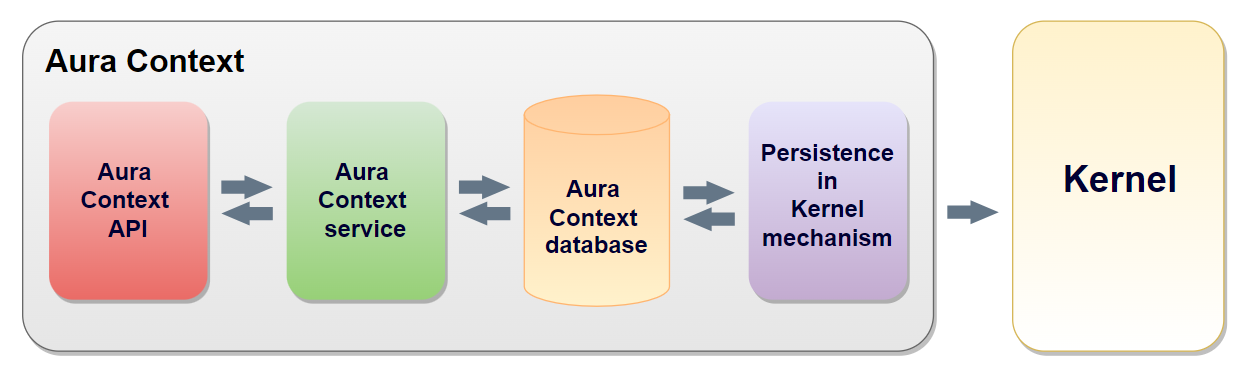
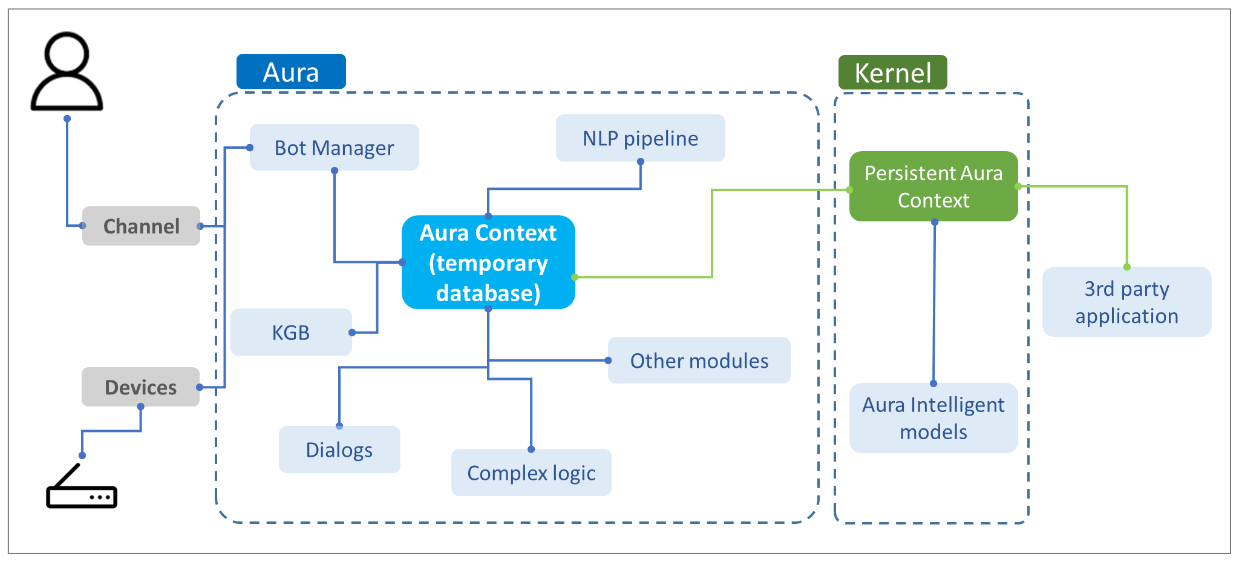
The current document defines the key components in Aura Context:
Agent
Definition and sub-components
An agent is defined as a specific profile for accessing and using Aura Context.
This profile provides a unique layout of the information included in Aura Context, so the different fields included in the context database are shown or not or can be displayed with one specific structure or another.
An agent contains two main components: transforms and fields schema. When an agent is created, it includes by default a set of predefined transforms and fields schema that define how data is handled by the agent:
-
Transform
Component that defines the behavior of the agent when performing different operations.
It includes the default configuration for the agent using the Aura Context global data model.
If developers require the modification of fields in the global data model, it must be done via transform.
-
Fields schema
Component that defines and validates the agent’s own data fields. It is a JSON file named fields_schema.json, which is empty when creating an agent. It must be edited if developers want to include new fields in the global data model.
After creating an agent, developers can start using Aura Context with its default transforms.
However, if the Aura Context global data model does not fit the developer’s model, it can be modified through these two components of the agent.
Agents can perform three different data handling operations:
-
create_context
- Operation for the creation of a data entry in Aura Context. If a data entry already exists, it overwrites it.
- The URL has the following format:
<agent_name>/create
-
upsert_context
- Operation for the modification of a data entry in Aura Context. Depending on the existing data, this operation works to update or insert data.
- The URL has the following format:
<agent_name>/upsert
-
fetch_context
- Operation for data recovery in Aura Context.
- The URL has the following format:
<agent_name>/fetch
- There are three different procedures for data fetching:
- Retrieving data using a correlator (
corrId field in the Aura Context global data model)
- Retrieving data with user and date
- Retrieving user’s N latest data
These endpoints are fixed, but the user can configure how each endpoint is summoned.
Definition
In Aura Context Framework, a transform is a component that defines the behavior of an agent for the performance of different operations.
It allows the adaptation of data provided by a user into data compatible with the Aura Context data model. The transform defines the request to the API, so every agent can decide how to send data by defining the appropriate transforms.
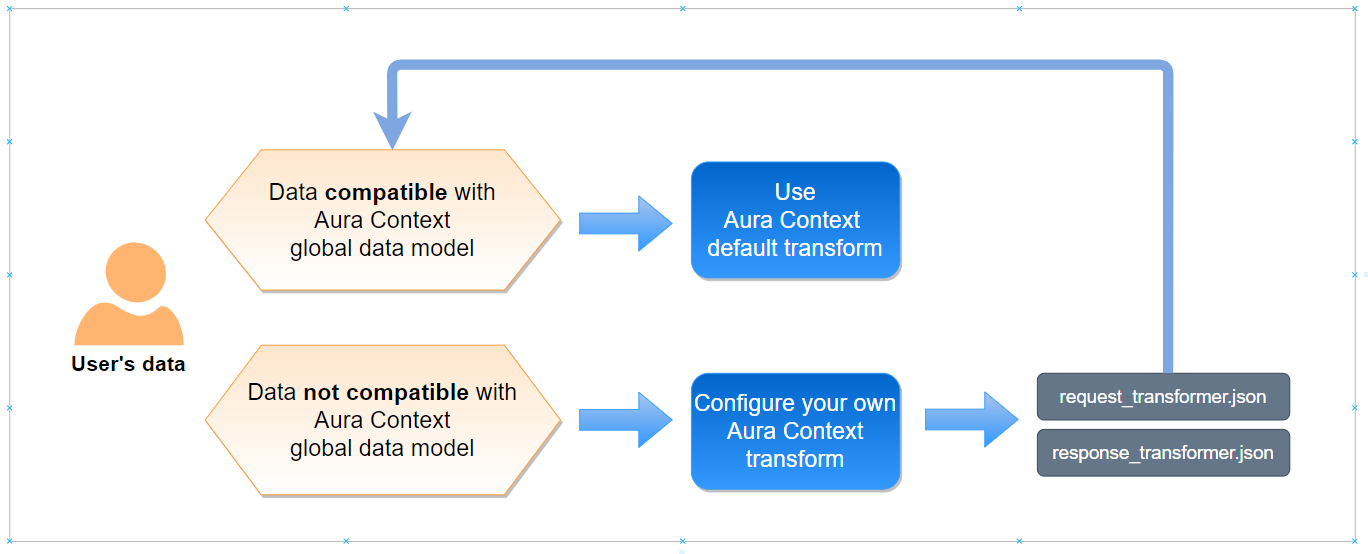
When a developer wants to use Aura Context, she is provided with a default set of transforms, that correspond to the format suitable with the Aura Context global data model:
Find here Aura Context default transforms.
-
If the user’s data is compatible with the global data model, the developer can use the default transforms and start working with Aura Context. This situation corresponds to the API specifications set in the swagger.
-
However, if the developer requires the conversion of data with specific format into data compatible with the Aura Context global data model, he must configure his own transform. In this situation, API specifications will change. This provides a great flexibility to Aura Context, so every developer can upload his own data (in different formats or with different fields) to the Context database and the homogeneity of the uploaded data is guaranteed.
The following examples show a practical use of a transform:
-
Scenario A
- Agent bot generates data A (integer).
- Data must be stored in the context database as a string.
- The developer converts data A from integer to string via transform.
-
Scenario B
- Agent NLP has a field named “applicationId_2”
- This field is named as “applicationId” in the context database
- The developer converts the name of this field to be compatible with the context database via transform.
Files
Each transform includes two different files:
request_transformer.json:
This file allows sending free-formatted fields to be included in Aura Context through the API. Data will be transformed later on, so the resulting data is suitable with the Aura Context global data model.
The file includes the data/metadata in the request from Aura Context API:
- “data” corresponds to the request body
- “metadata” corresponds with the request header
response_transformer.json:
This file allows transforming the result data from a specific operation, which fits with the context global data model, into data suitable with the input component.
The file includes the data/metadata in the response from Aura Context API:
- “data” corresponds to the response body
- “metadata” corresponds with the response header
Each type of operation performed by the agent must include these two files. Therefore, the following combination of operations and files will be generated:
[working_directory]/agents/transformations/[agent_name]/create_context/request_transformer.json
[working_directory]/agents/transformations/[agent_name]/create_context/response_transformer.json
[working_directory]/agents/transformations/[agent_name]/fetch_context/request_transformer.json
[working_directory]/agents/transformations/[agent_name]/fetch_context/response_transformer.json
[working_directory]/agents/transformations/[agent_name]/upsert_context/request_transformer.json
[working_directory]/agents/transformations/[agent_name]/upsert_context/response_transformer.json
[working_directory]/agents/fields_schemas/[agent_name]/fields_schema.json
Types of Aura Context Transforms
Depending on the goal to be achieved with the transformation of the agent, there are three different types of Aura Context transforms: inferred / injected / imported. All of them has certain mandatory files:
This transform allows reusing common content from other transforms. The transform is imported if it is loaded from a JSON file.
Mandatory fields for this transform are included in the tables of the section fields of Aura Context transforms.
An example is shown below:
    [
        {
            "t_type": "imported",
            "relative_file_path": "../../transformer.json"
        }
    ]
This transform is used to enter a forced value from the transform itself, through the o_value field. It is used when you need to load a value that is not found in the origin data or in metadata.
Mandatory fields for this transform are included in the tables of the section fields of Aura Context transforms.
An example is shown below:
    [
        {
                "t_type": "injected",
                "a_trans": [],
                "o_value": "100",
                "o_basic_type": "str",
                "o_collection_type": "simple",
                "d_path": "metadata.database.field1",
                "d_basic_type": "str",
                "d_collection_type": "simple",
                "required": true,
                "o_nullable": false,
                "d_nullable": false
        }
    ]
The output of this transform is:
    metadata = {
        'database': {
            'field1': '100'
        }
    }
The field d_path is used to define the new field name, and o_value corresponds to the origin value.
This transform is used to get the value from data/metadata sent in the request and transform it. For example, if the initial data is:
        data = {
            'information': {
                'name': 'test',
            }
        }
And it is required to change the field path information by info, the following transform can be used:
        [
            {
                't_type': 'inferred',
                'a_trans': [],
                'o_path': 'data.information.name',
                'o_basic_type': 'str',
                'o_collection_type': 'simple',
                'd_path': 'data.info.name',
                'd_basic_type': 'str',
                'd_collection_type': 'simple',
                'required': True,
                'o_nullable': False,
                'd_nullable': False
            }
        ]
The results will be:
        data = {
            'info': {
                'name': 'test',
            }
        }
The field d_path is used to define the new destination field name.
Mandatory fields for this transform are included in the tables of the section fields of Aura Context transforms.
Fields of Aura Context transforms
The definition of a transform includes several mandatory fields, depending on the transform type:
- Fields beginning with
o_: data corresponding to the transform input (origin)
- Fields beginning with
d_: data corresponding to the transform output (destination)
Fields in Aura Context transforms
The following table shows the existing fields in Aura Context transforms. They can be mandatory or optional depending on the type of transform.
| Field |
Description |
t_type |
Field that indicates the transform type (imported, injected or inferred). |
relative_file_path |
Path that indicates the location of the origin JSON file with the transforms. This file needs to be included in the agent. |
a_trans |
It indicates an additional transform and can be a list composed of the following elements: to_str, to_int, to_float, uniques, to_list, sum, average, from_json, to_json, min, max, round, round_floor or round_ceil. |
o_value |
Field value. |
o_path |
Origin field name. It must be a string formed from ASCII letters, numbers, ‘.’, ‘@’, ‘_’ and ‘-’ |
o_basic_type |
Field data type. It can be str, bool, float, int, nested or date |
nested_transformations |
It indicates a nested transform. It is mandatory if o_basic_type or d_basic_type is nested |
o_collection_type |
It indicates whether the field is a collection or a simple string. It can be list or simple |
d_basic_type |
Destination field data type in the JSON file. It can be str, bool, float, int, nested or date |
d_collection_type |
It indicates whether the field is a collection or a simple string. It can be list or simple |
d_path |
Destination field name. It must be a string formed from ASCII letters, numbers, ‘.’, ‘@’, ‘_’ |
required |
Boolean field (true / false) |
o_nullable |
It indicates that the field can be nullable before transformation (origin). It is a boolean field (true / false) |
d_nullable |
Mandatory field in injected and inferred transforms. It indicates that the field can be nullable after transformation (destination). It is a boolean field (true / false) |
The table below summarizes the mandatory fields ( ) for each type of transform:
| Fields |
Imported transform |
Injected transform |
Inferred transform |
t_type |
|
|
|
relative_file_path |
|
.. |
.. |
a_trans |
.. |
|
|
o_value |
.. |
|
.. |
vo_path |
.. |
.. |
|
o_basic_type |
.. |
|
|
nested_transformations |
.. |
If o_basic_type or
d_basic_type is nested |
if o_basic_type or
d_basic_type is nested |
o_collection_type |
.. |
|
|
d_basic_type |
.. |
|
|
d_collection_type |
.. |
|
|
d_path |
.. |
|
|
required |
.. |
|
|
o_nullable |
.. |
|
|
d_nullable |
.. |
|
|
Additional Aura Context transforms
Aura Context also allow certain additional transforms that can be applied to the fields. They are indicated in the field a_trans and applied in the order they have been defined. The output of a transform is the input to the following one.
They are listed below:
to_str: It converts the field to a string.
For example: 2 –> “2”, [“hello”] –> “[“hello”]”to_int: It converts the field to an integer.
For example: “2” –> 2, 3.2 –> 3to_float: It converts the field to an integer.
For example: “2,6” –> 2.6, 3 –> 3.0uniques: It receives a list of strings and remove duplicate items.
For example: [“hello”, “hello”] -> [“hello”]to_list: It converts the field to a list.
For example: “hello” -> [“hello”]sum: It receives a list of integers or floats and sum the elements. It returns an integer if all elements are integer and otherwise, returns a float. In case of empty list, it returns none.average: It calculates the average of the elements of a list. It returns a float. In case of empty list, it returns none.from_json: It deserializes the field in a JSON.to_json: It converts the field in a serializable JSON.min: It gets the minimum of the elements in a list. It returns a float or an integer depending on the type of element. In case of empty list, it returns none.max: It gets the maximum of the elements in a list. It returns a float or an integer depending on the type of element. In case of empty list, it returns none.round: Round up. It returns an integer.round_floor: Round down. It returns an integer.round_ceil: Round up. It returns an integer.
It is also possible to define multiple additional transforms in the a_trans field.
For example:
{
    "a_trans": ["sum", "to_int"],
}
If you have the following data:
data = [2.1, 3.0]
-
- All elements are added
-
- It converts the result into an integer. So, the result will be 5.
Data availability
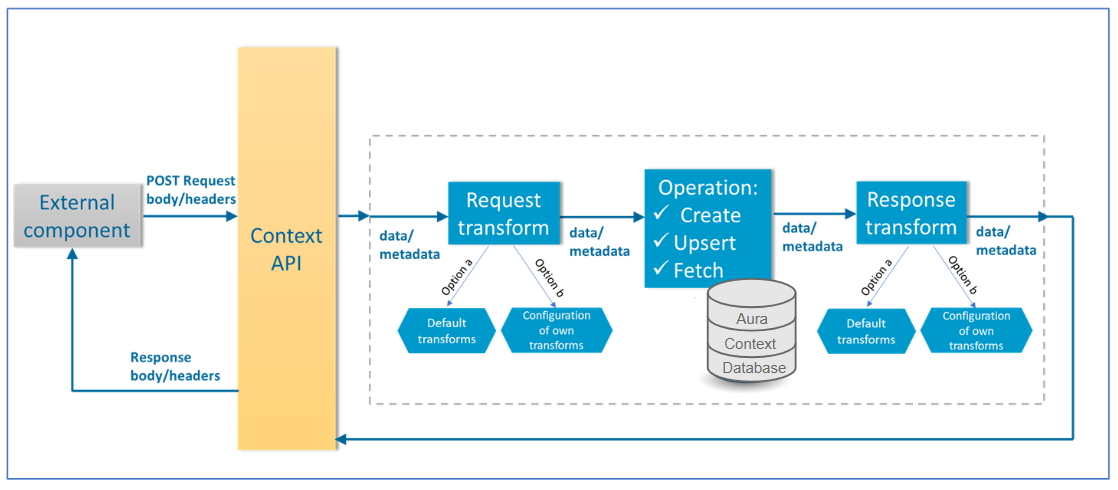
Aura Context works with data and metadata for every operation to be performed (create, upsert or fetch).
In order to perform these operations, it is required to know how the Aura Context API matches input data (data sent via API) with data/metadata for Aura Context and vice versa (how internal data/metadata used by Aura Context for each operation is transformed into response data).
Currently, the three permitted operations correspond to the HTTP POST request method:
-
HTTP POST request’s body and headers will be matched with the input data and metadata of the request transform respectively.
- Field
data: request body
- Field
metadata: request headers
-
After the execution of the corresponding operation, the data/metadata in the response transform will be matched with the HTTP body and headers respectively:
- Field
data: response body
- Field
metadata: response headers
The following figure shows the match between HTTP request/response and Aura Context data/metadata:
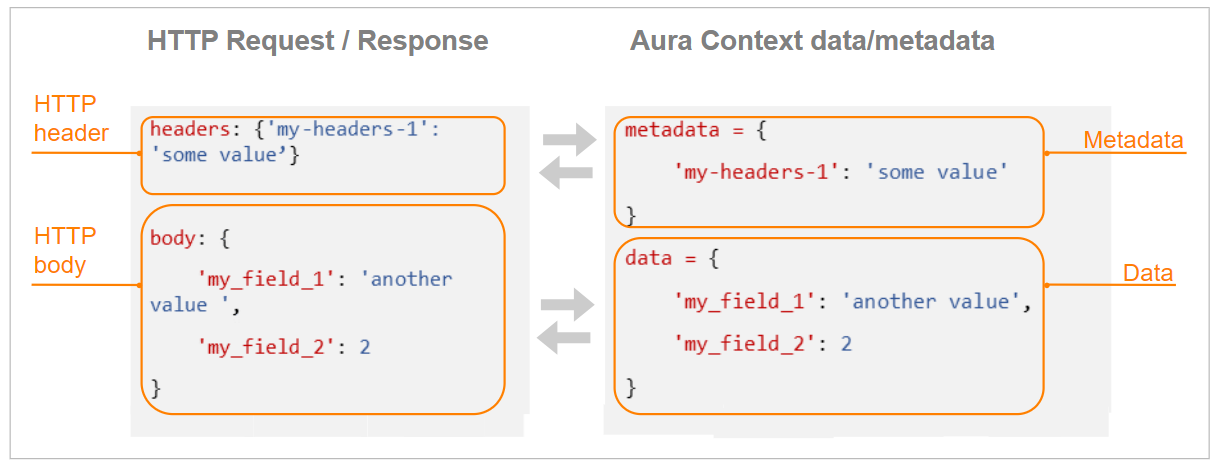
As an example, if the following request is sent:
headers: {'my-headers-1': 'some value'}
body: {
    'my_field_1': 'another value',
    'my_field_2': 2
}
Then, the following data and metadata will be available to be used in the request transforms:
data = {
    'my_field_1': 'another value',
    'my_field_2': 2
}
metadata = {
    'my-headers-1': 'some value'
}
Therefore, a transform containing the following input fields can be generated:
{
'o_path': 'data.my_field_1',
'o_collection_type': 'simple',
'o_basic_type': 'str'
}
Apart from these general considerations for the use of data and metadata in Aura Context, each specific operation (create, upsert, fetch) require certain data/metadata for the request and for the response. They are described in the following sections.
Remember that this section is useful just for generating your own transforms, as the default ones already include this content
request_transformer.json
- Data and metadata required for the create/upsert operations must be transformed in a specific way so as to be a valid input for these operations:
- Data: Document to be inserted in the context database, following the requirements of the global data model. Therefore, each field must match with the fields of the global database (column “Name in database”).
- Metadata: Automatically generated.
response_transformer.json
- Once data is created/modified in the context database, these two operations generates another data/metadata with the result of the corresponding operation.
- These data and metadata can be used as input fields for the
response_transformer.json file, with the following mandatory fields:
- Data:
results: List including true/false value for the result of the process of inserting/modifying data (upsert operation)
- Metadata:
db_execution_time: Duration of the operation execution in the database
An example is shown below:
{
'o_path': 'metadata.db_execution_time',
'o_collection_type': 'simple',
'o_basic_type': 'float',
'd_path': 'data.execution_time',
'o_collection_type': 'simple',
'o_basic_type': 'float'
}
In this example, the body of the response to the request includes a new field execution_time, with the value of the operation duration.
The fetch operation includes different procedures, each of them requiring different data and metadata depending on the type of query to the database.
The content of data and metadata on each operation is described in the following sections.
Common data and metadata for the three different procedures in the request_transformer.json file.
- Data
projection (optional): this field filters specific fields from each document fetched from the context database
- Metadata
page_size (optional): number of documents to be retrieved from the context database (applicable in case of queries including page numbering)page (optional): page to be retrieved from the context database (applicable in case of queries including page numbering)
Fetch by correlator
Apart from the common data and metadata, the following mandatory data/metadata must be included in the request_transformer.json:
- Metadata
corr: correlator ID to be fetched from the context database, together with the aura_id_global parameter.
Fetch by user’s N latest data
Apart from the common data and metadata, the following mandatory data/metadata must be included in the request_transformer.json:
- Data
last_n: number of documents to be retrieved from the context database
Fetch by date range
Apart from the common data and metadata, the following mandatory data/metadata must be included in the request_transformer.json:
- Data
start_date: starting date of the date rangeend_date: ending date of the date range
When the fetch operation is executed, the data and metadata from the response, which follow the format from the global data model, can be transformed to fit with the user’s data model in the response_transformer.json file. In this transform, only data from the response documents can be modified, the remaining data are provided back by default (this is fully specified in the Aura Context swagger).
Fields schema
Definition
The fields schema is the second component of an Aura Context agent. It is used for the definition of new fields on the Aura Context global data model if it is required by the developer.
When an agent is created, it includes the empty JSON file fields_schema.json.
Find here Aura Context default fields schema.
If the developer requires the generation of a new field in the global data model to be adapted to his own data, he must modify the fields schema:
- Edition of the
fields_schema.json to include the necessary modifications.
- Definition of the modifications in the transform: Once the fields schema file has been modified, these variations must also be reflected on the agent’s transform.
The file fields_schema.json is a dictionary of dictionaries that includes the different types of fields that must be used in the agent’s transform.
These fields must have the following format:
<data | metadata>. <agent_name> @ <field_name>
Where:
<data | metadata>: origin of the field (data or metadata)<agent_name>: name of the agent<field_name>: name of the field
Each new field is characterized by two main parameters:
basic_type: it can be str, bool, int, float, nested and date.collection_type: it can be of type simple or list.
It is important to bear in mind that new fields in the Aura Context global data model must be created in a new table, as it is not possible to add a field to an existing table such as Application, Environment, etc.
3 - Global data model
Aura Context global data model
Description of the global model in which Aura Context data is structured
Introduction
Aura Context data is structured in context fields, each of them defined by a pair name-value.
This model is common for all developers willing to use Aura Context: Aura Global Team defines and manages the model and uploads data from Aura modules, channels or devices into the Aura Context database.
An Aura Context developer:
- Can consume this data directly, if the global data model is fully compatible with his own data model, or
- Can use a transform or a file schema in order to modify or add new fields to the database
Certain key considerations regarding the Aura Context global data model are included below:
- Different Aura components, channels or devices can upload data to certain specific fields of the global database.
- It is possible to have fields with no filled data in the database due to several reasons. For example: in a specific lapse of time, information has not been sent from a module, channel or device; a specific channel is not available, thus its associated fields are not of application, etc.
- However, there are certain mandatory fields that correspond to the table “Identification fields” of the database that must be always filled. These fields cannot be modified via an Aura Context transform.
- The storage of data into the database is always based on:
- A user, identified by the field
aura:idGlobal
- An interaction, identified by the field
aura:corrId
- The name of the field is different from the name of the field that is stored in the database. Both are included in columns 1 and 2 of the following tables.
Identification fields
| Name |
Name in database |
Format |
Semantics |
Current Aura Context version |
aura:idGlobal |
aura_id_global |
string (UUID) |
aura_id_global for the user |
✔️ |
aura:userId |
user_id |
string (UUID) |
userId in the OB |
✔️ |
aura:corrId |
corr |
string (UUID) |
corr_id corresponding to the current interaction |
✔️ |
aura:timestamp |
timestamp |
ISO 8601 (UTC, with milliseconds) |
First transaction storage timestamp |
✔️
(automatically filled) |
aura:timestampLastUpdate |
timestamp_last_update |
ISO 8601 (UTC, with milliseconds) |
Last timestamp update of this interaction |
✔️
(automatically filled) |
aura:activeMsisdn |
active_msisdn |
string (country prefix and MSISDN integer number) |
Currently active MSISDN of the interaction.
Empty if a MultiMSISDN user is logged with user/pass. |
✔️
(phoneNumber) |
aura:userType |
data.user_type |
enum string: monoMSISDN, multiMSISDN, anonymous, etc. |
Type of Aura user |
✔️ |
aura:subscriptionType |
subscription_type |
enum string: prepaid, postpaid, control, other |
Type of user subscription.
Empty, if a multiMSISDN user is logged with user/pass. |
✔️ |
aura:accountNumber |
account_number |
string |
User AccountNumber in TV use cases.
Empty for other use cases. |
✔️ |
Application
| Name |
Name in database |
Format |
Semantics |
Current Aura Context version |
application:id |
application_app_id |
string (UUID or similar) |
Unique identifier for the application (it changes with each application version) |
✔️ |
application:channelName |
application_app_channel_name |
string |
Canonic name of the channel where the request is sent by the user |
✔️ (prefix format) |
application:contextFilters |
application_app_context_filters |
Array of strings |
application:contextFilters semantics. String to filter the final response sent by aura-bot instance back to the Telefónica client. I.e., to determine the most appropriate answer to a generic question. The format of each entry of the array should be key:value, where both key and value are application dependant. |
✔️ |
application:playId |
application_app_play_id |
string (integer, UUID or similar) |
Identifier for the content being played (local or remote) |
✔️ |
application:playMode |
application_app_play_mode |
string: local or remote |
Content playing mode set in the application |
✔️ |
application:playType |
application_app_play_type |
string: live, catchup, vod, etc. |
Content type being played |
✔️ |
application:playServiceId |
application_app_play_service_id |
string |
Identifier of the service to be played |
✔️ |
application:playServiceUID |
application_app_play_service_uid |
string |
Unique Identifier of the service being played |
✔️ |
application:playLiveProgramId |
application_app_play_live_program_id |
string |
Identifier of the show being played |
✔️ |
application:timezone |
application_app_timezone |
IANA timezone |
Timezone configured at the application/client |
✔️ |
application:userAction |
application_app_user_action |
string, app-dependent. Eg: playContent, searchContent, viewAccountDetails, phoneCall, etc. |
A token describing the action the user was carrying on in the device that generated the request when the Aura request was launched |
Field currently not filled |
application:interfaceLanguage |
application_app_interface_language |
string: ISO 639-1 + ISO 3166 (joined by underscore) |
Language in which the application is configured |
✔️ |
application:channelDataVersion |
application_app_channel_data_version |
string |
Version sent in the channel request |
✔️ |
device:id |
application_device_id |
string (UUID or similar) |
Unique identifier for the device running the application |
✔️ (from device) |
device:type |
application_device_type |
string: homebase, ios.cell, android.cell, ios.tablet, android.tablet, pc |
Device class |
✔️ (from device) |
application:screenId |
application_app_screen_id |
string (application dependent) |
Identifier designating the application section/screen where the Aura request came from |
✔️ |
application:screenElements |
application_app_screen_elements
Name in the database for internal sub-fields:
ucid; type; resume_time; live_program_id; focus |
Array of maps showing content in the device.
Each map has these fields: ucid: string; type: string; resumeTime: string; liveProgramId: string; focus: boolean |
List of elements that appears in the application screen. It could be empty. |
✔️ |
output:showSuggestions |
application_output_show_suggestions
Name in the database for internal sub-fields:
suggestion_id; intent; entities; type; value; canon; label; score; text; timestamp; show_to_user |
Array of maps with suggestions sent to the channel: suggestion_id: string; intent: string; entities: array of maps; type: entity-type; value: entity-value; canon: canon-value; label: label-value; score: score-value; text: string; timestamp: ISO 8601; show_to_user: boolean |
List of suggestions shown to the user. Each has a unique identifier (suggestion_id) to correlate the effect on the next user’s action and contains a timestamp of the approximate moment when it was shown to the user. The rest of elements are the suggestion components, including intent, entity types (useful for further semantic analysis on analytical models), entities and the current text shown. The field show_to_user tells whether the suggestion has been shown to user by the channel. |
Field currently not filled |
Environment
| Name |
Name in database |
Format |
Semantics |
Current Aura Context version |
location:logical |
environment_location_logical |
string: home, outsidehome |
Current logical location for the user |
✔️ |
Conversation
| Name |
Name in database |
Format |
Semantics |
Current Aura Context version |
input:modality |
conversation_input_modality |
string: voice, text, form |
Modality for the input user interaction |
✔️ |
input:utterance |
conversation_input_utterance |
string |
Utterance sent by the user. Empty if auraCommand. |
✔️ |
input:command |
conversation_input_command |
string |
Stringified of the auraCommand object |
✔️ |
recog:module |
conversation_recog_module |
string: nlp, value, text, command |
A string identifying the module that was responsible for the NLP decision |
✔️ |
recog:domain |
conversation_recog_domain |
string |
Domain recognized by NLP |
Field currently not filled |
recog:resultList |
conversation_recog_result_list
Name for internal sub-fields:
id; score |
id: string; score: number |
List of recognized results (up to 3), ordered by they corresponding scores. |
✔️ |
recog:entities |
conversation_recog_entities
Name for internal sub-fields:
type; value; canon; label; score |
Array of maps: type: entity-type; value: entity-value; canon: canon-value; label: label-value; score: score-value |
List of recognized entities, regarding only to the first intent returned during the main recognition phase |
✔️ |
recog:negativity |
conversation_recog_negativity |
double: value in [0, 1] |
Level of negative sentiment identified by a trained model |
Field currently not filled |
dialog:intents |
conversation_dialog_intents |
array of strings |
Each intent redirection made by the bot will add the name of the intent to the list. |
Currently, only redirections with contex-filter are stored |
dialog:ids |
conversation_dialog_ids |
array of strings |
Each dialog redirection made by the bot will add the id of the dialog to the list. |
Currently, only first dialog id is stored |
output:text |
conversation_output_text |
string |
Message sent back to the user |
✔️ |
output:speak |
conversation_output_speak |
string |
Spoken message sent back to the user |
✔️ |
output:suggestions |
conversation_output_suggestions
Name for internal sub-fields from ‘suggestions’: type; value; canon; label; score |
Array of suggestion results. A suggestion is a map with type, id and (optionally) an array of entities as a map. The entities array contains: type: entity-type; value: entity-value; canon: canon-value; label: label-value; score: score-value |
Produced list of suggestions |
✔️ |
User
| Name |
Name in database |
Format |
Semantics |
Current Aura Context version |
userProductList |
user_user_product_list |
array of strings |
List of products/services contracted by the user |
Field currently not filled |
videoProfileName |
user_video_profile_name |
string |
The video profile assigned to the user |
Field currently not filled |
Data model in Kernel
The process of data storage in Kernel is automatic and transparent for developers.
Information is stored in Kernel datasets using URM format. These specific datasets are:
Aura_Agent_Context
{
  "namespace": "com.plainAVRO",
  "name": "Aura_Agent_Context",
  "type": "record",
  "doc": "Contains the data for Aura context stored by agents for each user and correlator",
  "x-fp-version": "5.9.0",
  "fields": [
    {
      "name": "OPERATOR_ID",
      "aliases": [
        "operator_id"
      ],
      "type": [
        "null",
        "string"
      ],
      "doc": "Global Operator Identifier (Operator acting as owner of the information present in the current entity)"
    },
    {
      "name": "USER_4P_ID",
      "aliases": [
        "user_4p_id"
      ],
      "type": {
        "type": "string",
        "x-fp-user-id": true
      },
      "doc": "Identifier of the user in 4th Platform (as returned by the OB in the 4th Platform APIs)"
    },
    {
      "name": "RECORD_ID",
      "aliases": [
        "record_id"
      ],
      "type": "string",
      "doc": "Id for the record in context"
    },
    {
      "name": "AGENT_DES",
      "aliases": [
        "agent_des"
      ],
      "type": "string",
      "doc": "Agent name using context"
    },
    {
      "name": "FIELD_DES",
      "aliases": [
        "field_des"
      ],
      "type": "string",
      "doc": "Agent stored field name"
    },
    {
      "name": "VALUE_DES",
      "aliases": [
        "value_des"
      ],
      "type": [
        "null",
        "string"
      ],
      "doc": "Agent stored field value"
    },
    {
      "name": "PARTITION_TM",
      "aliases": [
        "partition_tm"
      ],
      "type": {
        "type": "string",
        "logicalType": "datetime"
      },
      "doc": "Date-time of the record, for data partitioning purposes"
    }
  ]
}
Aura_Context
    {
      "name": "APPLICATION_APP_PLAY_ID",
      "aliases": [
        "application_app_play_id"
      ],
      "type": [
        "null",
        "string"
      ],
      "doc": "Identifier for the content being played"
    },
    {
      "name": "APPLICATION_APP_PLAY_MODE_DES",
      "aliases": [
        "application_app_play_mode_des"
      ],
      "type": [
        "null",
        "string"
      ],
      "doc": "Content playing mode set in the application"
    },
    {
      "name": "APPLICATION_APP_PLAY_TYPE_DES",
      "aliases": [
        "application_app_play_type_des"
      ],
      "type": [
        "null",
        "string"
      ],
      "doc": "Content type being played"
    },
    {
      "name": "APPLICATION_APP_PLAY_SERVICE_ID",
      "aliases": [
        "application_app_play_service_id"
      ],
      "type": [
        "null",
        "string"
      ],
      "doc": "Identifier of the service being used to played"
    },
    {
      "name": "APPLICATION_APP_PLAY_SERVICE_U_ID",
      "aliases": [
        "application_app_play_service_u_id"
      ],
      "type": [
        "null",
        "string"
      ],
      "doc": "Unique identifier of the service being played"
    },
    {
      "name": "APPLICATION_APP_PLAY_LIVE_PROGRAM_ID",
      "aliases": [
        "application_app_play_live_program_id"
      ],
      "type": [
        "null",
        "string"
      ],
      "doc": "Identifier of the show being played"
    },
    {
      "name": "APPLICATION_APP_TIMEZONE_DES",
      "aliases": [
        "application_app_timezone_des"
      ],
      "type": [
        "null",
        "string"
      ],
      "doc": "Timezone configured at the application/client"
    },
    {
      "name": "APPLICATION_APP_USER_ACTION_DES",
      "aliases": [
        "application_app_user_action_des"
      ],
      "type": [
        "null",
        "string"
      ],
      "doc": "A token describing the action the user was carrying on in the device that generated the request when the AURA request was launched"
    },
    {
      "name": "APPLICATION_APP_INTERFACE_LANG_ID",
      "aliases": [
        "application_app_interface_lang_id"
      ],
      "type": [
        "null",
        "string"
      ],
      "doc": "Language the application is configured in"
    },
    {
      "name": "APPLICATION_APP_CHANNEL_DATA_VERSION_DES",
      "aliases": [
        "application_app_channel_data_version_des"
      ],
      "type": [
        "null",
        "string"
      ],
      "doc": "Version sent in the request of the channel"
    },
    {
      "name": "APPLICATION_APP_SCREEN_ID",
      "aliases": [
        "application_app_screen_id"
      ],
      "type": [
        "null",
        "string"
      ],
      "doc": "An identifier designating the application section/screen where the AURA request came from"
    },
    {
      "name": "APPLICATION_APP_SCREEN_ELEMENTS_ID",
      "aliases": [
        "application_app_screen_elements_id"
      ],
      "type": [
        "null",
        "string"
      ],
      "doc": "Elements that appear in the screen of the application"
    },
    {
      "name": "APPLICATION_DEVICE_ID",
      "aliases": [
        "application_device_id"
      ],
      "type": [
        "null",
        "string"
      ],
      "doc": "A unique identifier for the device running the application"
    },
    {
      "name": "APPLICATION_DEVICE_TYPE_DES",
      "aliases": [
        "application_device_type_des"
      ],
      "type": [
        "null",
        "string"
      ],
      "doc": "The device class"
    },
    {
      "name": "APPLICATION_OUTPUT_SHOW_SUGGESTIONS_DES",
      "aliases": [
        "application_output_show_suggestions_des"
      ],
      "type": [
        "null",
        "string"
      ],
      "doc": "Suggestions shown to the user"
    },
    {
      "name": "ENVIRONMENT_LOCATION_LOGICAL_DES",
      "aliases": [
        "environment_location_logical_des"
      ],
      "type": [
        "null",
        "string"
      ],
      "doc": "Current logical location for the user"
    },
    {
      "name": "CONVERSATION_INPUT_MODALITY_DES",
      "aliases": [
        "conversation_input_modality_des"
      ],
      "type": [
        "null",
        "string"
      ],
      "doc": "Modality for the input user interaction"
    },
    {
      "name": "CONVERSATION_INPUT_UTTERANCE_DES",
      "aliases": [
        "conversation_input_utterance_des"
      ],
      "type": [
        "null",
        "string"
      ],
      "doc": "Utterance sent by the user"
    },
    {
      "name": "CONVERSATION_INPUT_COMMAND_DES",
      "aliases": [
        "conversation_input_command_des"
      ],
      "type": [
        "null",
        "string"
      ],
      "doc": "Stringified of the Aura Command object"
    },
    {
      "name": "CONVERSATION_RECOG_MODULE_DES",
      "aliases": [
        "conversation_recog_module_des"
      ],
      "type": [
        "null",
        "string"
      ],
      "doc": "A string identifying the module that was responsible for the NLP decision"
    },
    {
      "name": "CONVERSATION_RECOG_DOMAIN_DES",
      "aliases": [
        "conversation_recog_domain_des"
      ],
      "type": [
        "null",
        "string"
      ],
      "doc": "Domain recognized by NLP"
    },
    {
      "name": "CONVERSATION_RECOG_RESULT_TYPE_DES",
      "aliases": [
        "conversation_recog_result_type_des"
      ],
      "type": [
        "null",
        "string"
      ],
      "doc": "Type of result produced by NLP"
    },
    {
      "name": "CONVERSATION_RECOG_RESULT_LIST_DES",
      "aliases": [
        "conversation_recog_result_list_des"
      ],
      "type": [
        "null",
        "string"
      ],
      "doc": "Recognized results with their scores"
    },
    {
      "name": "CONVERSATION_RECOG_ENTITIES_DES",
      "aliases": [
        "conversation_recog_entities_des"
      ],
      "type": [
        "null",
        "string"
      ],
      "doc": "Recognized entities"
    },
    {
      "name": "CONVERSATION_RECOG_NEGATIVITY_QT",
      "aliases": [
        "conversation_recog_negativity_qt"
      ],
      "type": [
        "null",
        "float"
      ],
      "doc": "Grade of negative sentiment identified by a trained model"
    },
    {
      "name": "CONVERSATION_DIALOG_INTENTS_DES",
      "aliases": [
        "conversation_dialog_intents_des"
      ],
      "type": [
        "null",
        "string"
      ],
      "doc": "Each intent redirection made by the bot"
    },
    {
      "name": "CONVERSATION_DIALOG_IDS_DES",
      "aliases": [
        "conversation_dialog_ids_des"
      ],
      "type": [
        "null",
        "string"
      ],
      "doc": "Each dialog redirection made by the bot"
    },
    {
      "name": "CONVERSATION_OUTPUT_TEXT_DES",
      "aliases": [
        "conversation_output_text_des"
      ],
      "type": [
        "null",
        "string"
      ],
      "doc": "Message sent back to the user"
    },
    {
      "name": "CONVERSATION_OUTPUT_SPEAK_DES",
      "aliases": [
        "conversation_output_speak_des"
      ],
      "type": [
        "null",
        "string"
      ],
      "doc": "Message to be spoken sent back to the user"
    },
    {
      "name": "CONVERSATION_OUTPUT_SUGGESTIONS_DES",
      "aliases": [
        "conversation_output_suggestions_des"
      ],
      "type": [
        "null",
        "string"
      ],
      "doc": "Produced suggestions"
    },
    {
      "name": "USER_USER_PRODUCT_LIST_DES",
      "aliases": [
        "user_user_product_list_des"
      ],
      "type": [
        "null",
        "string"
      ],
      "doc": "Products/services contracted by the user"
    },
    {
      "name": "USER_VIDEO_PROFILE_NAME",
      "aliases": [
        "user_video_profile_name"
      ],
      "type": [
        "null",
        "string"
      ],
      "doc": "The video profile assigned to the user"
    },
    {
      "name": "PARTITION_TM",
      "aliases": [
        "partition_tm"
      ],
      "type": {
        "type": "string",
        "logicalType": "datetime"
      },
      "doc": "Date-time of the record, for data partitioning purposes"
    }