1 - Incoming Event middleware
Incoming Event middleware
Description of incoming-event-middleware, executed in event activity types.
Introduction
The incoming-event-middleware is in charge of managing events, that is, activities for the end-to-end communication between aura-bot and channels.
Channels can send events to aura-bot to inform about any relevant event happening on their side.
In particular, aura-bridge sends an event to aura-bot, when the transformation from bot activity to WhatsApp message fails, that is handled by this middleware.
When aura-bot receives an event, this middleware prevents the execution of the rest of the middlewares by completing the request flow.
There are two types of events:
- Log type: the channel asks aura-bot to log certain information
- emptyResponse type: Event sent by the bot when no response activity is sent. Currently, it is internally used for aura-bot towards aura-bridge.
export enum TypeEvent {
    /**
     * Log event
     */
    Log = 'log',
    /**
     * Directline empty response event (Event sent by the bot when no response activity is sent)
     */
    EmptyResponse = 'emptyResponse'
}
This middleware is executed once the HTTP request arrives at the server to the POST /api/messages endpoint and the Direct Line authentication executed by the Adapter is successful.
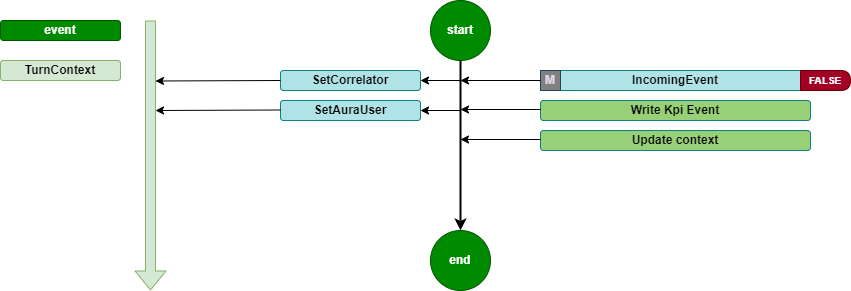
It is a Turn middleware, so it is executed during turn initialization. It is only executed if the type of the activity is event. In this case, the middleware records the KPIs and updates the context.
The source code of this middleware is included in Aura Bot Platform middlewares - Github repository.
Incoming Event flow diagram
The incoming-event-middleware flowchart is included below:
2 - Init middleware
Init middleware
Description of init-middleware, the very first one to be executed once the HTTP request arrives at the server
Introduction
The init-middleware is the first to be executed once the HTTP request arrives at the server to the POST /api/messages endpoint and the Direct Line authentication executed by the Adapter is successful.
It is a Turn middleware, so it is executed during turn initialization.
It launches the execution of all the following middlewares, in the order declared during aura-bot initialization. It is only executed if the type of the activity is message.
The source code of this middleware is included in Aura Bot Platform middlewares - Github repository.
init-middleware flowchart
The orderly steps for the management of this middleware are detailed below:
- Set a proper correlator in the
TurnContext, that will be used during the whole processing of the activity throughout aura-bot.
This means that:
- If a correlator is received in the
channelData of the activity, this one is used.
- If the channel does not send a correlator, a new one is generated at this point, to be used the same way.
ContextUtils.setCorrelator(context, ContextUtils.getCorrelatorFromChannelData(context));
/**
 * Get correlator from channel data, if exist there, or creates a new one.
    * @param context Context where the channel data will be taken from
    */
static getCorrelatorFromChannelData(context) {
    if (!context.activity.channelData || !context.activity.channelData.correlator) {
        context.activity.channelData = { ...context.activity.channelData || {}, correlator: uuid.v4() };
    }
    return context.activity.channelData.correlator;
}
-
Push the auraId, received in the from.id of the activity, to the TurnContext, to make it available in all the activity execution steps. The getAuraId method sets the auraId based on the channel type, if the channel is integrated. Then, the auraId is prefixed with the channel prefix.
This is necessary because the auraId is the key to the user cache and, if it is not formatted properly, it will fail to fetch the user from the cache and will re-request the user’s data from the services.
ContextUtils.setAuraId(context, ChannelDataUtils.getAuraId(context, AuraChannelsConfiguration.instance));
-
Initialize the data accessors of the conversational context in the TurnContext: conversationState, userState and authenticationState.
ContextUtils.setAuraPersistentDataAccesors(context, this.dataAccessors);
-
Initialize the conversationState. This is necessary to avoid errors when a user accesses through several channels simultaneously.
ContextUtils.setConversationState(context, this.conversationState);
-
Set activity locale with the default value.
context.activity.locale = ConfigurationManager.instance.environmentConfiguration.AURA_DEFAULT_LOCALE;
At this stage, two scenarios can happen:
-
If the activity processing is executed properly, the following middleware is executed.
-
In the happening of an unexpected error during the activity processing, the error makes all its way back to this initialization middleware error handling, in order to return the user a response activity including the most appropriate text related to the error.
One of the possible errors landing in this middleware during the activity processing, happens when the size of the response is bigger than the ones allowed by Direct Line protocol, that must not exceed 256K characters, the response is bypassed and a generic text explaining that there are too many results is returned to the user: (errors:error.message.oversize).
3 - Fourth Platform Authorization middleware
Description of fourth-platform-authorization-middleware, in charge of the validation of the user’s credentials
Introduction
fourth-platform-authorization-middleware validates the user’s credentials and the authorization of the auraId sent by the channel, in order to provide all the information of the user needed before the execution of any Aura use case.
It is always executed just after the init-middleware.
For further details about Aura authentication, please go to Aura authentication, in order to understand the different types of Aura users regarding authentication.
Modules
fourth-platform-authorization-middleware lays on two modules:
-
FourthPlatformAuth: class that must implement IAuraAuthenticator interface. This class provides all the methods and properties required to handle Kernel authorization mechanisms.
-
AuraUser: generic class depending on the authenticator provided, in this case FourthPlatformAuth, and that implements AuraUserBaseModel<IAuraAuthenticator>.
The first step is to try to get the user details from the aura-bot cache. In order to improve performance, we try to get it from the local cache of the server and only go to the remote cache if needed. This is done both if the user is authenticated or anonymous, but reading from different caches.
The source code of this middleware is included in Aura Bot Platform middlewares - Github repository.
If the user’s authentication information is cached, the next step is to validate it. If valid, then kpi-handler is called to write the USER entity row, and the next middleware is called. If user’s authentication information is neither cached nor valid, then the authentication process is launched:
-
Get user’s information by auraId from Aura AuthenticationService, getting both the data of the user stored in Aura users database and her channel configuration.
-
If it is a valid authenticated user, then read user’s authorization data from Kernel.
-
The first step in Kernel authentication is to have a valid accessToken, granted for the scopes and purposes needed by the use cases managed by the channel.
-
Then, if the channel needs it, UserProfile is read from Kernel API. Out of it, the AuraUserType is calculated in order to know if the user is monomsisdn, multimsisdn, nomsisdn.
-
The last step is to get the introspection token to obtain a complete view of the user’s identification, related to her authorization_id. Then, all the scopes in the introspection will be merged together and added to the information of the user.
-
After data from Aura AuthenticationService and Kernel is read and processed, there is a valid AuraUser object that is stored in the userDataCache and in the corresponding UserState of aura-bot.
-
Then, the next middleware is executed.
-
Error cases:
-
If a new accessToken cannot be obtained because authorization_id is not valid, then aura-bot stops message processing and returns an activity with an UNAUTHENTICATED code in the channelData to the channel, indicating that the channel must relaunch user authentication with Kernel.
-
Any other error generating accessToken or getting UserProfile or IntrospectionToken will return an INTERNAL code error in the channel, so it should retry the communication after a while.
-
If the given auraId does not exist in Aura’s database, it is validated if the user can be treated as anonymous.
In all the cases, before leaving the fourth-platform-authorization-middleware, the kpi-handler will be called to write a new row in the USER entity file, with the result of the authentication.
The flow diagram of the process is included below:

4 - Incoming KPI middleware
Incoming KPI middleware
Description of incoming-KPI-middleware, in charge of writing the KPI when a message is received
Introduction
The incoming-KPI-middleware extends BotFramework class IncomingMessageMiddleware, meaning that certain code is executed on incoming message.
This middleware is always executed just after the fourth-platform-authorization-middleware.
This middleware is in charge of writing a row in the MESSAGE entity file with the action received. This row is only written if the type of the received activity is message; otherwise, it is ignored.
In the happening of an error writing this information, the activity processing stops here, and an activity is sent to the user with an unexpected error text (errors:error.unexpected).
The source code of this middleware is included in Aura Bot Platform middlewares - Github repository.
5 - Bypass Mode middleware
Bypass Mode middleware
Description of bypass-mode-middleware, that when Aura Bot is in bypass mode, sends any input message directly to an external service
Introduction
The main functionality of bypass mode, is that once we are in this mode within a conversation, any input message to aura-bot will be directly sent to the external service, without any recognition made by the bot.
Likewise, any message from the external service will be shown to the user without going through aura-bot recognition system.
The source code of this middleware is included in Aura Bot Platform middlewares - Github repository.
The bypass-mode-middleware extends BotFramework class IncommingMessageMiddleware, meaning that certain code is executed on incoming message.
flowchart TD
    A[Request] --> InitMiddleware (Middlewares)
    subgraph Middlewares
        direction LR
        InitMiddleware[...] --> BypassMode
        BypassMode -->|disable| NLPRecognizer
        BypassMode -->|enable| FinalizeRecognizer
        NLPRecognizer --> FinalizeRecognizer
        FinalizeRecognizer --> EndMiddlewares[...]
    end
    EndMiddlewares --> AuraBot[Aura Bot]
    style BypassMode fill:#800,stroke:#300,stroke-width:1px
The bypass-mode-middleware skips the execution of nlp-recognizer-middleware, setting the value of intentResult in the TurnContext to the same that started the bypass mode.
In case of Init state, all the following middlewares are skipped. The dialog can find these messages in channelData conversationHistory.
⚠️ This is an incoming message middleware, so it only handles incoming messages.
📃 Find here practical guidelines for the configuration of aura-bot in bypass mode.
When using the bypass mode
The bypass mode can be used when all messages in a conversation want to be managed by the same dialog, without the bot recognizer system redirecting the request to another dialog.
The bypass mode ensures that, once active, all requests will be sent to the dialog that started this mode and will continue to receive all requests until the bypass mode is deactivated.
The bypass mode can be useful in multiple use cases:
- Chat with external systems. For example, the handover dialog directly forwards to Genesys (call center) all the messages the user sends once the communication between Aura and Genesys is established.
When the Bypass mode is finished
There are three different ways to exit the bypass mode:
-
It can be decided by the handover dialog itself, using closeBypass method in the bypass object stored in the TurnContext.
-
When certain time (configurable using de expirationTime field in the bypass object) passes without any exchange of messages.
-
When a user message sends one text defined as closeString. Currently, the user can close bypass indicating keywords defined by the bypass_model (using the closeString field). In the bypass model (saved in conversationData), it is possible to indicate the words that close the bypass mode. By default: core:bypass.close.words.
How does it work
The bypass-mode-middleware checks for each request if there is a bypass variable in the user’s conversationData. If the bypass variable exists (type @telefonica/aura-bot-common/models/bypass-model) and its status is different from Off, the middleware will perform the operations depending on the state.
The different possible bypass states are defined in BypassState enum:
export enum BypassState {
    Init = 'init',
    Bypass = 'bypass',
    Closed = 'closed',
    Paused = 'paused',
    Off = 'off'
}
Behavior depending on the state
As previously indicated, the bypass-mode-middleware performs operations based on the state of the bypass variable, which can be modified by the dialog according to the needs:
Init
Perform as in Bypass state. It allows the dialog to execute boot actions.
Bypass
By default, the bypass-mode-middleware sets the intentResult in TurnContext with the intent to start the bypass mode (bypass.intent), so that the dialog can manage the message.
If the bypass has not expired, the last access information (using updateLastAccess method) will be updated, restarting the expiration time again. In this state, the middleware does not close the bypass, this work is delegated to the dialog itself.
In the Bypass state, it is possible to execute an action using an channelData.auraCommand with the following format in the intent field (activity.channelData.auraCommand.value.intent):
<intent>.<action>
The possible actions that can be executed are defined in BypassAction enum:
export declare enum BypassAction {
    Init = "init",
    Start = "start",
    Close = "close",
    Pause = "pause",
    None = "none"
}
Currently, only the following actions have an effect on bypass-mode-middleware:
- Close. Set bypass in
Closed state and continues the normal execution.
As an example, we can send an auraCommand with the example-intent.close value on intent field to close the bypass and send to the dialog that handles the example-intent intent.
{
    "auraCommand": {
        ...
        "value": {
            "intent": "example-intent.close",
            "entities": [
                ...
            ]
        }
    }
}
Closed
Close bypass removing it from conversationData.
Paused
Currently it has no effect, although in the future it will temporarily stop bypass mode and resume it again.
Off
It has no effect.
Bypass model
The bypass model contains the following information:
export interface BypassModel {
    state: BypassState
    intent: Intent;
    duration: number;
    recipient: ChannelAccount;
    userId: string;
    data: any;
    closeReason: BypassCloseReason;
    payloadName: string;
    closeString: string | string[];
    expirationTime: number;
    recognizersEnabled: boolean;
    recognizersBreakIntents: Map<string, string[]>;
}
| Property |
Description |
| BypassState |
Current Bypass State |
| intent |
Intent that initiates the Bypass |
| duration |
Bypass life time in minutes |
| recipient |
Recipient to return the message to |
| userId |
Identifier of the user who activated the Bypass |
| data |
Specify information for dialog |
| closeReason |
Reason for closure. If unknown, the dialog must find out what the cause was |
| payloadName |
Name of the property in the channelData.payload. Used to send data to the bypass.ex: ‘handover’ |
| closeString |
Comma-separated string or array of string with the words that directly close the bypass |
| expirationTime |
Date of timeout for bypass |
| recognizersEnabled |
Flag to indicate whether or not recognizers must be executed and the final result stored, although the bypass is enabled. |
| recognizersBreakIntents |
Recognized intents to replace dialog with |
State diagram
The following diagram shows the state transition of bypass mode:
stateDiagram-v2
    [*] --> Init : Dialog init bypass (Bypass.initialize)
    Init --> Bypass : Dialog update
    Bypass --> Closed : Dialog update or BypassAction.Close is received
    Init --> Closed : Dialog update or BypassAction.Close is received
    Closed --> [*] : Bypass model is removed
    %% note left of Init : Dialog perform startup tasks
    %% note left of Bypass : Dialog manages all incoming conversation requests
Examples
Dialog using bypass
Starting bypass mode
In an initial state, the user’s conversationData does not have bypass information. The dialog must create the bypass object to start the bypass mode.
sequenceDiagram
    actor User
    Note right of User: No bypass
    User->>Bot: "First message"
    Bot->>BypassModeMiddleware: request context
    Note right of BypassModeMiddleware: does nothing (no bypass model)
    BypassModeMiddleware->>NLPRecognizerMiddleware: recognize from context
    NLPRecognizerMiddleware->>NLPRecognizerMiddleware: recognized intent: "intent.example"
    NLPRecognizerMiddleware->>ExampleDialog: request context
    ExampleDialog->>ExampleDialog: OnInit
    Note right of ExampleDialog: Create bypass model (bypass state: Init)
Receiving messages with Init or Bypass state
The bypass mode can remain in Init state until the dialog itself ends up performing startup tasks, or it can directly set the Bypass state (if the dialog does not have to execute any task).
In this state, nlp-recognizer will not do anything, since the bypass-mode-middleware will have set intentResult with the intent.example value.
sequenceDiagram
    actor User
    loop
        Note right of User: Bypass on Init/Bypass state
        User->>Bot: "New message X"
        Bot->>BypassModeMiddleware: request context
        Note right of BypassModeMiddleware: intentResult = "intent.example"
        BypassModeMiddleware->>NLPRecognizerMiddleware: does nothing
        Note right of NLPRecognizerMiddleware: does nothing
        NLPRecognizerMiddleware->>ExampleDialog: request context
        Note right of ExampleDialog: Message received
    end
    ExampleDialog->>ExampleDialog: OnBypass
    Note right of ExampleDialog: When the dialog finishes startup tasks, it can change the bypass state (state: Bypass)
Close bypass
The bypass mode can be closed directly by the dialog, when it has completed its tasks, or by sending the auraCommand with the value intent.example.close:
sequenceDiagram
    actor User

    Note right of User: Bypass on Init/Bypass state
    User->>Bot: "Message with auraCommand: intent.example.close"
    Bot->>BypassModeMiddleware: request context
    Note right of BypassModeMiddleware: Close bypass and set intentResult to "intent.example"
    BypassModeMiddleware->>NLPRecognizerMiddleware: does nothing
    Note right of NLPRecognizerMiddleware: does nothing
    NLPRecognizerMiddleware->>ExampleDialog: request context
    Note right of ExampleDialog: Message received
    ExampleDialog->>ExampleDialog: OnClose
    Note right of ExampleDialog: Execute close tasks
Recognizers enabled
The bypass mode, by default, is designed to avoid the execution of the recognizers of aura-bot, but starting in release 9.10.0 (delivered in March 25) it can be configured, using the dialog flag recognizersEnabled, to allow the execution of the recognizers, but the result is just stored in the context to be available for the dialog, and not to overwrite the bypassed dialog execution.
sequenceDiagram
    actor User

    Note right of User: Bypass on Bypass state
    User->>Bot: "Message from the user: I want to watch channel four"
    Bot->>BypassModeMiddleware: request context
    BypassModeMiddleware->>NLPRecognizerMiddleware: call to nlp
    FinalizeRecognizers->>BypassModeMiddleware: Store the IntentResult for intent.tv.display_channel
    Note right of ExampleDialog: Message received
    ExampleDialog->>ExampleDialog: Execute next step of the bypass dialog
    ExampleDialog->>ExampleDialog: Check if IntentResult is in recognizersBreakIntents
    ExampleDialog->>ExampleDialog: Close bypass
    ExampleDialog->>DisplayChannelDialog: Execute dialog
    DisplayChannelDialog->>Bot: Return display channel response
    Bot->>User: Return display channel response
9 - Batch Outgoing Message middleware
Batch Outgoing Message middleware
Description of batch-outgoing-message-middleware, in charge of handling all the activities within one response jointly
Introduction
batch-outgoing-message-middleware implements BotFramework class Middleware.
It is executed after the aura-bot recognizers, whenever a new turn is started. Then, it waits for the execution of all the middlewares and the rest of the components of aura-bot, and thus it is the last element to be executed.
The goal of this middleware is to handle all the activities within one response jointly, to avoid issues with activity.inputHint. setting also activity.channelData.hasMoreMessages field properly, if the channel request needs it (for example, if channelData version is lower than 2).
The source code of this middleware is included in Aura Bot Platform middlewares - Github repository.
The flow of the middleware is explained as follows:
-
First of all, batch-outgoing-message-middleware looks for any error stored in the TurnContext.
-
If there is no error, it would check if the bot is configured to use always batch processing of the activities being returned or if the channel needs it.
-
If some error exists in the TurnContext, nothing is done.
-
If there is no error and the bot or channel implies batch activities processing, it would get all the activities to be sent from TurnContext activities queue and handle them to:
-
Set inputHint properly in each activity. There are 3 different values, defined by BotFramework:
-
IgnoringInput: it should be sent when the answer of the bot counts on several activities in all of them but the last one, so it indicates the channel to ignore the messages of the user until the last activity arrives.
-
AcceptingInput: it should be sent in the last activity of the answer of the bot, except if there’s a prompt. It indicates the channel that could start handling user messages again.
-
ExpectingInput: it should be sent if the last activity of the answer of the bot if there’s a prompt in it, it indicates the channel that the bot has asked something to the user and it is waiting for her response.
-
It also includes in the channelData of each activity the proper value for hasMoreMessages field, if the channel is configured to use it and the channelData version of the request (from version 2 onwards).
-
Finally, it calls the AuraBotAdapter method to send all the stored activities. In case the size of the response for any activity is larger than allowed by the Direct Line protocol, that must not exceed 256K characters, the response is ignored and a generic text explaining that there are too many results is returned to the user (errors:error.message.oversize).
10 - Extended Incoming Kpi middleware
Extended Incoming Kpi middleware
Description of extended-incoming-kpi-middleware, in charge of writing the KPI when a message is received. This is an extension of incoming-kpi-middleware
Introduction
extended-incoming-kpi-middleware extends BotFramework class IncomingMessageMiddleware, meaning that certain code is executed on the incoming message.
It is in charge of writing the row in the MESSAGE and EXTENDED_MESSAGE entity files with the action received. This row is only written if the type of the received activity is message; otherwise it is ignored.
In the happening of an error writing this information, the activity processing stops here and an activity is sent to the user with an unexpected error text (errors:error.unexpected).
This middleware is always executed just after the incoming-kpi-middleware.
The source code of this middleware is included in Aura Bot Platform middlewares - Github repository.
