This is the multi-page printable view of this section.
Click here to print.
Return to the regular view of this page.
ATRIA Model Gateway
ATRIA Model Gateway
Descriptive documentation regarding the ATRIA component atria-model-gateway
Introduction
atria-model-gateway is an ATRIA component in charge of managing the communication with different AI models.
Currently, this component receives a request from aura-gateway-api, together with other input data, and makes a call to the LLM/LMM Experiences Builder and use its capabilities.
atria-model-gateway is also in charge of security and privacy control and allows users to provide feedback on their experience.
If the selected AI model is RAG, then atria-model-gateway calls the atria-rag-server, which is in charge of executing the RAG chain and making the corresponding calls to the LLM models and databases.
The functional components of atria-model-gateway are described in the document LLM/LMM Experiences Builder
Associated documentation
Descriptive technical documentation regarding atria-model-gateway includes:
1 - Architecture and components
ATRIA Model Gateway architecture and components
Development architecture and technical components of the atria-model-gateway
Technical foundations
atria-model-gateway is responsible for managing the communication with different AI models. This component receives a request from aura-gateway-api, together with other input data, and makes a call the corresponding AI models.
If the selected AI model is RAG, then atria-model-gateway calls the atria-rag-server, which is in charge of executing the RAG chain and making the corresponding calls to the LLM models and databases.
Functional components
The functional components of atria-model-gateway are described in the document LLM/LMM Experiences Builder
Architecture overview
The following diagram schematically shows the main technical components integrated into atria-model-gateway.
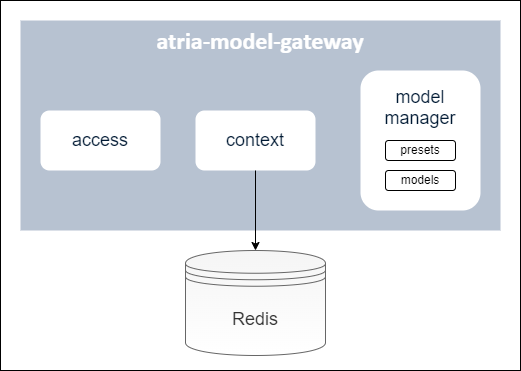
A brief description of these components is included below:
Access module
Module for the management of different profiles to access atria-model-gateway.
Context module
Module in charge of the storage of a conversation history in a cache (currently, Redis is used) over a period of time, grouped by session ID. These conversations are taken into account when calling the generative LLM models.
Model manager
Module that includes the available models and presets. It is in charge of receiving the info from aura-gateway-api and calling the corresponding model.
Models
Available AI models integrated into the atria-model-gateway.
Presets
Presets are configurable entities to define the specific model to work with and certain parameters associated to it: model Id, name, description, model parameters, etc.
Constructors can use the default presets or build new ones: Go to document ATRIA configuration.
When configuring an application, all the presets that can be used for this application must be previously defined.
2 - Operational overview
ATRIA Model Gateway operational overview
Overview of the atria-model-gateway operation
Operational workflow
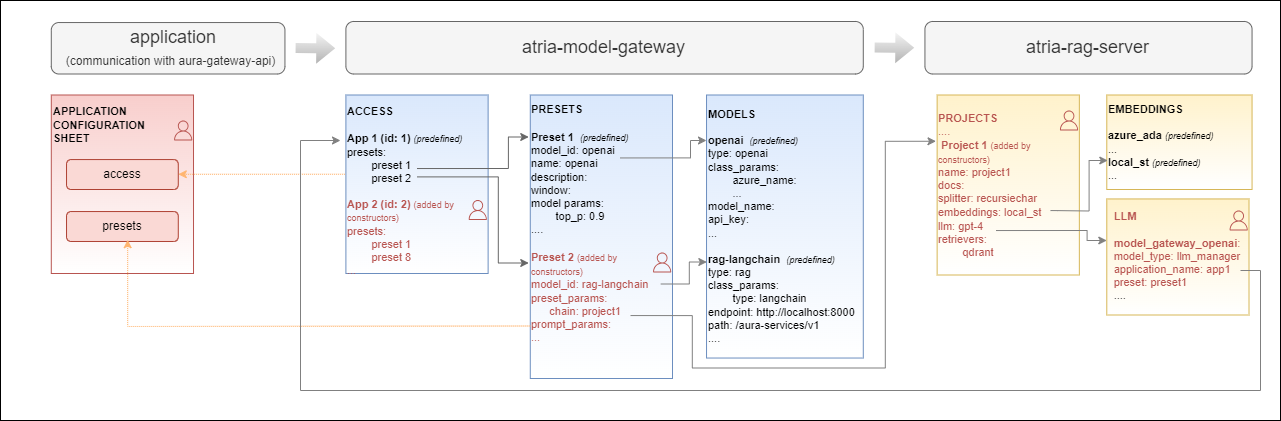
The operational flow between an application (for the communication with aura-gateway-apì), atria-model-gateway, atria-rag-server and atria-rag-generate-db is schematically shown in the following figure:
Configuration
atria-model-gateway includes a default configuration. Constructors can use it as is or they can modify it to be adapted to their requirements or business models: Go to document ATRIA configuration.
3 - API definition
Atria Model Gateway API definition
Description of Atria Model Gateway configuration API swagger
This is an internal ATRIA API
Download swagger file
4 - Environment variables
ATRIA Model Gateway environment variables
List of environment variables handled by the atria-model-gateway
Introduction
The atria-model-gateway depends on these environment variables to be set. None of them are modifiable by the OBs.
| Property |
Type |
Description |
| AURA_REDIS_DATABASE |
number |
Redis database number to be used by the server. This number is used to connect to the Redis database. |
| AURA_REDIS_HOSTS |
string |
Redis hosts to be used by the server. This is a comma-separated list of Redis host names or IP addresses. |
| AURA_REDIS_MODE |
string |
Mode of the Redis connection. |
| AURA_REDIS_PASSWORD |
number |
Ppassword for the Redis connection. This password is used to authenticate the connection to the Redis database. |
| AURA_REDIS_POOL_SIZE |
number |
Size of the Redis connection pool. This number is used to limit the number of connections to the Redis database. |
| AURA_REDIS_PREFIX_SUBSCRIBERS |
string |
Prefix for the Redis subscribers. This prefix is used to identify the subscribers in the Redis database. |
| AURA_REDIS_CHANNELS_SUBSCRIBERS |
string |
Channels (separated by ‘,’) for the Redis subscribers. Redis prefix is added to these channels at the beginning. |
| AURA_REDIS_P_CHANNELS_SUBSCRIBERS |
string |
Pattern channels (separated by ‘,’) for the Redis subscribers. Redis prefix is added to these pattern channels at the beginning. |
| AURA_DAPR_PUBSUB_NAME |
string |
DAPR pubsub component name. It is used to identify DAPR component to be used. |
| AURA_DAPR_PREFIX_SUBSCRIBERS |
string |
Prefix for the DAPR pubsub subscribers. This prefix is used to identify the subscribers in the configured database. |
| AURA_DAPR_TOPICS_SUBSCRIBERS |
string |
Topics (separated by ‘,’) for the DAPR pubsub subscribers. DAPR prefix is added to these topics at the beginning. |
-
The environment variables related to Redis are used to connect to the Redis database. This database is used to refresh the agent’s configuration, because every time the configuration of an agent is changed, it publishes this change in the corresponding channel so we can detect this change in order to refresh it.
-
The environment variables related to DAPR are used to connect to the DAPR components. These components are used to refresh the agent’s configuration, because every time the configuration of an agent is changed, it publishes this change in a corresponding topic, so we can detect this change in order to refresh it.
-
In order to use DAPR, it is necessary to have the DAPR pubsub component configured in the DAPR configuration file, besides the DAPR environment variables.