This is the multi-page printable view of this section.
Click here to print.
Return to the regular view of this page.
Aura Billing Module
Aura Billing Module
Description of Aura Billing Module, the tool for the generation of Liceo invoices.
Introduction
The Aura Billing Module is a tool for the generation of Liceo invoices, that allow charging each customer for the services that she has used. This is a mandatory process for OBs.
It is based on the storage and processing of specific logs in the OB’s Aura systems to track the type and number of interactions of a user or service with Aura.
This information is used to assign costs based on different billing models and criteria chosen by the OB, which ultimately determines the total amount of the invoice.
The invoices will be generated in XLSX (Excel) format and stored in an Azure Storage Explorer blob container, along with the historical invoice records.
These invoices will be available for download by the Aura Global Team, to be sent to the OBs.
Interested in how the Aura Billing Module works and which are the tasks required to bring it into use? Access the document Aura Billing Module operation.
Generated Liceo invoices
The Liceo invoices generated by Aura Billing Module will contain the following information:
- Invoicing model (based on the payment model of the OB)
- Aura components used to provide the service
- Service/app that used this component
- Number of queries per component
- Cost of each query in each specific component
- Total amount generated by each component
- Total number of requests made during the billing period
- Total amount of the invoice
1 - Aura Billing Module operation
Aura Billing Module operation
This document contains:
- An overview of Aura Billing Module functional operation
- Tasks to be executed by OBs to bring Aura Billing Module into use
Aura Billing Module operational flowchart
Figure 1 schematically shows how Aura Billing Module operates, where three different instances come into play:
- Aura: OB managed environment
- Aura: Global Team managed environment
- Kernel
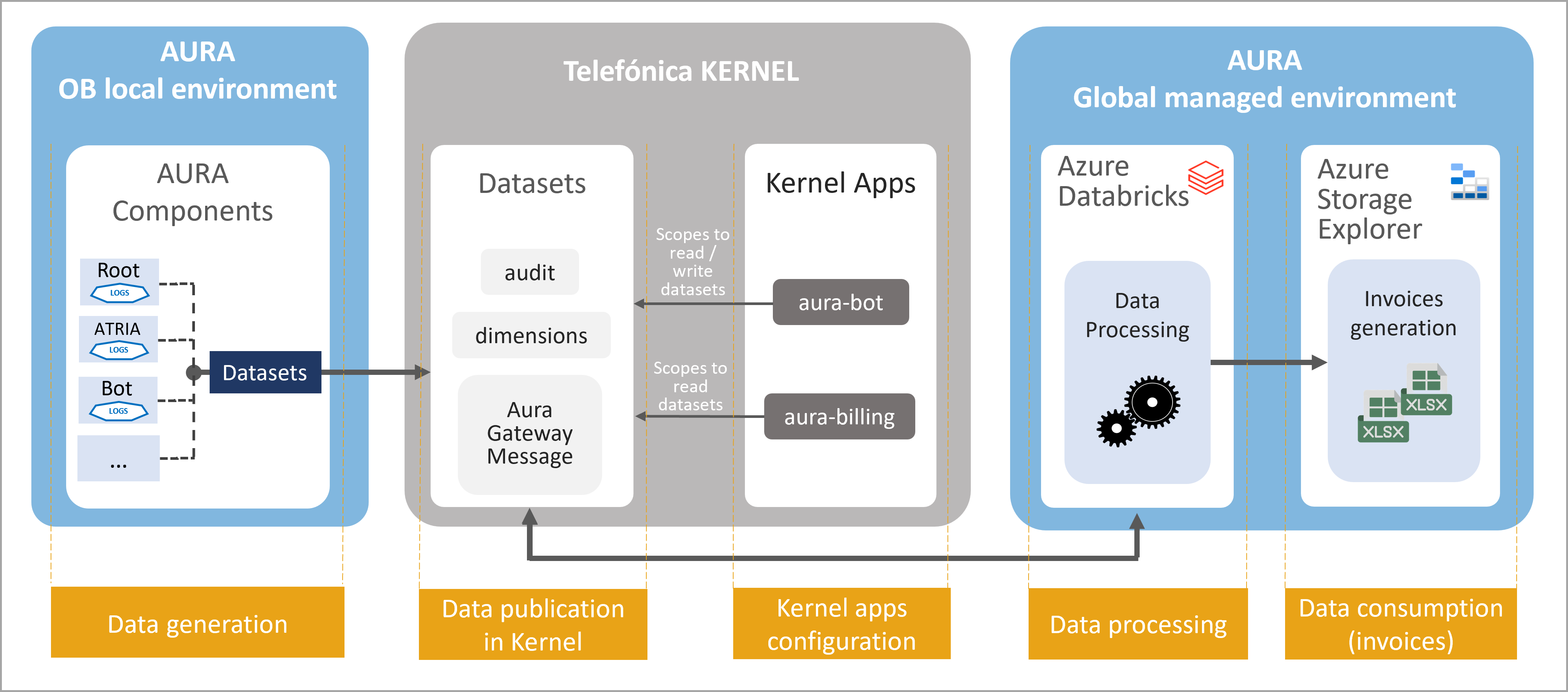
Figure 1. Aura Billing Module operation
The operational processes executed by the Aura Billing Module are outlined below. In each step, the tasks that must be carried out by the OBs in order to bring it into use, are described.
1. Data generation
This task takes place in Aura’s OB managed environment.
-
Aura components automatically generate logs every time a user/service interacts with Aura in local environment.
-
These logs are pre-processed, cleaned and converted into datasets, in Avro format.
-
These are the required Avro-formatted datasets for the Aura Billing Module:
-
Aura_Audit, that stores the minimum information needed for generating the Liceo invoices.
-
Aura dimensional entities:
- D_Aura_App schema definition: List of possible Apps defined in Aura.
- D_Aura_Channel: List of possible channels defined in Aura.
- D_Aura_Component: List of possible components defined in Aura.
- D_Aura_Preset: List of possible presets defined in Aura.
- D_Aura_Recognizer: List of possible recognizers defined by Aura.
- D_Aura_Skill: List of possible skills defined in Aura.
-
Aura Gateway Message: summary of Aura interactions handled by aura-gateway-api.
2. Data publication in Kernel
- The latest versions of the previous Avro-formatted datasets must be published into Kernel productive environment by the Kernel team.
2.1. Ask the Kernel Team to publish the datasets in Kernel productive environment with the latest version.
2.2. When correctly published, you can check them in the repository: 4p-datasets
3. Kernel apps configuration to write/read datasets
-
Two Kernel applications (clients) must be created/configured by the Kernel team to allow the use of Kernel resources:
- aura-bot-[environment]: already existing app in Kernel
- aura-billing-[environment]: new application
-
Specifically, the applications must be configured with concrete scopes that provide permissions to write/read the datasets.
-
The obligation to indicate the exact version in the configuration is removed. Therefore, in the following deployments, the version number indicated in the scope will be eliminated. For example, the configuration of the Brazil OB will have to be updated when a new scope change is made. For example: data:Aura_Audit:6:read —> data:Aura_Audit:read.
3.1. Configure aura-bot Kernel application to write datasets
Ask the Kernel Team to create a list of scopes in the aura-bot application for your intended environment.
- admin:datasets:read
- data:read
- data:write
- data:Aura_Audit:read
- data:Aura_Audit:write
- data:Aura_Gateway_Message:read
- data:Aura_Gateway_Message:write
- data:D_Aura_App:read
- data:D_Aura_App:write
- data:D_Aura_Channel:read
- data:D_Aura_Channel:write
- data:D_Aura_Component:read
- data:D_Aura_Component:write
- data:D_Aura_Preset:read
- data:D_Aura_Preset:write
- data:D_Aura_Recognizer:read
- data:D_Aura_Recognizer:write
- data:D_Aura_Skill:read
- data:D_Aura_Skill:write
- data:D_Gbl_Brand:read
- data:D_Gbl_Contact_Channel:read
- data:D_Gbl_Country:read
The scopes are associated with a specific version of the dataset, that will increase and vary with time.
3.2. Create a new app for Aura Billing Module and configure it to write datasets
Ask the Kernel Team to create a new application aura-billing in Kernel for your intended environment
Ask the Kernel Team to create a purpose for this application. For instance, aura-kpi-data-read-purpose
Ask the Kernel Team to assign to this purpose the following scopes:
- admin:datasets:read
- data:read
- data:write
- data:Aura_Audit:read
- data:Aura_Gateway_Message:read
- data:D_Aura_App:read
- data:D_Aura_Channel:read
- data:D_Aura_Component:read
- data:D_Aura_Preset:read
- data:D_Aura_Recognizer:read
- data:D_Aura_Skill:read
- data:D_Gbl_Brand:read
- data:D_Gbl_Contact_Channel:read
- data:D_Gbl_Country:read
3.3. Access the Kernel applications
Once the Kernel team has created the app with the above-mentioned purposes and scopes, two parameters for securely accessing the app will be provided:
- client_id: unique identifier of the consuming app acting as Kernel API client.
- client_secret: password.
This allows Kernel to securely identify, authenticate and authorize any access requested from this app.
4. Data processing
Data processing is executed with Azure Databricks.
In this process, the information from the Kernel datasets is recovered and read by the Aura Billing Module, that uses algorithms to assign a unitary cost to each concept that composes the invoice to calculate the total amount of this invoice.
4.1. Enable Aura components
Check that Aura KPIs Uploader, the component in charge of the management of KPIs entities and KPIs dimensions in Aura, is in use.
Check that Aura Databricks Jobs, component used to import Avro-formatted files into a Kernel dataset, is enabled in Aura installer.
Configure Azure Common:
- To avoid data files migrations between releases, KPI files are now stored in an Azure common storage that is not release dependent.
- The default value of days for KPIs uploading is changed to 30 days. Due to that, the variable fourth_platform.conversations.days_to_find must be removed from OB deployments, because it will be configured by the installer.
5. Data consumption
This step refers to the generation of the Liceo invoices and its storage in Azure Storage Explorer in xlsx format.
These invoices will be available for download by the Aura Global Team, to be sent to the OBs.