Aura staging environments
The current documents describe:
- How channels should be integrated in the staging environments
- How Aura environments should be configured to be used by channels
Introduction
Staging environments refers to Aura environments to be used by the channels to integrate their own releases with the succeeding release of Aura.
The following picture provides a diagram to show how Kernel and Aura environments are connected.
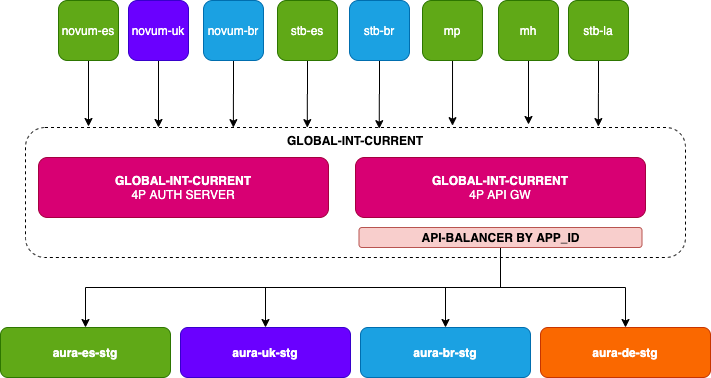
- The current document contains the information needed by the channels, excepting the passwords, to access all Aura integration environments from Kernel
global-int-currentenvironment. - Read the document Configuration of Aura environmenta to know how Aura environments must be configured to be used by the channels that want to integrate their own releases with the next Aura release.
Integration of channels to access to Aura environments
Integration for channels in Spain
- Aura environment name:
es-stg - Direct Line token endpoint
- The APIKey to access this environment will be shared by the Aura Global Delivery team, probably jointly with these instructions.
- https://svc-es-stg.auracognitive.com/aura-services/v1/token/wss
$ curl -X GET https://svc-es-stg.auracognitive.com/aura-services/v1/token/wss --header 'Authorization: APIKEY <YOUR-API-KEY>' - Kernel integration:
- In order to connect from
global-int-currentto the correspondingaura-servicesAPI endpoint, each channel willing to connect toes-stgenvironment should request to the Kernel global-int-current support team to redirect theirget-aura-idrequest to theaura-servicesendpoint ofes-stg. - Kernel auth endpoint: https://auth.global-int-current.baikalplatform.com/
- In order to connect from
- Get
aura-idendpoint: https://api.global-int-current.baikalplatform.com/aura-services/v1/users/aura-id
$ curl -X GET https://api.global-int-current.baikalplatform.com/aura-services/v1/users/aura-id --header 'Authorization: Bearer <user-access-token>'
Integration for channels in Brazil
- Aura environment name:
br-stg - Direct Line token endpoint
- The APIKey to access this environment will be shared by the Aura Global Delivery team, probably jointly with these instructions.
- https://svc-br-stg.auracognitive.com/aura-services/v1/token/wss
$ curl -X GET https://svc-br-stg.auracognitive.com/aura-services/v1/token/wss --header 'Authorization: APIKEY <YOUR-API-KEY>'
- Kernel integration:
- In order to connect from
global-int-currentto the correspondingaura-servicesAPI endpoint, each channel willing to connect tobr-stgenvironment should request to the Kernel global-int-current support team to redirect theirget-aura-idrequest to theaura-servicesendpoint ofbr-stg. - Kernel auth endpoint: https://auth.global-int-current.baikalplatform.com/
- In order to connect from
- Get
aura-idendpoint: https://api.global-int-current.baikalplatform.com/aura-services/v1/users/aura-id
$ curl -X GET https://api.global-int-current.baikalplatform.com/aura-services/v1/users/aura-id --header 'Authorization: Bearer <user-access-token>'
Integration for channels in UK
- Aura environment name:
uk-stg - Direct Line token endpoint
- The APIKey to access this environment will be shared by the Aura Global Delivery team, probably jointly with these instructions.
- https://svc-uk-stg.auracognitive.com/aura-services/v1/token/wss
$ curl -X GET https://svc-uk-stg.auracognitive.com/aura-services/v1/token/wss --header 'Authorization: APIKEY <YOUR-API-KEY>'
- Kernel integration:
- In order to connect from
global-int-currentto the correspondingaura-servicesAPI endpoint, each channel willing to connect touk-stgenvironment should request to the Kernel global-int-current support team to redirect theirget-aura-idrequest to theaura-servicesendpoint ofuk-stg. - Kernel auth endpoint: https://auth.global-int-current.baikalplatform.com/
- In order to connect from
- Get
aura-idendpoint: https://api.global-int-current.baikalplatform.com/aura-services/v1/users/aura-id
$ curl -X GET https://api.global-int-current.baikalplatform.com/aura-services/v1/users/aura-id --header 'Authorization: Bearer <user-access-token>'
Integration for channels in Germany
- Aura environment name:
de-stg - DirectLine token endpoint
- The APIKey to access this environment will be shared by the Aura Global Delivery team, probably jointly with these instructions.
- https://svc-de-stg.auracognitive.com/aura-services/v1/token/wss
$ curl -X GET https://svc-de-stg.auracognitive.com/aura-services/v1/token/wss --header 'Authorization: APIKEY <YOUR-API-KEY>'
- Kernel integration:
- In order to connect from Kernel
global-int-currentenvironment to the correspondingaura-servicesAPI endpoint, each channel willing to connect tode-stgenvironment should request to the Kernel global-int-current support team to redirect theirget-aura-idrequest to theaura-servicesendpoint ofde-stg. - Kernel auth endpoint: https://auth.global-int-current.baikalplatform.com/
- In order to connect from Kernel
- Get
aura-idendpoint: https://api.global-int-current.baikalplatform.com/aura-services/v1/users/aura-id
$ curl -X GET https://api.global-int-current.baikalplatform.com/aura-services/v1/users/aura-id --header 'Authorization: Bearer <user-access-token>'