1 - Kubernetes cluster
Kubernetes cluster
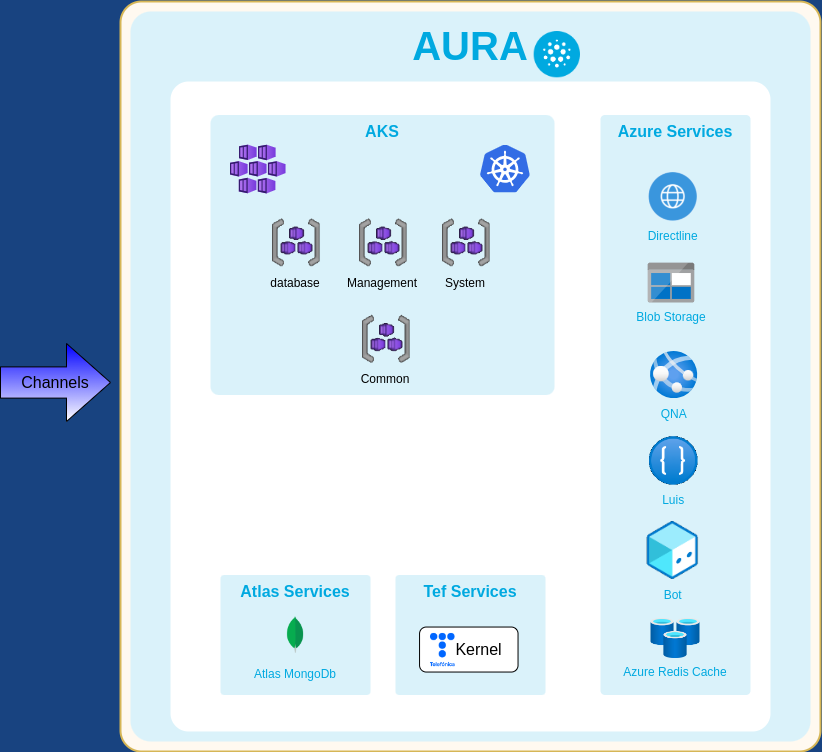
Description of the Kubernetes cluster: components, connection, automation, storage and more
Introduction
The Kubernetes cluster is created on the cloud using aks-engine (Azure), the tool provided by Microsoft to generate the Azure Resource Manager templates that deploy Kubernetes cluster. This tool simplifies the cluster installation, management and upgrades.
Kubernetes are internally used by the Aura Platform installer but they are not intended to be directly used by the Operations and Support Teams. The reason is that changes made to a Kubernetes cluster that are not reflected in the Aura Platform deployment profile could be lost in a platform upgrade. For example, if you changed the instance type in a specific agent pool with Kops, you would lose the changes in a new deployment.
The cluster metadata is saved in the object storage (Azure Blob Storage).
⚠️ Remember that if you lose this bucket, you need to rebuild the cluster manually (Azure). It also contains critical information to access the cluster (certificates, private keys), so it must not be shared.
Connecting to Kubernetes
The kubectl command-line tool is the basic tool to operate the Kubernetes cluster. It uses kubeconfig files that contain all the required information (endpoints, certificates, etc) to connect with the Kubernetes API and manage the cluster in a secure way.
A default (root) kubeconfig file with full access to the cluster is created the first time you install the Aura Platform and is stored in a bucket as part of the cluster metadata.
⚠️Do NOT use the default kubeconfig file to manage the cluster. Use it to create new users with limited permissions instead.
By default, kubectl looks for a file named config in the $HOME/.kube directory. However, you can specify other kubeconfig files by setting the KUBECONFIG environment variable or passing the flag --kubeconfig to kubectl.
export KUBECONFIG=/path/to/kubeconfig.json # Azure
⚠️ For security reasons, kubeconfig files are personal and must not be shared. Each action a user executes on the cluster is logged. If your kubeconfig file is compromised, you must report it.
📄 You can get more information about kubeconfig files at the
official Kubernetes documentation.
⚠️ Kubernetes-dashboard is not deployed in Aura cluster as we promote the kubectl use, but if you still want to use it, you can run the dashboard in your machine and connect to the cluster with your kubeconfig as follows:
docker run -p 9090:9090 -v ${PATH_TO_YOUR_KUBECONFIG}/kubeconfig.json:/opt/kubeconfig.json -v /tmp:/tmp kubernetesui/dashboard:v2.2.0 --kubeconfig /opt/kubeconfig.json
Kubernetes automation with the Cloud
Kubernetes automates certain tasks such as creating a Load Balancer for a service or mounting a disk on a node as a persistent volume for a pod.
Authentication against the cloud provider APIs is done using credentials configured automatically:
-
Azure: by using a Service Principal with contributor role and scope for the infrastructure Resource Group.
⚠️ Please do not change the password, delete the Service Principal or remove its Contributor role If doing so, credentials will not be automatically updated due to a known limitation of aks-engine.
See the issue Azure/aks-engine/724 in the aks-engine repository for more information.
The “Security” section describes an unofficial procedure to change the Service Principal credentials in Azure that involves a period of service disruption.
Kubernetes Namespaces
Kubernates Namespaces are a way to divide and organize cluster resources.
You can list the existing namespaces running kubectl get namespaces. In Aura Platform, you will find the following ones:
-
Namespaces used by the Aura Platform services:
- aura-$ENV: Aura Platform core services.
- aura-system: Aura Platform system services (prometheus, alertmanager, node-exporter,
fluentd, elasticsearch, kube-static-metrics).
-
Namespaces used by Kubernetes:
- kube-system: for objects created by the Kubernetes system. Aura Platform also deploys some objects into this namespace that are very tied to the infrastructure.
- kube-public: readable by all users. It should be empty.
-
Default namespace (default): for objects with no other namespace.
In most situations, you will need to use aura-$ENV. You can use the --namespace flag in kubectl to specify which namespace you are referring to. For example, to get the pods in the Aura Platform core:
$ kubectl get pods --namespace aura-$ENV
Remember that some low-level resources, such as nodes and persistent volumes, are not in a namespace.
Kubernetes objects
Working with pods
You can list all pods in a given namespace along with additional metadata (the node where the pod is allocated, its age, etc.):
$ kubectl get pods -n aura-$ENV -o wide
NAME                                 READY   STATUS      RESTARTS   AGE
aog-bridge-744bbb9595-94g7n          1/1     Running     0          4h15m
aog-bridge-744bbb9595-pzg2l          1/1     Running     0          4h15m
api-gw-5c584b4c8d-hdk25              1/1     Running     0          4h15m
api-gw-5c584b4c8d-knm27              1/1     Running     0          4h15m
aura-bot-84bd44dc6d-5jdzk            1/1     Running     0          4h16m
aura-bot-84bd44dc6d-ktz74            1/1     Running     0          4h16m
aura-bot-makeup-4qrbl                0/1     Completed   0          4h16m
authentication-api-b849b6ff9-5t96c   1/1     Running     0          4h16m
authentication-api-b849b6ff9-rwcvm   1/1     Running     0          4h16m
nginx-5fd94584d8-tcpwd               2/2     Running     0          4h15m
nginx-5fd94584d8-z72tf               2/2     Running     0          4h15m
nlp-85b4b446cc-df2zw                 1/1     Running     0          4h16m
nlp-85b4b446cc-s6z5k                 1/1     Running     0          4h16m
nlp-provisioning-zxkk5               0/1     Completed   0          4h16m
user-helper-67b75cb8fc-6vkt9         1/1     Running     0          4h15m
user-helper-67b75cb8fc-td42l         1/1     Running     0          4h15m
web-sdk-5f7654b797-9npzn             1/1     Running     0          4h16m
web-sdk-5f7654b797-mlcrj             1/1     Running     0          4h16m
Pods can have different statuses:
- Running
- Completed: some pods (e.g., jobs) have a reduced lifespan. They change to completed status when they finish.
Kubernetes eventually removes them from the list of pods.
- Others
📄 You can get more information about working with pods in the
Kubernetes documentation.
Each pod is configured using environment variables. They are a OS-agnostic standard that allows to change the configuration between deployments without changing any code in a very easy way.
Sensitive information (e.g., passwords) is configured using Kubernetes secrets.
Working with deployments
A deployment controller provides declarative updates for Pods and ReplicaSets, according to the desired state described in a deployment object.
$ kubectl get deployments

NAME                 READY   UP-TO-DATE   AVAILABLE   AGE
aog-bridge           2/2     2            2           4h16m
api-gw               2/2     2            2           4h16m
aura-bot             2/2     2            2           4h17m
authentication-api   2/2     2            2           4h16m
nginx                2/2     2            2           4h16m
nlp                  2/2     2            2           4h16m
user-helper          2/2     2            2           4h16m
web-sdk              2/2     2            2           4h16m
ℹ️ You can get more information about working with deployments in the
Kubernetes documentation.
Working with nodes
Nodes are the virtual machines that run Aura Platform.
There are two types of nodes in any Kubernetes cluster:
- Master nodes: they host the control plane aspects of the cluster. Typically, these nodes are not used to schedule application workloads.
- Compute nodes: nodes which are responsible for executing workloads for the platform services.
If there is an issue in the cluster, the first thing you should review is the status of the nodes.
$ kubectl get nodes

NAME                                 STATUS   ROLES    AGE     VERSION
k8s-common-26582301-vmss000000       Ready    agent    7h33m   v1.13.4
k8s-common-26582301-vmss000001       Ready    agent    7h33m   v1.13.4
k8s-database-26582301-vmss000000     Ready    agent    7h33m   v1.13.4
k8s-database-26582301-vmss000001     Ready    agent    7h33m   v1.13.4
k8s-database-26582301-vmss000002     Ready    agent    7h33m   v1.13.4
k8s-management-26582301-vmss000000   Ready    agent    7h33m   v1.13.4
k8s-management-26582301-vmss000001   Ready    agent    7h33m   v1.13.4
k8s-management-26582301-vmss000002   Ready    agent    7h33m   v1.13.4
k8s-master-26582301-0                Ready    master   7h33m   v1.13.4
k8s-master-26582301-1                Ready    master   7h33m   v1.13.4
k8s-master-26582301-2                Ready    master   7h32m   v1.13.4
You should see three nodes with the role “master”, that is the default recommended value. An odd number of master nodes is mandatory to guarantee that etcd, the service that stores the cluster status, reaches its consensus (see “Why an odd number of cluster members” in etcd frequently asked questions).
The normal status for a node is “Ready”, that means that the node is up and a healthy member of the Kubernetes cluster.
Nodes can become “NotReady” for different reasons when something is not right. In this case, the first step is to describe the affected node and check the “Conditions” and “Events” to determine what could be wrong:
$ kubectl describe node k8s-common-26582301-vmss000000

...
Conditions:
  Type                 Status  LastHeartbeatTime                 LastTransitionTime                Reason                       Message
  ----                 ------  -----------------                 ------------------                ------                       -------
  NetworkUnavailable   False   Thu, 04 Jul 2019 07:08:50 +0200   Thu, 04 Jul 2019 07:08:50 +0200   RouteCreated                 RouteController created a route
  MemoryPressure       False   Thu, 04 Jul 2019 14:41:10 +0200   Thu, 04 Jul 2019 07:07:06 +0200   KubeletHasSufficientMemory   kubelet has sufficient memory available
  DiskPressure         False   Thu, 04 Jul 2019 14:41:10 +0200   Thu, 04 Jul 2019 07:07:06 +0200   KubeletHasNoDiskPressure     kubelet has no disk pressure
  PIDPressure          False   Thu, 04 Jul 2019 14:41:10 +0200   Thu, 04 Jul 2019 07:07:06 +0200   KubeletHasSufficientPID      kubelet has sufficient PID available
  Ready                True    Thu, 04 Jul 2019 14:41:10 +0200   Thu, 04 Jul 2019 07:07:20 +0200   KubeletReady                 kubelet is posting ready status. AppArmor enabled
...
With kubectl top nodes, you can get a quick overview of each node CPU and memory usage. If it is not enough and you need more details about the usage of resources, go to Grafana dashboards section in Monitor Aura documentation.
If a node is misbehaving, the recommended steps are:
- Drain the Kubernetes node. This way, Kubernetes give the pods running on that node a chance to stop in an orderly way and stops scheduling new pods on it. This step is not mandatory, but recommended.
- Terminate the node. It is always safe to terminate one node at a time, waiting until it joins the cluster. Terminating many nodes at a time can affect the quorum of services that need to form a cluster,
so it is not recommended if the node you want to terminate contains these kind of pods.
Nodes that are cordoned appear with the status “SchedulingDisabled”:
k8s-common-26582301-vmss000000 Ready,SchedulingDisabled agent ...
Filtering nodes with kubectl is very handy. For example, you can filter nodes to get those in a specific agent pool:
$ kubectl get nodes -l 'agentpool in (common)'
NAME                             STATUS   ROLES   AGE     VERSION
k8s-common-26582301-vmss000000   Ready    agent   7h36m   v1.13.4
k8s-common-26582301-vmss000001   Ready    agent   7h36m   v1.13.4
Or to get only those in a specific availability zone:
$ kubectl get nodes -l 'failure-domain.beta.kubernetes.io/zone in (0)'
NAME                                 STATUS   ROLES    AGE     VERSION
k8s-common-26582301-vmss000000       Ready    agent    4h14m   v1.13.4
k8s-database-26582301-vmss000000     Ready    agent    4h14m   v1.13.4
k8s-management-26582301-vmss000000   Ready    agent    4h14m   v1.13.4
k8s-master-26582301-0                Ready    master   4h14m   v1.13.4
k8s-master-26582301-1                Ready    master   4h14m   v1.13.4
You can find information about the nodes usage in Grafana. Also, describing the nodes gives you information about how Kubernetes allocated resources on it:
$ kubectl describe node k8s-common-26582301-vmss000001

Non-terminated Pods:         (13 in total)
  Namespace                  Name                                     CPU Requests  CPU Limits  Memory Requests  Memory Limits  AGE
  ---------                  ----                                     ------------  ----------  ---------------  -------------  ---
  aura-es-test               aog-bridge-744bbb9595-ffbzz              100m (5%)     1 (51%)     256Mi (4%)       512Mi (9%)     35m
  aura-es-test               api-gw-5c584b4c8d-qg7bz                  100m (5%)     1 (51%)     256Mi (4%)       512Mi (9%)     35m
  aura-es-test               aura-bot-84bd44dc6d-7cc46                100m (5%)     1 (51%)     256Mi (4%)       512Mi (9%)     36m
  aura-es-test               authentication-api-b849b6ff9-pjdk6       100m (5%)     1 (51%)     256Mi (4%)       512Mi (9%)     35m
  aura-es-test               nginx-5fd94584d8-fwmcd                   600m (31%)    2 (103%)    768Mi (14%)      1Gi (19%)      34m
  aura-es-test               nlp-85b4b446cc-2dtj8                     100m (5%)     1 (51%)     256Mi (4%)       512Mi (9%)     35m
  aura-es-test               user-helper-67b75cb8fc-szmv8             100m (5%)     1 (51%)     256Mi (4%)       512Mi (9%)     35m
  aura-es-test               web-sdk-5f7654b797-jbrfg                 100m (5%)     1 (51%)     256Mi (4%)       512Mi (9%)     35m
  aura-system                fluentd-st7jb                            50m (2%)      100m (5%)   256Mi (4%)       512Mi (9%)     51m
  aura-system                node-exporter-4mlqs                      10m (0%)      50m (2%)    24Mi (0%)        32Mi (0%)      52m
  kube-system                kube-proxy-fnb2d                         100m (5%)     0 (0%)      0 (0%)           0 (0%)         4h14m
  kube-system                kubernetes-dashboard-7947fffdf5-pdrf2    300m (15%)    300m (15%)  150Mi (2%)       150Mi (2%)     4h14m
Allocated resources:
  (Total limits may be over 100 percent, i.e., overcommitted.)
  Resource                       Requests      Limits
  --------                       --------      ------
  cpu                            1860m (96%)   10450m (541%)
  memory                         3246Mi (62%)  5814Mi (111%)
  ephemeral-storage              0 (0%)        0 (0%)
  attachable-volumes-azure-disk  0             0
The CPU and memory limits can be over 100%. But the CPU and memory requests cannot. This means that the resources requested by the pods also establish a limit even if they do not use the requested resources.
If all nodes in an agent pool are full, new pods will wait in a “pending” status until the cluster autoscaler adds a new node to the agent pool.
Autoscaling groups
Compute nodes
In Azure, we use virtual machine scale set, this means that, when a node is terminated for any reason, another one will be automatically created and each agent pool corresponds to one VMSS in Azure.
Master nodes
Master nodes in Azure are individual nodes that do not belong to any VMSS.
This means that, if you remove a master node in Azure, you need to run the installer again to recreate it.
For this reason, you can restart the node first and wait some minutes to verify if is able to rejoin the Kubernetes cluster.
In this case you do not need to terminate it. Remember to uncordon the node if you had cordoned it previously.
Horizontal scaling of a component
Scaling deployments is easy using the kubectl scale command. It enables you to scale one or more replicated services either up or down to the desired number of replicas.
For example, you might want to scale the number of replicas of the apigw deployment to 6:
$ kubectl scale deployment aura-bot --replicas=6 -n aura-$ENV
Deployments contain stateless loads, so they can safely scale up and down. The only restrictions are:
- To have only one insights-loader in order to avoid race conditions trying to load insight files from the object storage.
- To have only one kube-state-metrics to avoid duplicated metrics in Prometheus.
The platform supports Horizontal Pod Autoscalers.
They have been included in some relevant services to autoscale the number of replicas based the CPU usage of a pod.
$ kubectl get hpa -n aura-$ENV

NAME                 REFERENCE                       TARGETS   MINPODS   MAXPODS   REPLICAS   AGE
aog-bridge           Deployment/aog-bridge           0%/150%   2         4         2          65m
api-gw               Deployment/api-gw               0%/150%   2         4         2          65m
aura-bot             Deployment/aura-bot             0%/150%   2         4         2          66m
authentication-api   Deployment/authentication-api   0%/150%   2         4         2          66m
nginx                Deployment/nginx                0%/150%   2         4         2          65m
nlp                  Deployment/nlp                  0%/150%   2         4         2          65m
user-helper          Deployment/user-helper          0%/150%   2         4         2          65m
web-sdk              Deployment/web-sdk              0%/150%   2         4         2          66m
- MINPODS values are set according to your deployment profile using the
service_replicas value for each service.
- MAXPODS values are stablished as three times the value of MINPODS.
- TARGET is defined as a CPU utilization threshold fixed to 80% for all platform services. According to these policies, each service will scale up/down (when needed) based on their own CPU usage metrics. Support for additional custom metrics (e.g., latencies) will be added in future releases.
This feature is very powerful in combination with the cluster autoscaler, because once the pods created by the HPA do not fit in the available compute nodes, the cluster autoscaler will automatically add new nodes to the cluster.
Regarding statefulsets, not all of them scale nicely, so it is really important to understand them well to be able to scale them safely.
$ kubectl get statefulsets --namespace aura-system

NAME                    READY   AGE
alertmanager            2/2     82m
elasticsearch           3/3     83m
fluent-bit-aggregator   3/3     83m
mongodb                 3/3     84m
prometheus              3/3     83m
ℹ️ You have to keep in mind that:
- elasticsearch scales well for adding or removing nodes.
- fluentd-aggregator scales well for adding or removing nodes.
- prometheus stores the same information in all the available replicas, so it is recommended to keep the number of replicas in, at least, 2 for high availability reasons.
Once you are sure about it, use kubectl to scale the statefulset, for example:
$ kubectl scale statefulsets elasticsearch --replicas=7 -n aura-$ENV
Jobs
There are some scheduled jobs that run in Aura Platform. You can check them with kubectl get jobs:
$ kubectl get jobs --namespace aura-es-test

NAME                      COMPLETIONS   DURATION   AGE
aura-bot-makeup           1/1           92s        69m
nlp-provisioning          1/1           10m        68m
Most of them are provisioning jobs that create all the required entities during the installation (applications, APIs, etc).
Horizontal scaling the infrastructure
It is possible to add and remove nodes to the different agent pools in the Kubernetes cluster.
Adding nodes to a running cluster is a safe operation. However, bear in mind that removing nodes can result in statefulsets not working properly. The reason is that some agent pools are dedicated to stateful services that need to form a cluster.
That is the case of the following agent pools:
- master: Kubernetes master nodes use a quorum protocol that needs an odd number of nodes. Three nodes is the minimum number to have HA (high availability), so 3 nodes in preproduction and 5 in production environments is a safe choice. The number of master nodes in an existing environment cannot be modified for now.
- database: It must be 3, for a PostgreSQL cluster with one master and two followers.
Cluster autoscaler
The Aura Platform Kubernetes cluster deploys the official Kubernetes cluster-autoscaler. It is a deployment with one pod that runs in one of the master nodes.
$ kubectl get po -l app=cluster-autoscaler -n kube-system

NAME                                  READY   STATUS    RESTARTS   AGE
cluster-autoscaler-6fb6b8dcdc-xr59x   1/1     Running   1          4h48m
This feature is intended to automatically adjust the Kubernetes cluster size when one of these conditions are met:
- Scale up: there are pending pods that do not fit in the cluster due to insufficient available resources, but could fit if new compute nodes are added.
- Scale down: there are nodes in the cluster that have been underutilized for an extended period of time and their pods can be placed on other existing nodes.
The cluster autoscaler is able to scale the agent pools down to zero if needed.
This is the reason why it is not needed to configure the number of nodes in your deployment profile.
The cluster autoscaler will take care of everything to cut your cloud costs to the minimum.
ℹ️ You can find more information about the cluster autoscaler in the official GitHub repository.
Vertical scaling the infrastructure
The process is similar to the horizontal scaling. You need to tune the type properties in the infrastructure section of your profile configuration file.
# Infrastructure
infrastructure:
  region: "westeurope"
  compute:
    masters:
      size: 3
      type: "Standard_DS2_v2"
    common_nodes:
      min_size: 2
      max_size: 8
      type: "Standard_DS2_v2"
    database_nodes:
      min_size: 3
      max_size: 6
      type: "Standard_DS2_v2"
    management_nodes:
      min_size: 3
      max_size: 6
      type: "Standard_DS3_v2"
Afterwards, run the installer to apply the changes:
$ ./aura deploy_infra --cfg /PATH/TO/config.yml -c /PATH/TO/credentials.k8s.json -v "VAULT_PASSWD"
$ ./aura deploy_system --cfg /PATH/TO/config.yml -c /PATH/TO/credentials.k8s.json -v "VAULT_PASSWD"
$ ./aura deploy_core --cfg /PATH/TO/config.yml -c /PATH/TO/credentials.k8s.json -v "VAULT_PASSWD"
The operation has to terminate and recreate every node. It has to be done as a rolling update to avoid service disruption, so it can take a lot of time to complete (around 5-10 minutes per node) in a big Kubernetes cluster.
In Azure, it is not possible to change the instance types with the Aura Platform installer yet. This means that changing the instance types in the deployment profile has no effects on redeployments.
⚠️ Do not use the Azure Portal to modify the cluster nodes. It is an error-prone and unsupported
way to scale the cluster that could impact the Aura Platform stability. Kubernetes must be aware of the changes done to the cluster and all changes must be kept in sync with the deployment profile.
Kubernetes storage
Kubernetes uses persistent volumes.
They are backed by Managed Disks in Azure.
Services logs with kubectl
The best way to access to the logs of one service is using Kibana platform. Find more information in Manage Aura logs.
However, you can access the same way to:
$ kubectl logs -f -l app=aura-bot -n aura-$ENV
2 - Aura Platform services
Description of all the services that compose Aura Platform
Introduction to Aura Platform services
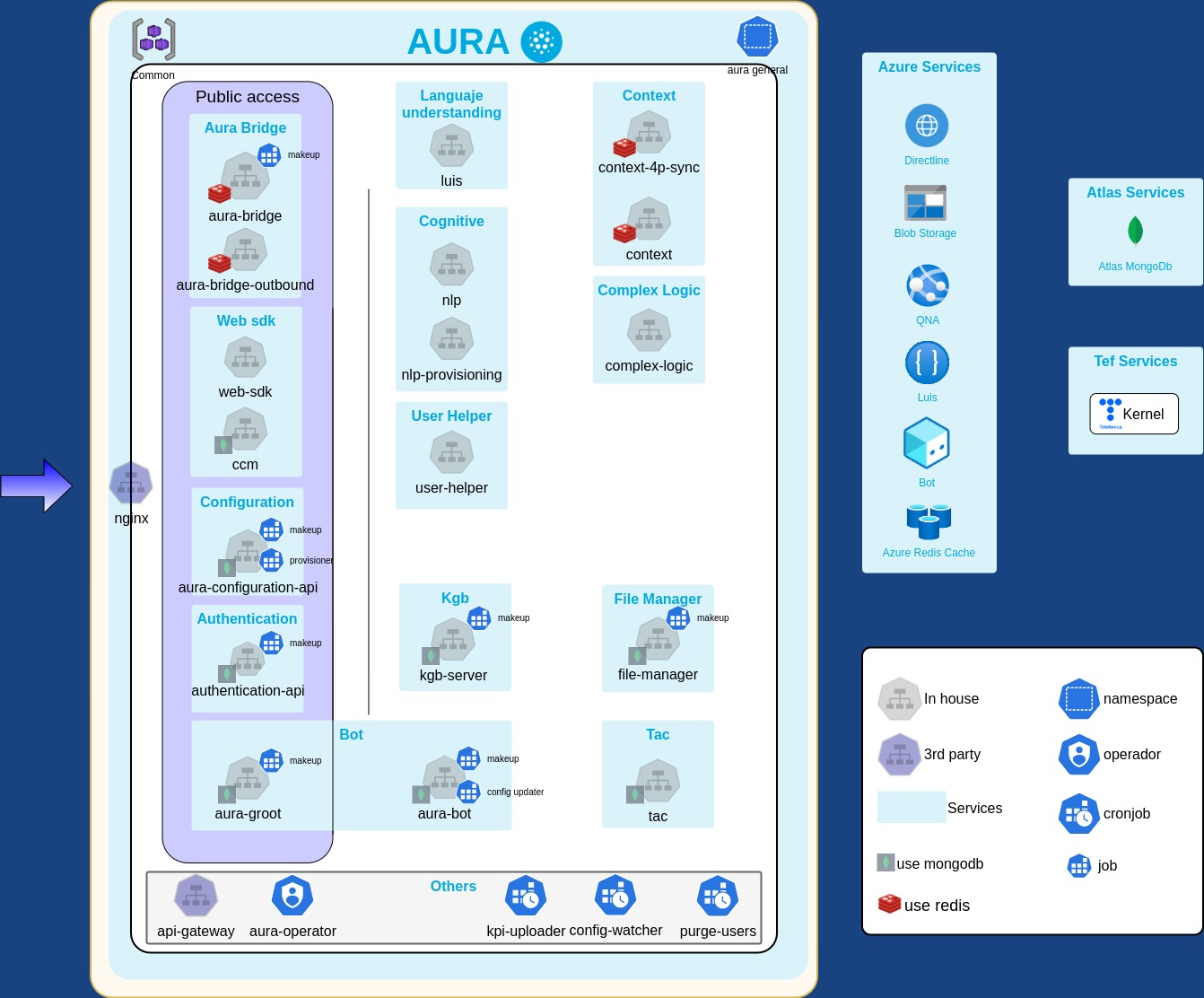
All services that compose the Aura Platform are run as Docker containers on the Kubernetes cluster. This helps us monitor and operate them in a consistent way.
The services can be grouped in three categories:
- Infrastructure services. Services that are very tied to the infrastructure and could be reused by other products using this infrastructure.
- System services. Management services that are part of Aura Platform and could be potentially shared by several Aura Platform deployments.
- Core services. All the other platform services that provide the end-user features.
Infrastructure services
Services related to Aura infrastructure that could be reused by other products using this infrastructure.
cluster-autoscaler
This service scales the cluster nodes. See cluster autoscaler section in the Kubernetes cluster documentation for more details.
System services
alertmanager
The alertmanager is part of the Prometheus suite in charge of sending notifications (email, slack) when an alert goes off in Prometheus.
Notifications are sent to the notifications_email (defined in the deployment profile) using an external global SMTP server administered by the Aura Platform team.
⚠️ It is important that the different teams that operate the platform are subscribed to the alerts.
blackbox-exporter
The blackbox-exporter is a service that allows probing endpoints over HTTP, HTTPS, DNS, TCP and ICMP.
Aura Platform is deployed along with an external service/endpoint that is able to check some services health. The blackbox-exporter uses some HTTPS probes that periodically sends a request to the external endpoint to validate that is still healthy. Its metrics (result, latency, etc) are stored in Prometheus.
Elasticsearch
ElasticSearch is a stateful service that indexes the Aura Platform logs so they can be used for analysis.
It runs as a statefulset. Logs can use a lot of space in disk, so it is important to size the volume accordingly by modifying the following section of the deployment profile:
elasticsearch:
  storage: 10
The retention time of the logs is 7 days by default, but can be configured in the deployment profile.
Remember that increasing this value means that logs will take more space on disk and queries against ElasticSearch could take longer to complete.
There is a lifecycle policy configured to remove the old index from Elasticsearch. You can check this in the Kibana UI.
Also for long term storage of indexes, there is an snapshot configured that stores the index during a year in a blob from the cluster associated storage account. This snapshot can be also checked in Kibana UI.
To check the disk usage, you can use both the Kubernetes Storage or the ElasticSearch dashboard in Grafana.
fluent-bit
Fluent-bit is a daemonset that runs in all nodes, processing its logs and sending them to fluentbit-aggregator.
fluentbit-aggregator
Stateful service that aggregates all logs coming from the fluent-bit processes on every node.
It indexes the logs in Elasticsearch. It has a small data disk of 10GB that acts as a buffer to avoid losing data if something goes wrong (e.g., a network issue or a problem with the Elasticsearch cluster) while trying to index the logs.
It is safe to kill a specific fluentbit-aggregator pod (kubectl delete pod) if it gets stuck for some reason.
node-exporter
The node-exporter is an official Prometheus exporter that gathers hardware and OS metrics exposed by the virtual machines that compose Aura Platform.
Prometheus
Prometheus is a stateful service that scrapes metrics from all the exporters in the platform.
It works in a pull-based metrics collection approach. This means that it periodically (every 30 seconds) requests metrics from every HTTP endpoint exposed by the Aura Platform services. It also gathers information about the infrastructure that sustains the Aura Platform.
Metrics are stored using a local on-disk time series database. The local storage is not meant as durable long-term storage, so metrics have a retention time of 15 days.
On average, Prometheus uses only around 1-2 bytes per sample. To plan the capacity of a Prometheus server, you can use the formula:
needed_disk_space = retention_time_seconds * ingested_samples_per_second * bytes_per_sample
Since metrics can take some space, it is important to size its volume size accordingly in the following section of the deployment profile:
prometheus:
  storage_size: 10
If the local storage becomes corrupted for whatever reason, shut down Prometheus and remove the storage directory, that is mounted under /prometheus on the Prometheus container.
To check the disk usage, you can use the Kubernetes Storage dashboard in Grafana, looking for the PVC named data-prometheus-0.
If you have a user with a valid role to access the Kubernetes cluster, you can also check the disk usage running df -h on the Prometheus container:
$ kubectl -n aura-system exec -it prometheus-0 -- df -h
However, the second alternative is discouraged because it is more intrusive and error prone. Running arbitrary commands on the Aura Platform containers or nodes will be forbidden and will fire security alerts in future releases.
The recommended pattern for running Prometheus in HA mode is to run duplicated instances (same configuration, scraping the same targets independently). That means having at least two replicas running.
Thanos
thanos-sidecar container
The “thanos-sidecar” container is a sidecar to the “prometheus” container that enhances it by exposing a gRPC StoreAPI and by uploading blocks to an object storage API (like Azure Blob Storage). It is a stateless component.
thanos-querier
The “thanos-querier” container exposes a gRPC StoreAPI and an HTTP Prometheus v1 API. It gathers the data needed to evaluate the query from underlying StoreAPIs, evaluates the query and returns the result. It is a stateless component.
The configured StoreAPI sources are:
- system namespace -> prometheus/thanos-sidecar
- system namespace -> thanos-store-gateway
thanos-compact
The “thanos-compact” container is a component that applies the compaction procedure of the Prometheus 2.0 storage engine in order to block data stored in object storage APIs (like Azure Blob Storage). It also generates downsampled blocks from each raw block.
It is a stateful component, as it must be deployed as a singleton (against an exclusive label selector).
thanos-store-gateway
The “thanos-store-gateway” container exposes a gRPC StoreAPI. It serves data blocks containing metrics stored in Azure Blob Storage.
It is a stateless component; however it consumes local storage for sync purposes and benefits from persistence against increased start-up times.
Grafana
Grafana is an open-source service for analytics and monitoring purposes. The Aura Platform uses it to display metrics from Prometheus in several dashboards.
⚠️ Changes to the official Aura Platform dashboards (those with the “baikal” label) will be overridden on every deployment of the Aura Platform infrastructure.
⚠️ Grafana is not prepared to alert the Aura Platform. Aura Platform interfaces are the Prometheus API and the alertmanager.
Kibana
Kibana is the service used by Aura Platform to access logs indexed in ElasticSearch.
The first time accessing Kibana, you need to create an index mapping against “aura-services-*”, using @timestamp as the temporal reference for logs.
Remember that logs are stored in ElasticSearch for 10 days by default.