1 - Aura channels factory
Aura channels factory
Description of the list of Aura channels factory component
Introduction
Aura channels factory is a component that allows an easy integration of aura-bot in web and mobile environments (iOS and Android).

Class diagrams
@telefonica/aura-channels-cli
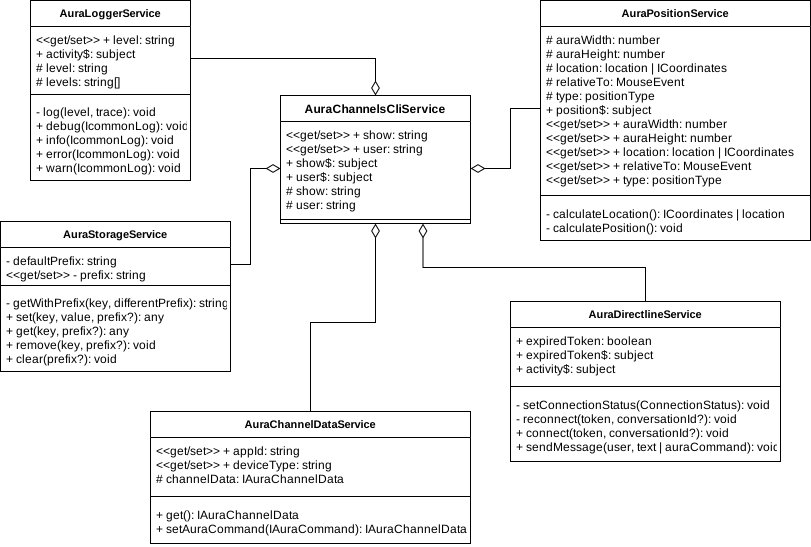
@telefonica/aura-channels-views
// TODO:…
Communication flow
Request flow of a message to aura-bot from a web container or native app.
sequenceDiagram

web/app ->> container: message
container ->> cli: command(message)
cli -->> aura: request directline
aura -->> cli: response directline
cli ->> container: subscribe(message)
container ->> view: emit message
note over container, view: parser and render message
view ->> container: render view
container ->> web/app: view response
How to use
Here are some examples of use. You can see the documentation of all available commands.
Add webcomponent
Here is an example of how to add the component to your website.
<!-- add this code in body tag of your website -->
<aura-component></aura-component>
<script type="text/javascript" src="http://<end-point>/aura-component.js"></script>
Entry point
It is possible to change position of default entry point. For example:
aura.position.location = 'top-left';
Or generate our own entry point, example:
<!-- add this code inside your html -->
<button onclick="myEntryPoint(event)">Relative to this element</button>
// add this function inside the scripts of your page.
function myEntryPoint(event) {
    aura.position.type = 'fixed';
    aura.position.relativeTo = event;
    aura.position.location = 'bottom-left';
    aura.show = !!aura.show;
}
Setting up a channel
The following is an example of how to set up communication for a channel. For example:
window.onload = () => { // you need to wait until the component is loaded.
    // channel user.
    aura.user = '<user>';
    // channel identifier.
    aura.channel.appId = '<channelId>';
    // directLine token.
    aura.directline.connect('<token>');
    // send an message.
    aura.directline.sendMessage('Hi!');
    // send an command.
    aura.directLine.sendMessage({ title: 'onBoarding', value: { intent: 'intent.getOnboarding' }});
};
aura.user: property to define a user. Otherwise, the system will provide an anonymous user.aura.channel.appId: property to define a Aura channel. By default, the system will provide with ‘default’.aura.directline.connect(): function to connect to Aura environment. DirectLine token is required.aura.directline.sendMessage(): function to send message to aura-bot.
To obtain a DirectLine token, you can use the Aura services. For example:
curl --location --request GET 'https://<environment>.auracognitive.com/aura-services/v1/token' \
--header 'Authorization: <api-key>' \
--header 'Access-Control-Allow-Origin: *'
Messages types:
| Type |
Value |
Description |
| CLEAN |
|
Clean previus messages. |
| LARGE.TEXT |
string |
Used as a title introducing an specific view, brief and direct. |
| MEDIUM.BOLD.TEXT |
string |
It is mainly used to format the transcription of what the user says. Always in the top of the screen. |
| MEDIUM.TEXT |
string |
Mainly used to format Aura´s responses but can also be found in the onboarding and help preceded by a title component. |
| SMALL.ITALIC.TEXT |
string |
It is used when Aura quotes voice commands as no clickable suggestions. Always in between quotation marks. |
| EXTRA.SMALL.TEXT |
string |
Different than Aura´s insight, smaller and used to clarify some concepts, within conversation but outside the dialog with Aura. |
| BUTTONS |
object |
Used to render buttons. |
| ADAPTIVECARD |
adaptive schema |
Used as a rich text card, more information |
| HEROCARD |
coming soon |
Used as a rich text card. It allows to have a title, text, image and buttons. |
| ALFRED |
object |
Used to render Alfred response. |
Rendering clean and text messages
The owner and containers can create messages in the following way:
aura.container.render({ type: 'CLEAN' }); // Clean messages.
aura.container.render({ type: 'MEDIUM.BOLD.TEXT', value: 'hello' }); // User message.
aura.container.render({ type: 'MEDIUM.TEXT', value: 'Hi!' }); // Aura response.

// Or send an array of messages:
aura.container.render([
    { type: 'CLEAN' },
    { type: 'MEDIUM.BOLD.TEXT', value: 'hello' },
    { type: 'MEDIUM.TEXT', value: 'Hi!' }
]);
The owner and containers can create buttons in the following way:
aura.container.render({
    type: 'BUTTONS',
    value: [
        {
            type: 'postBack',
            title: 'Suggestion button',
            value: {
                type: 'suggestion',
                intent: 'intent.command',
                entities: []
            }
        },
        {
            type: 'openUrl',
            title: 'xternal link button',
            value: 'https://www.google.com/'
        },
        {
            type: 'imBack',
            title: 'title button',
            value: 'value button',
            channelData: {
                substyle: 'hightlighted'
            }
        }
    ]
});
BUTTON TYPE
| Button |
Type |
Description |
| Suggestions |
postback |
Generation of recommended basic suggestions |
| Actions |
imback |
Generation of Yes / No actions |
| External Links |
posturl |
Link to external page |
BUTTON TITLE
Text rendered inside the button
BUTTON VALUE
On Suggestions and Actions, the message sent to Aura when the user clicks the button
On External Links, the url opened when the user clicks the button
BUTTON SUBSTYLE
In channelData object, we can add as many properties as we wish. In substyle property, we are indicating if the button has a highlighted style. If we don’t include this substyle indication, the button appearance will be the default.
Rendering alfred response
The owner and containers can create buttons in the following way:
aura.container.render({
    type: 'ALFRED',
    value: {
          greetings: 'Ich kann dir mit diesen Themen helfen',
          elements: [
            {
              text: 'Rechnung',
              display_text: 'Rechnung',
              icon: 'https://auraapcurrent16f444bd7c.blob.core.windows.net/static-resources/libraries/alfred/default/images/xxxhdpi/icn-al-assistant-bill.png?sv=2018-11-09&si=static-resources-policy-ap-current&sr=c&sig=Pam5HyRzlW43cpM/pJTdswam2qAG9zD8xdV641iMtjY%3D',
              is_suggestion: false,
              user_type: [ 'monomsisdn'],
              subscription_type: [ 'postpaid', 'control'],
              type: 'navigation',
              elements: [
                {
                  text: 'Letzte Rechnung',
                  display_text: 'Letzte Rechnung',
                  type: 'button',
                  is_suggestion: true,
                  user_type: [ 'monomsisdn' ],
                  value: {
                    intent: 'intent.billing.check',
                    entities: []
                  },
                  subscription_type: ['postpaid', 'control']
                },
                {
                  text: 'Higher charges, why?',
                  display_text: 'Higher charges, why?',
                  type: 'button',
                  is_suggestion: true,
                  user_type: [ 'monomsisdn'],
                  value: {
                    intent: 'intent.billing.unusual',
                    entities: []
                  },
                  subscription_type: ['postpaid', 'control']
                }
              ]
            },
            {
              text: 'FAQs',
              display_text: 'Puedo ayudarte con',
              icon: 'https://auraapcurrent16f444bd7c.blob.core.windows.net/static-resources/libraries/alfred/default/images/xxxhdpi/icn-al-assistant-faqs.png?sv=2018-11-09&si=static-resources-policy-ap-current&sr=c&sig=Pam5HyRzlW43cpM/pJTdswam2qAG9zD8xdV641iMtjY%3D',
              is_suggestion: false,
              user_type: ['all'],
              subscription_type: ['all'],
              type: AlfredElementType.Navigation,
              elements: [
                {
                  text: 'Wo finde ich den Einzelverbindungsnachweis?',
                  display_text: 'Wo finde ich den Einzelverbindungsnachweis?',
                  type: 'text',
                  is_suggestion: false,
                  user_type: ['all'],
                  subscription_type: ['all']
                },
                {
                  text: 'Aparelho bloqueado',
                  display_text: 'Aparelho bloqueado',
                  type: 'text',
                  is_suggestion: false,
                  user_type: ['all'],
                  subscription_type: ['all']
                }
              ]
            }
          ]
    }
});
ELEMENT TYPE
| Element render |
Type |
Description |
| NavigationButton |
navigation |
Navigation button |
| Button |
button |
Clickable suggestions |
| Text |
text |
Non clickable suggestions |
ELEMENT TEXT
Test sent to aura
ELEMENT DISPLAY_TEXT
Text rendered as title
ELEMENT ICON
Icon url rendered as image on navigation button
ELEMENT IS_SUGGESTION
Flag to check if is a suggestion
ELEMENT USER_TYPE
Type of user
ELEMENT SUBSCRIPTION_TYPE
Type of subscription
ELEMENT VALUE
On Suggestions and Actions, the message sent to Aura when the user clicks the button
ELEMENT ELEMENTS
Array of child elements
STYLES ARQUITECTURE
One of the requirements of the project is the owner must have the chance to change styles like colors, fonts, etc. Some of these styles are on libraries (cli and views) and we have to import them to the containers (web and native) and share them on dist folder.
HOW WE DO THE DISTRIBUTION
The owner will have different ways to modify or add skins, these ways are explained above. To allow these features our sass structure is:
Cli library styles:
On CLI library, inside assets folder, we define the different themes of Telefonica: Default, O2, Vivo, Movistar. All these sass files are distributed for their use on containers.
Views library styles:
In this library we have defined the aura components such as buttons, text, cards… There are some styles of those components (colors, fonts, backgrounds) allowed to change by the owner. All of these dynamic styles are on assets/skins/skin.sass. If in the future we create more components, we need to include dynamic styles here. Not-dynamic styles (withs, paddings, margins…) are added on the corresponding sass file on each component.
Containers styles (web and native)
On containers the organization is very similar to the Views library: Not-dynamic styles are added on the corresponding sass file on each component. Dynamic styles are all on skins/default.sass. In this file, we import as well the default theme from cli library and dynamics styles from views library. The file skin.sass is a skin provided for the owner use.
Further, on containers we save on dist directory different skins files for each theme coming from cli library. On dist/assets/skins we have vivo, movistar, o2, default and skin. These files contain all the styles coming on skin/default.sass but applying the different themes. We also convert them to css. All this process is made on built.ts file.
HOW THE OWNERS CAN CHANGE STYLES
Owner wants to change the main theme
When the owner wants to change to another theme like o2 or vivo, they just need to choose the desired theme we provide on dist folder. Right now, these styles are not defined yet and inside there is fake data. But in the future, we will define these themes with the corresponding corporative colors and fonts
Owner wants to change a few styles or colors
Owner can modify the CSS provided on dist folder. In this case, they just need to modify the desired styles on default.css file.
Owner wants to create a completely personalized theme and styles
Owners can add their own style on dist/assets/skins/skin.css. They can change as well the main font family. Then, they need to execute the function:
aura.skin.change({
  style: 'skin.css',
  fonts:[
    {
      fileName: 'OfficinaSerifITCTTBook.woff',
      family: 'OfficinaSerifITCTTBook',
      weight: 500,
      style: normal
      format: 'woff'
    },
    {
      fileName: 'OfficinaSerifITCTTBold.woff',
      family: 'OfficinaSerifITCTTBold',
      style: italic
      weight: 800,
      format: 'woff'
    }
  ]
});