Aura Authentication API definition
Definition of APIs in aura-authentication-api component
Introduction
This section includes the API definition files that affects to the authentication processes in Aura:
This is the multi-page printable view of this section. Click here to print.
Definition of APIs in aura-authentication-api component
This section includes the API definition files that affects to the authentication processes in Aura:
Description of Aura Authentication API swagger
Download swagger file
Description of Aura Terms and Conditions API
Temporary implementation of the Kernel TermsAndConditions API.
This is an internal, privileged API that allows Aura to save the user’s acceptation.
As this API is not inside any secured deployment, an x-api-key header should be sent in every request.
This service is available in all the deployments with services needing Terms and Conditions handling, such as WhatsApp
Terms and Conditions database contains the services collection with the following structure:
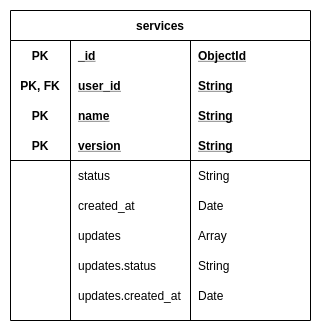
Create an acceptation for a service version T&C POST /v0/users/:user_id/services
POST /v0/users/9a47b037-825f-4ae7-bf55-6290efd5d036/services
Content-Type: application/json
x-api-key: 58e76225-d275-495b-a232-fdf3364ac277
{
	"version": "1",
	"name": "aura"
}

HTTP/1.1 201 Created
Content-Type: application/json
{
  "user_id": "9a47b037-825f-4ae7-bf55-6290efd5d036",
  "name": "aura",
  "version": "1",
  "status": "accepted",
  "created_at": "2019-08-08T15:19:48.259Z"
}
List user acceptations GET /v0/users/:user_id/services
GET /v0/users/9a47b037-825f-4ae7-bf55-6290efd5d036/services
x-api-key: 58e76225-d275-495b-a232-fdf3364ac277

HTTP/1.1 200 OK
Content-Type: application/json
[
  {
    "user_id": "9a47b037-825f-4ae7-bf55-6290efd5d036",
    "name": "aura",
    "version": "1",
    "status": "accepted",
    "created_at": "2019-08-08T15:19:48.259Z"
  }
]
get specific user acceptation GET /v0/users/:user_id/services/:name/:version
GET /v0/users/9a47b037-825f-4ae7-bf55-6290efd5d036/services/aura/1
x-api-key: 58e76225-d275-495b-a232-fdf3364ac277

HTTP/1.1 200 OK
Content-Type: application/json
{
  "user_id": "9a47b037-825f-4ae7-bf55-6290efd5d036",
  "name": "aura",
  "version": "1",
  "status": "accepted",
  "created_at": "2019-08-08T15:19:48.259Z"
}
delete all user acceptations DELETE /v0/users/:user_id/services
DELETE /v0/users/9a47b037-825f-4ae7-bf55-6290efd5d036/services
x-api-key: 58e76225-d275-495b-a232-fdf3364ac277

HTTP/1.1 204 No Content
Create an entry with custom status for a service version T&C POST /v0/users/:user_id/services/:status
POST /v0/users/9a47b037-825f-4ae7-bf55-6290efd5d036/services/pending
Content-Type: application/json
x-api-key: 58e76225-d275-495b-a232-fdf3364ac277
{
	"version": "1",
	"name": "aura"
}

HTTP/1.1 201 Created
Content-Type: application/json
{
  "user_id": "9a47b037-825f-4ae7-bf55-6290efd5d036",
  "name": "aura",
  "version": "1",
  "status": "pending",
  "created_at": "2019-08-08T15:19:48.259Z"
}
Update an entry with custom status for a service version T&C PUT /v0/users/:user_id/services/:status
PUT /v0/users/9a47b037-825f-4ae7-bf55-6290efd5d036/services/newStatus
Content-Type: application/json
x-api-key: 58e76225-d275-495b-a232-fdf3364ac277
{
	"version": "1",
	"name": "aura"
}

HTTP/1.1 201 Created
Content-Type: application/json
{
    "n": 1,
    "nModified": 1,
    "ok": 1
}
prometheus
GET /metrics
HTTP/1.1 200 OK

...txt...
liveness prove
GET /ping
HTTP/1.1 200 OK
Content-Type: application/json

{
  "timestamp": 1567693845103,
  "uptime": 7026,
  "service": {
    "name": "tac",
    "version": "1.0.5"
  }
}
docker-compose up
To clean database and start from scratch
docker-compose down -v
The configuration comes from environment variables.
# the mongodb uri, including user/password and ssl configuration
export TAC_MONGODB_URI=mongodb://db:27017/tac
# API key that should be sent in every request in the `x-api-key` header
export TAC_APIKEY=58e76225-d275-495b-a232-fdf3364ac277
Description of Aura Authentication API endpoints published in Kernel
As mentioned in the endpoints section, some of the endpoints of the aura-authentication-api are published in Kernel, while others are only for internal usage and others are published in Internet because they can be called by any other service, with the proper credentials.
This section is dedicated to those published in Kernel.
The API published in Kernel is not strictly the same as the one published in aura-authentication-api. In the end, they represent the very same service, but the former needs to provide the layer of Kernel authentication.
The API definition can be found in Kernel developers site, where both the different versions deployed in every environment are presented.
This is a regular Kernel API, so in order to consume it, just follow the same instructions as for the rest of Kernel APIs: consuming APIs.