This is the multi-page printable view of this section.
Click here to print.
Return to the regular view of this page.
ATRIA RAG Server
ATRIA RAG Server
Descriptive documentation regarding the ATRIA component atria-rag-server
Introduction
atria-rag-server is an ATRIA component that manages a RAG-type server. It is called by atria-model-gateway when RAG (Retrieval Augmented Generation) is used.
atria-rag-server manages the request made to the RAG model following the predefined RAG chain (pipeline) and making continuous requests combining Generative AI technology (LLMs) with semantic and lexical searches to retrieve the required information.
Associated documentation
Descriptive technical documentation regarding atria-rag-server includes:
1 - Architecture and components
ATRIA RAG Server architecture and components
Development architecture and technical components of the atria-rag-server
Architecture overview
The following diagram schematically shows the main technical components integrated into atria-rag-server.
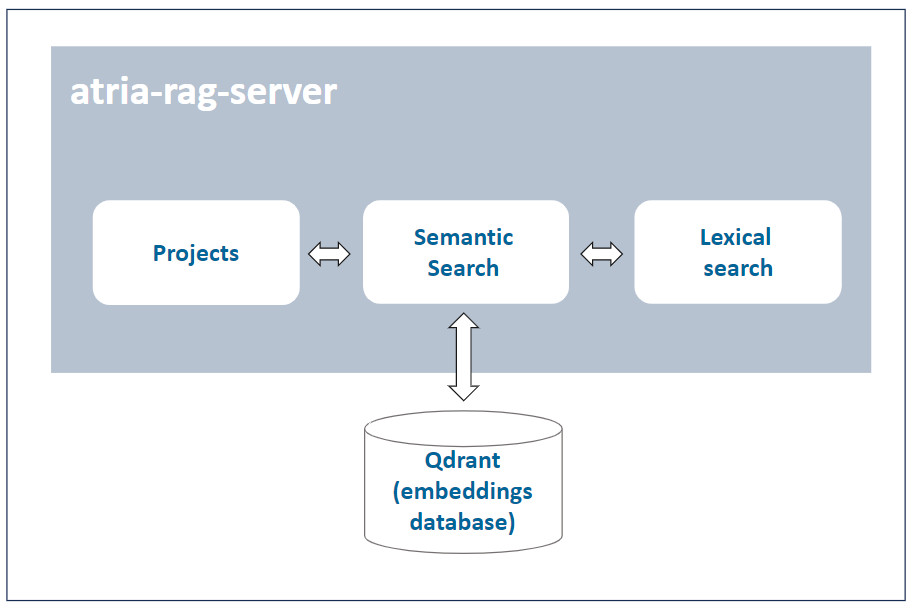
A brief description of the technical components is included below:
Project
A project contains information required for the execution of the RAG pipeline: specific models for semantic search and lexical search; path where the documents to feed the LLMs are located; allowed file extensions, etc.
Semantic search (embeddings)
Qdrant database that stores the embeddings generated through semantic search (OpenAI embeddings) technology.
Lexical search (LLMs)
Database that stores the required documentation for making lexical searching, based on keywords.
Configuration
atria-rag-server includes a default configuration. Constructors can use it as is or they can modify it to be adapted to their requirements or business models: Go to document ATRIA configuration.
2 - Operational overview
ATRIA RAG Server operational overview
Overview of the atria-rag-server operation
Operational workflow
The operational flow between an application (for the communication with aura-gateway-api), atria-model-gateway, atria-rag-server and atria-rag-generate-db is schematically shown in the document atria-model-gateway: operational flow.
Configuration
atria-rag-server includes a default configuration. Constructors can use it as is or they can modify it to be adapted to their requirements or business models: Go to document ATRIA configuration.
3 - Environment variables
ATRIA RAG Server environment variables
List of environment variables handled by the atria-rag-server
Introduction
The atria-rag-server depends on these environment variables to be set. None of them are modifiable by the OBs.
| Property |
Type |
Description |
| AURA_REDIS_DATABASE |
number |
Redis database number to be used by the server. This number is used to connect to the Redis database. |
| AURA_REDIS_HOSTS |
string |
Redis hosts to be used by the server. This is a comma-separated list of Redis host names or IP addresses. |
| AURA_REDIS_MODE |
string |
Mode of the Redis connection. |
| AURA_REDIS_PASSWORD |
number |
Ppassword for the Redis connection. This password is used to authenticate the connection to the Redis database. |
| AURA_REDIS_POOL_SIZE |
number |
Size of the Redis connection pool. This number is used to limit the number of connections to the Redis database. |
| AURA_REDIS_PREFIX_SUBSCRIBERS |
string |
Prefix for the Redis subscribers. This prefix is used to identify the subscribers in the Redis database. |
| AURA_REDIS_CHANNELS_SUBSCRIBERS |
string |
Channels (separated by ‘,’) for the Redis subscribers. Redis prefix is added to these channels at the beginning. |
| AURA_REDIS_P_CHANNELS_SUBSCRIBERS |
string |
Pattern channels (separated by ‘,’) for the Redis subscribers. Redis prefix is added to these pattern channels at the beginning. |
| AURA_DAPR_PUBSUB_NAME |
string |
DAPR pubsub component name. It is used to identify DAPR component to be used. |
| AURA_DAPR_PREFIX_SUBSCRIBERS |
string |
Prefix for the DAPR pubsub subscribers. This prefix is used to identify the subscribers in the configured database. |
| AURA_DAPR_TOPICS_SUBSCRIBERS |
string |
Topics (separated by ‘,’) for the DAPR pubsub subscribers. DAPR prefix is added to these topics at the beginning. |
-
The environment variables related to Redis are used to connect to the Redis database. This database is used to refresh the agent’s configuration, because every time the configuration of an agent is changed, it publishes this change in the corresponding channel so we can detect this change in order to refresh it.
-
The environment variables related to DAPR are used to connect to the DAPR components. These components are used to refresh the agent’s configuration, because every time the configuration of an agent is changed, it publishes this change in a corresponding topic, so we can detect this change in order to refresh it.
-
In order to use DAPR, it is necessary to have the DAPR pubsub component configured in the DAPR configuration file, besides the DAPR environment variables.