This is the multi-page printable view of this section.
Click here to print.
Return to the regular view of this page.
ATRIA RAG generate DB
ATRIA RAG Generate DB
Descriptive documentation regarding the ATRIA component atria-rag-generate-db
Introduction
atria-rag-generate-db is an ATRIA component that manages a RAG-type database. This component is launched when you want to feed the document database for the first time or when you want to update the database with new information. See more information about these processes in the guidelines Import documents into ATRIA.
atria-rag-generate-db is in charge of handling the information coming from different sources and feeding the databases the RAG works with.
Associated documentation
Descriptive technical documentation regarding atria-rag-generate-db includes:
Launch atria-rag-generate-db
To launch atria-rag-generate-db, there are two suitable options:
Option 1
Send a request to the API for it to launch the atria-rag-generate-db. The endpoint responsible for this is:
/aura-services/v2/operations/data
curl -X POST "https://<your-atria-domain>/aura-services/v2/operations/data" \
-H "Content-Type: application/json"
-d '{
  "presetId": "<name of the project>"
}'
Option 2
Execute the following command to update the data in the environment.
This command is in charge of launching the generation of the database for all the projects, but we can launch this generation for a specific project.
PROJECT='project-copilot-reduced'
kubectl patch configmap/atria-rag-generate-db-project --type merge -p "{\"data\":{\"ATRIA_PROJECT\":\"${PROJECT}\"}}" -n <namespace>
kubectl create job --from=cronjob/atria-rag-generate-db $(date +%Y%m%d%H%M%S)-atria-rag-generate-db-${PROJECT} -n <namespace>
(Change <namespace> by the specific one)
1 - Architecture and components
ATRIA RAG Generate DB architecture and components
Development architecture and technical components of the atria-rag-generate-db
Architecture overview
The following diagram schematically shows the main technical components integrated into atria-rag-generate-db.
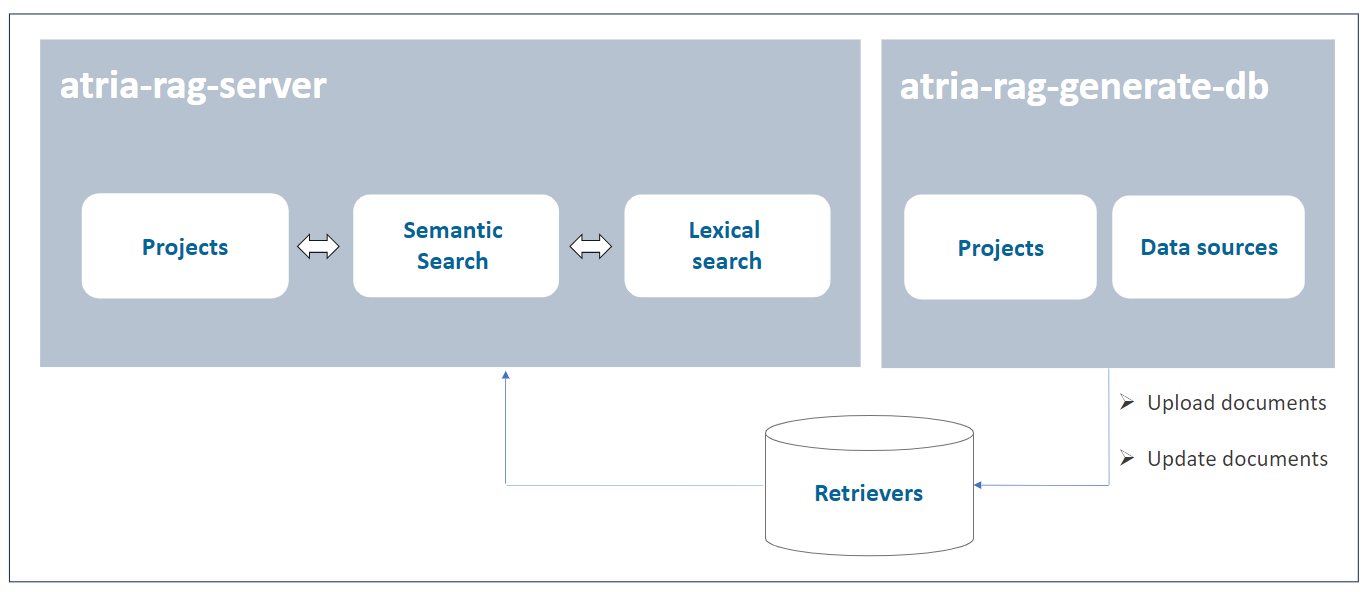
A brief description of the technical components is included below:
Data sources
A project contains information required for the execution of the generation of the databases: specific path of documents to feed the databases, allowed file extensions, etc. It can read from different sources, this source type is defined in the extensions field.
Before the information from the documents is stored in the corresponding database, the documents are processed, e.g., they are cut up and cleaned.
Retrievers
The retrievers are in charge of reading the information from the documents and feeding the databases.
The retrievers are defined in the retrievers field of the project. Each retriever is associated with a database in order to feed or retrieve information from it.
2 - Operational overview
ATRIA RAG Generate DB operational overview
Overview of the atria-rag-generate-db operation
Operational flow
The operational flow between an application (for the communication with aura-gateway-api), atria-model-gateway, atria-rag-server and atria-rag-generate-db is schematically shown in the document atria-model-gateway: operational flow.
Configuration
atria-model-gateway includes a default configuration. Constructors can use it as is or they can modify it to be adapted to their requirements or business models: Go to document ATRIA configuration.
Data persistence feature
Now ATRIA enables data persistence in knowledge bases across releases: After the installation of a new release, all existing data in the knowledge base (currently, Qdrant) remains fully available and accessible for every ATRIA experience. Thus, information is completely independent of the deployed version.
This feature provides key advantages:
- Guaranteed continuity of ATRIA experiences.
- No need for data re-ingestion after each release.
- No need to recalculate embeddings.
- Data ingested after the installation of a release (through hot swapping) is now automatically consolidated and carried forward to subsequent releases.
Tracking and clean-up processes
atria-rag-generate-db keeps a record of the current state of documents and related configuration for data sources, so it only feeds documents that have been modified or added since the last update.
atria-rag-generate-db also cleans up any resources that are left behind and no longer used after new ones are introduced.
Preset management
Preset report
After generation-db is executed, a report is logged with the following information for each preset:
- The preset name.
- The status of the execution (success, skipped or error).
- A descriptive message with the reason for the status.
- Date and time of the execution start.
- Date and time of the execution end.
- The configured documents for the preset
Preset availability
When a new preset is created, it is necessary to launch the database generation process by executing the atria-rag-generate-db component. This process may take several minutes to complete. Once the generation is finished, the atria-rag-generate-db component is automatically restarted.
While these processes are running, a message is shown to the user indicating that the preset is not yet available.
When both processes are finished, the preset becomes available for use.
Data migration between ATRIA releases
The data persistence feature is implemented by a migration tool between environments or releases integrated in the atria-rag-generate-db component. This tool moves the trained data from one release to another, to avoid generating preset data that has been previously created in a release.
The process for migrating data must be triggered manually by launching a command (similar to the aura-rag-generate-db job), where both source and target environments should be indicated.
After executing this command, data will be migrated from one environment to the other automatically.
The migration flow is executed as follows:
- Process the hashes file and, for each preset we want to migrate, we will do the following steps:
- Check that the preset from the source environment is in the config of the target environment
- Move the
trained_data files from the source environment to the respective training folder of the target environment
- Duplicate the collections from the source environment to the target environment
- Move the TFIDFs files from the source environment to the target environment
- Move the hashes file from the source environment to the target environment
- Add the new presets training files to the respective training folder in the target environment.
- Launch atria-rag-generate-db. Only new presets will be reloaded.
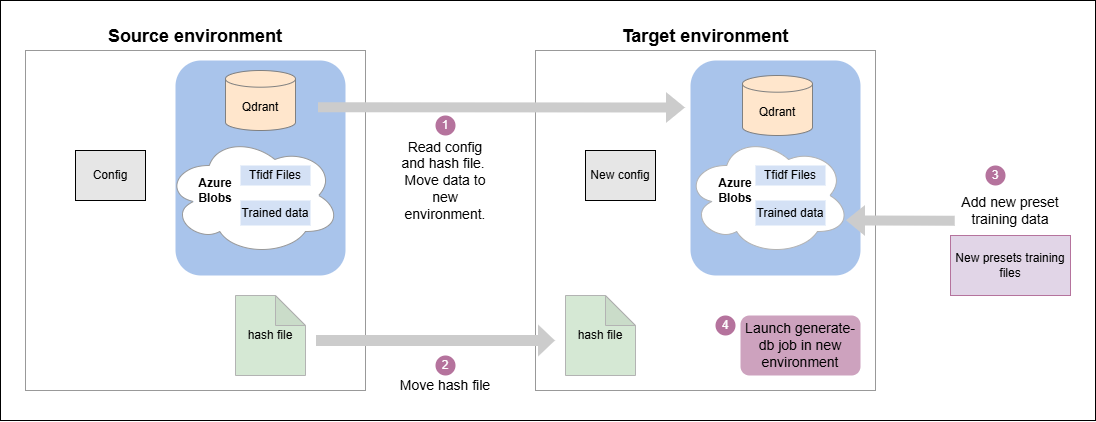
Data migration flow
In the migration process described above, the following folders are generated and stored in an Azure blob storage after atria-rag-generate-db is finished:
Shared data
This folder contains the trained data shared between atria-rag-server and atria-rag-generate-db.
This is used to store the files that the atria-rag-generate-db generates and then the atria-rag-server uses to be able to process the request.
At the moment, only the files generated by the TFIDF (Term Frequency–Inverse Document Frequency) exist in this folder.
This folder is used for migration, as we can take the TFIDFs of a trained preset to the blob of a specific release where that preset has not been trained and save the training afterward.
Trained data
This folder contains the files that have been used in the atria-rag-generate-db for each preset.
The folder structure is defined with a hash of the contents of all the files for each preset, to facilitate migration.
Atria RAG project hashes
This is a file containing all the information for each preset, to facilitate migration.
It contains the following information for each preset:
-
config_hash: Hash of the preset configuration at the time the atria-rag-generate-db was launched.
-
source_files_hash: Hash of the source files used to generate the preset. This hash should exist in one folder into the trained data folder.
-
metadata: Metadata of the preset, including the date of atria-rag-generate-db launching.
-
retrievers: Info that retrievers used to generate the preset. It contains the name of the Qdrant collection and the path where it holds the TFIDF files, which would correspond to the shared data.
{
  "5905dece-433d-47f4-a78c-72366bcd1473": {
    "config_hash": "28f837d56079f30c59a419292d129bc3",
    "source_files_hash": "cda3afcd8e74ede0d23065e897d55fae",
    "metadata": {
      "date": "2025-04-01 11:25:59"
    },
    "retrievers": {
      "qdrant_collection_name": "rag-ap-eight-9100-dev-project-copilot",
      "tfidf_path_file": "project-copilot/tfidf"
    }
  }
}
In addition to using this data for migration, it also speeds up the launch of the atria-rag-generate-db.
The config_hash and source_files_hash values are used to verify if, at the moment of launching the atria-rag-generate-db, something has been changed in the configuration or in the training data. If changes are detected, all the data for that preset is regenerated. Otherwise, if the preset has not changed, we will save that generation.
Launch migration process
The process to persist data between releases has to be launched manually through the execution of the following command:
To run this script, we just need the output files with the environment configuration info generated by the installer in the output_install directory from the source and destination environment.
With this info, run the script as shown below, using the corresponding files names for the desired environment:
./migrate-data --source-file ${SOURCE_ENVIRONMENT_INFO_FILE} --dest-file ${DEST_ENVIRONMENT_INFO_FILE}
Where:
source-file: Source environment info file where the data is stored.dest-file: Target environment info file where the data is going to be migrated.