This is the multi-page printable view of this section.
Click here to print.
Return to the regular view of this page.
Agents Server
Agents Server
Descriptive documentation regarding the component agents-server
Introduction
The agents-server component is a microservice that provides the capability to create server API and manage agents. It is responsible for executing the agent’s tasks.
To launch the agents-server component, you need install the agents package you prefer to use and deploy the server using this agents package.
Associated documentation
Descriptive technical documentation regarding agents-server includes:
1 - Architecture and components
Agents Server architecture and components
Development architecture and technical components of the agents-server
Technical foundations
The agents-server component will start a server that listens for incoming requests and executes the agent’s tasks based on the received input.
The server can be configured to use an agent by specifying the agent package name.
This server creates a REST API that can be used to interact with different agents. The API allows sending requests to the agent and receiving responses.
Within the agents-server, the agents package component enables information processing tasks to be performed and acted upon to achieve specific objectives. This information can come from a database and respond to the user’s request based on that acquired information.
Architecture overview
The following figure shows the main technical components of the agents-server, which are described below.
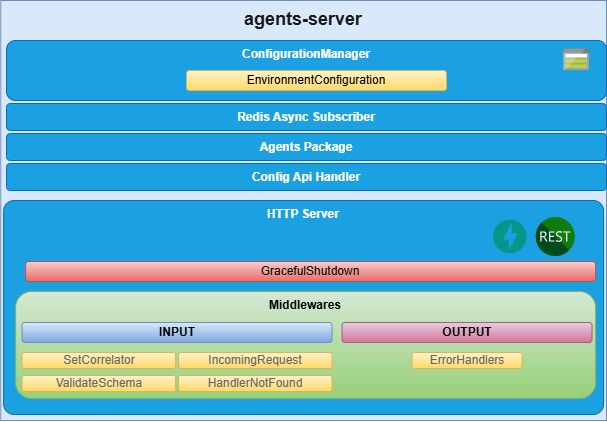
agents-server components
HTTP server
Microservice is implemented as an HTTP server (fastapi) that exposes an API to receive the request to be validated.
Config Api Handler
The agents-server uses the aura-configuration-api to get the configuration of the agent.
This handler is responsible for retrieving the configuration of the agent from the aura-configuration-api and providing it to the server.
ConfigurationManager
ConfigurationManager is a handler for configuration, obtained through a configuration file or environment variables.
Agents Package
The server is configured to use the agent of a specific agent package name. This package contains the agent’s code and its dependencies. The server will load the agent package and use it to execute the agent’s tasks.
Event Subscribers
Event subscribers are implementations for managing event registration and handling in the agents-server. They allow the server to listen for events and trigger actions based on those events.
Redis Async Subscriber
RedisAsyncSubscriber is a handler for subscribing to Redis channels asynchronously. It allows the server to receive messages from Redis and process them in real time.
DAPR Async Subscriber
DaprAsyncSubscriber is a handler for subscribing to DAPR topics asynchronously. It allows the server to receive messages from DAPR and process them in real time.
2 - Environment variables
Agents server environment variables
List of environment variables handled by the agents-server
Introduction
The agents-server depends on these environment variables to be set. None of them are modifiable by the OBs.
| Property |
Type |
Description |
| AGENT_PACKAGE_NAME |
string |
Package names containing the agents to be deployed. They must be separated by ,. |
| AURA_AGENT_DEPLOYMENT_NAME |
string |
Deployment name, which is used to obtain the agents to be deployed at API level. |
| AURA_CONFIG_API_API_KEY |
number |
APIKey for the aura-configuration-api. This key is used to authenticate requests to the aura-configuration-api. |
| AURA_CONFIG_API_BASE_URL |
string |
Base URL for the aura-configuration-api used to make requests to this component. |
| AURA_LOGGING_CONFIG_PATH |
string |
Path to the logging configuration file. This file is used to configure the logging settings for the server. |
| AURA_LOGGING_MODULE_NAME |
string |
Name of the logging module. This name is used to identify the logging module in the logging configuration. |
| AURA_LOGGING_NAME |
string |
Name of the logging instance. This name is used to identify the logging instance in the logging configuration. |
| AURA_REDIS_DATABASE |
number |
Redis database number to be used by the server. This number is used to connect to the Redis database. |
| AURA_REDIS_HOSTS |
string |
Redis hosts to be used by the server. This is a comma-separated list of Redis host names or IP addresses. |
| AURA_REDIS_MODE |
string |
Mode of the Redis connection. |
| AURA_REDIS_PASSWORD |
number |
Ppassword for the Redis connection. This password is used to authenticate the connection to the Redis database. |
| AURA_REDIS_POOL_SIZE |
number |
Size of the Redis connection pool. This number is used to limit the number of connections to the Redis database. |
| AURA_REDIS_PREFIX_SUBSCRIBERS |
string |
Prefix for the Redis subscribers. This prefix is used to identify the subscribers in the Redis database. |
| AURA_REDIS_CHANNELS_SUBSCRIBERS |
string |
Channels (separated by ‘,’) for the Redis subscribers. Redis prefix is added to these channels at the beginning. |
| AURA_REDIS_P_CHANNELS_SUBSCRIBERS |
string |
Pattern channels (separated by ‘,’) for the Redis subscribers. Redis prefix is added to these pattern channels at the beginning. |
| AURA_DAPR_PUBSUB_NAME |
string |
DAPR pubsub component name. It is used to identify DAPR component to be used. |
| AURA_DAPR_PREFIX_SUBSCRIBERS |
string |
Prefix for the DAPR pubsub subscribers. This prefix is used to identify the subscribers in the configured database. |
| AURA_DAPR_TOPICS_SUBSCRIBERS |
string |
Topics (separated by ‘,’) for the DAPR pubsub subscribers. DAPR prefix is added to these topics at the beginning. |
| AURA_MODEL_GW_BASE_URL |
string |
Base URL for the aura-model-gateway. This URL is used to make requests to the aura-model-gateway. |
| AURA_MONGODB_SSL |
boolean |
It indicates whether to use SSL for the MongoDB connection or not. This is a boolean value that can be set to true or false. |
| AURA_MONGODB_URI |
string |
URI for the MongoDB connection. This URI is used to connect to the MongoDB database. |
| AURA_MONGODB_USERNAME |
string |
Username for the MongoDB connection. This username is used to authenticate the connection to the MongoDB database. |
| AURA_MONGODB_PASSWORD |
string |
Password for the MongoDB connection. This password is used to authenticate the connection to the MongoDB database. |
-
The environment variables related to Redis are used to connect to the Redis database. This database is used to refresh the agent’s configuration, because every time the configuration of an agent is changed, it publishes this change in the corresponding channel so we can detect this change in order to refresh it.
-
The environment variables related to DAPR are used to connect to the DAPR components. These components are used to refresh the agent’s configuration, because every time the configuration of an agent is changed, it publishes this change in a corresponding topic, so we can detect this change in order to refresh it.
-
In order to use DAPR, it is necessary to have the DAPR pubsub component configured in the DAPR configuration file, besides the DAPR environment variables.
3 - API definition
Agents Server API definition
Description of Agents Server configuration API swagger
This is an internal AURA API.
Download swagger file