This is the multi-page printable view of this section.
Click here to print.
Return to the regular view of this page.
Agents Manager
Agents Manager
Descriptive technical documentation regarding agents-manager, the server in charge of managing and orchestrating access to the different agents within the ATRIA ecosystem
Introduction
agents-manager is a server in charge of managing and orchestrating access to the different agents within the AURA ecosystem.
The main purpose of agents-manager is to facilitate orchestration between the different agents registered in ATRIA, also to enrich the conversation by managing the message history, before sending the requests to the agent responsible for their processing.
Associated documentation
Descriptive technical documentation regarding agents-manager includes:
1 - Architecture and components
Agents Manager architecture and components
Development architecture and technical components of the agents-manager
Technical foundations
agents-manager is mainly a web server built on Typescript using nodejs as engine. It is api-first designed, using OpenAPI v3 to provide the API definition and openapi-backend to handle swagger specification.
agents-manager server is composed by several plugins, which provide different functionalities to this component.
A channel, service, or skill uses an application to connect with agents-manager following this communication protocol.
Architecture overview
The following figure shows the main technical components of the agents-manager, which are described below.
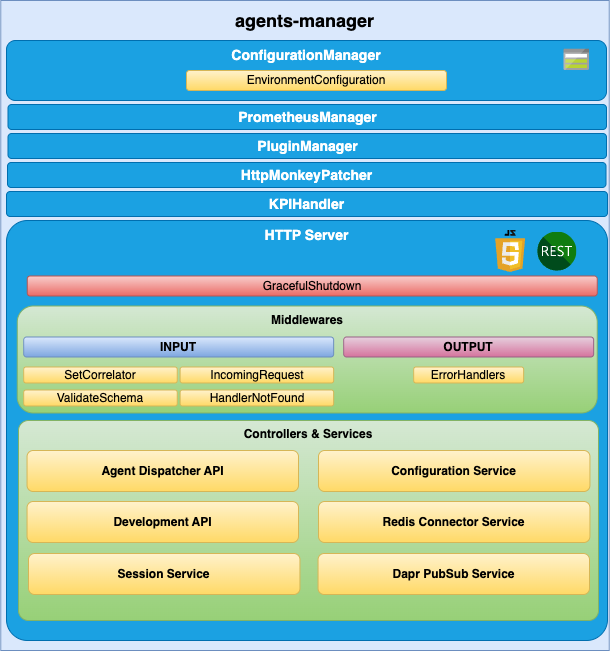
agents-manager components
ConfigurationManager
ConfigurationManager is a handler for configuration, obtained through a configuration file or environment variables.
RedisConnector
RedisConnector is a handler connection to Redis.
HTTP server
Microservice is implemented as an HTTP server (AuraServer) that exposes an API to receive the request to be validated.
Middlewares
The route published in the API definition file is handled by a controller but, before a request lands on its controller, it goes through a series of middlewares that provides some common steps needed by all the controllers of the server such as: request validation, common parameters extraction, logging, metrics initialization, etc.
Controllers and Services
agents-manager is composed of plugins, which provide functionality and uses specific modules from aura-configuration-api.
Check the available plugins together with detailed information in: agents-manager plugins.
1.1 - Plugins
Agents Manager API plugins
agents-manager plugins are components that provide different functionalities to agents-manager
Introduction
agents-manager is composed of plugins, which provide functionality to this component. Plugins work independently, the same way as a service in microservices oriented architecture: isolated, self-contained and without affecting other existing functionalities in the system.
From the different types of plugins, only Api plugins are available in agents-manager.
The following plugins are currently available in agents-manager. Certain plugins are used by all or some of the other plugins and others are specific for one capability.
Discover detailed information regarding the available plugins in the left index.
Plugins management
agents-manager uses the @architect/architect library for the management of plugins, so it is the architect library that is responsible for managing the dependencies injection in each module.
To create the architect application, agents-manager uses the PluginManager module (located in the modules/plugin-manager folder). This module starts as the rest of modules at the agents-manager start-up.
The PluginManager performs the following tasks:
- It starts the architect application with the plugins defined in
plugin-config.json file, located at the root of the agents-manager component.
- It adds the core modules to the IOC context. See the section plugins modules.
- It stores the information of each module defined in the plugins.
Apart from the agents-manager core environment variables, each plugin can define its own specific variables. Access the document agents-manager environment variables and find them in the section corresponding to your plugin.
Plugin basic structure
Currently, agents-manager uses @architect/architect library for plugins management.
A basic plugin must define at least:
- A
package.json file defining the library, like any other JavaScript library, with a plugin section defining which modules it consumes and supplies.
- A source code file that defines the modules that it supplies (
index.ts for example).
The structure of this basic plugin is as follows:
session-api
├── index.ts
└── package.json
Plugins modules
agents-manager currently adds one module that can be used by the different plugins. To use it, it is only necessary to add the package.json dependencies on plugin.consumes (like any other module/component).
- configurationManager: Module with the agents-manager configuration information.
- redisConnector: Module with the agents-manager Redis connection.
A plugin can provide one or more plugin modules and each plugin module can be of a different type. Each type of module is intended to add a specific functionality to agents-manager.
1.1.1 - agent-dispatcher-api plugin
agent-dispatcher-api plugin
Technical description of the agent-dispatcher-api plugin
Introduction
agent-dispatcher-api plugin manages and dispatches the requests to the agent API.
Consumes components (IOC)
| Name |
Type |
Description |
| configurationManager |
PluginType.Service |
Configuration manager |
| redisConnector |
PluginType.Service |
Redis connector |
| sessionService |
PluginType.Service |
Session service |
| agentsConfiguration |
PluginType.Service |
Agents Configuration |
Provides components (IOC)
| Name |
Type |
Description |
| agentDispatcherApi |
PluginType.API |
Agent dispatcher API |
1.1.2 - Agent Deployment Plugin
Agent Deployment Plugin
The agent-deployment plugin is a component that provides deployment functionalities for agents within the agents-manager.
Introduction
The agent-deployment plugin is designed to manage the deployment of agents in a flexible and scalable manner. It allows multiple agents to be deployed within a single microservice, and the same agent can be deployed with different configurations across different microservices or within the same microservice.
Plugin Management
The agent-deployment plugin uses the @architect/architect library for managing dependencies and plugin lifecycle. The PluginManager module, located in the modules/plugin-manager folder, is responsible for initializing the plugin at the start-up of the agents-manager.
The PluginManager performs the following tasks:
- Initializes the architect application with the plugins defined in the
plugin-config.json file, located at the root of the agents-manager component.
- Adds core modules to the IOC context. See the section plugin modules.
- Stores information about each module defined in the plugins.
Plugin Basic Structure
A basic plugin must define at least:
- A
package.json file defining the library, with a plugin section specifying which modules it consumes and supplies.
- A source code file that defines the modules it supplies (
index.ts for example).
The structure of this basic plugin is as follows:
agent-deployment-plugin
├── index.ts
└── package.json
Example index.ts
import { PluginType, registerPlugin } from '@telefonica/agents-manager-common';
import { Services } from './deployment-consume-services';

export = registerPlugin([
    {
        type: PluginType.Service,
        name: 'agentDeploymentService',
        instance: {
            deployAgent(agentConfig) {
                // Implementation for deploying an agent
            }
        },
        services: Services
    }
]);
Example package.json
{
    "name": "@telefonica/agent-deployment-plugin",
    "version": "1.0.0",
    "main": "index.js",
    "private": true,
    "plugin": {
        "consumes": [
            "configurationManager"
        ],
        "provides": [
            "agentDeploymentService"
        ]
    }
}
Plugin Modules
The agent-deployment plugin can utilize the following modules provided by the agents-manager:
- configurationManager: Module with the agents-manager configuration information.
- redisConnector: Module with the agents-manager Redis connection.
A plugin can provide one or more plugin modules, and each plugin module can be of a different type. Each type of module is intended to add specific functionality to the agents-manager.
1.1.3 - development-api plugin
development-api plugin
Technical description of the development-api plugin
Introduction
The development-api plugin manages the configuration in development environments. Only available in development environments.
Consumes components (IOC)
| Name |
Type |
Description |
| configurationManager |
PluginType.Service |
Configuration manager |
| redisConnector |
PluginType.Service |
Redis connector |
Provides components (IOC)
| Name |
Type |
Description |
| developmentApi |
PluginType.API |
Endpoints to change development configuration |
| behaviorCache |
PluginType.Service |
Cache to store the configuration changes |
| behaviorManager |
PluginType.Service |
Management of changes |
1.1.4 - configuration-service plugin
configuration-service plugin
Description of the configuration-service plugin
Introduction
The configuration-service plugin manages the configuration of agents.
Consumes components (IOC)
| Name |
Type |
Description |
| configurationManager |
PluginType.Service |
Configuration manager |
Provides components (IOC)
| Name |
Type |
Description |
| agentsConfiguration |
PluginType.Service |
Agents configuration |
1.1.5 - redis-connector-service plugin
redis-connector-service plugin
Description of the redis-connector-service plugin
Introduction
The redis-connector-service plugin manages requests to Redis.
Consumes components (IOC)
| Name |
Type |
Description |
| configurationManager |
PluginType.Service |
Configuration manager |
Provides components (IOC)
| Name |
Type |
Description |
| redisConnector |
PluginType.Service |
Redis connector |
1.1.6 - session-service plugin
session-service plugin
Technical description of the session-service plugin
Introduction
The session-service plugin manages the sessions.
Consumes components (IOC)
| Name |
Type |
Description |
| configurationManager |
PluginType.Service |
Configuration manager |
| redisConnector |
PluginType.Service |
Redis connector |
Provides components (IOC)
| Name |
Type |
Description |
| sessionService |
PluginType.Service |
Management of sessions |
2 - Communication protocol
Agents Manager communication protocol
Description of Agents Manager communication protocol
Communication protocol
The agents-manager uses a synchronous communication protocol, although the specific behavior may vary depending on the endpoint. The following diagram illustrates the protocol:
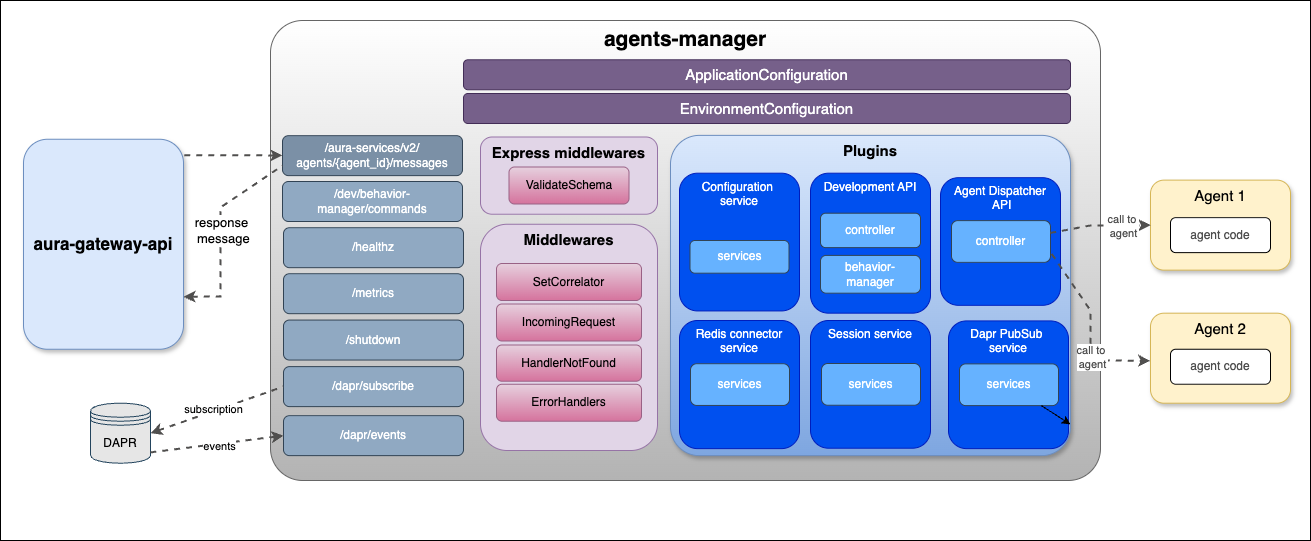
agents-manager communication protocol
3 - Environment variables
Agents Manager environment variables
List of environment variables handled by agents-manager
- Properties marked in bold are mandatory.
- Properties marked in italics are optional.
Introduction
agents-manager environment variables can be common for all plugins or specific for each of them.
Common properties
| Property |
Type |
Description |
Modifiable by OB? |
| AURA_AUTHORIZATION_HEADER |
string |
APIKey to use with aura-services. |
NO |
| AURA_DEFAULT_LOCALE |
string |
Culture code to be used by default in the current deployment: de-de, en-gb, es-es, pt-br. |
NO |
| AURA_DEFAULT_TIME_ZONE |
string |
Timezone where the service is running. |
NO |
| AURA_ENCRYPTION_ALGORITHM |
string |
Encryption algorithm that will be used to validate the APIKey. By default: aes-256-cbc. |
NO |
| AURA_ENCRYPTION_IV_LENGTH |
number |
Size for the initialization vector used by the encryption algorithm that validates the APIKey. By default: 16. |
NO |
| AURA_ENCRYPTION_IV_POSITION |
number |
Position where to insert the initialization vector in the final string with the encrypted payload. By default: 35. |
NO |
| AURA_ENCRYPTION_KEY |
string |
Encryption key or comma-separated list of encryption keys to be used in the environment. It is mainly used to decrypt the APIKeys. |
NO. It would break database encrypted data and APIKey validation. |
| AURA_ENVIRONMENT_NAME |
string |
Name of the environment where the server is deployed. Used during server make-up to handle the indexes of the database properly. |
NO |
| AURA_ENVIRONMENT_PREFIX |
string |
Prefix that will be used by all Redis keys when using redis-connector. By default: ``. (empty) |
YES |
| AURA_HTTP_KEEP_ALIVE |
boolean |
Use of keep-alive in HTTP connections. Used in monkey-patcher. By default: true. |
NO |
| AURA_HTTP_KEEP_ALIVE_MSECS |
number |
Number of milliseconds to keep alive HTTP connections. Used in monkey-patcher. By default: 100000. |
NO |
| AURA_HTTP_KEEP_MAX_SOCKETS |
number |
Maximum number of sockets. Used in monkey-patcher. By default: 250. |
NO |
| AURA_HTTP_MAX_REQUEST_SIZE |
string |
Maximum size in bytes of body request. Allowed values must indicate the units: 10 mb, 200 kb, etc. By default, 20mb. |
NO |
| AURA_LOGGING_FORMAT |
string |
Format to be used in monitoring logs: json or dev(more visual format). By default: json. |
NO. Only for development, set it to dev. |
| AURA_LOGGING_LEVEL |
string |
Level to be used in logs, from more to less verbose: 'TRACE', 'DEBUG', 'INFO', 'WARN', 'ERROR', 'FATAL', 'OFF'. By default: INFO. |
NO |
| AURA_MAKEUP_MODE |
string |
It allows dev mode for the make-up process with the value local. By default: full. |
NO |
| AURA_MICROSOFT_AZURE_STORAGE_ACCESS_KEY |
string |
Microsoft Storage password of the deployment. |
NO |
| AURA_MICROSOFT_AZURE_STORAGE_ACCOUNT |
string |
Microsoft Storage account of the environment. |
NO |
| AURA_MICROSOFT_AZURE_STORAGE_CONFIGURATION_CONTAINER |
string |
Aura configuration container name. By default: aura-configuration. |
NO |
| AURA_HTTP_MONKEY_PATCHER_ENABLED |
boolean |
Flag to indicate whether Monkey Patcher is used in service or not. |
NO |
| AURA_SERVER_PORT |
number |
Port to where server is listening. By default: 8990. |
NO |
| AURA_SERVER_REMOTE_CONTAINER_PREFIX |
number |
Remote container prefix. By default: agents-manager. |
NO |
| AURA_SERVICE_ENVIRONMENT |
string |
Type of environment: 'DEV', 'PRE', 'PRO'. By default, DEV. It is used during locale translation, to get the correct text reference. |
NO |
| AURA_SHUTDOWN_GRACEFUL_TTL |
number |
Time in milliseconds to complete the SHUTDOWN signal and process all the messages in queue before SIGTERM. By default: 25 * 1000. |
NO |
| AURA_SWAGGER_FROM_REMOTE |
boolean |
Flag to indicate whether the swagger file is loaded from remote or not. By default: true. |
NO |
| AURA_SWAGGER_LOCAL_PATH |
string |
Location of the swagger file generated from all loaded plugins. By default: swagger.yaml. Used during makeup to upload the file to remote. |
NO |
| AURA_SWAGGER_PLUGIN_PATH |
string |
Location of the swagger file of every plugin. By default: swagger.yaml. |
NO |
| AURA_SWAGGER_LOCAL_CORE_PATH |
string |
Location of server swagger base file. By default: swagger-core.yaml. |
NO |
| AURA_SWAGGER_REMOTE_CONTAINER_PREFIX |
string |
Remote container prefix to store the swagger information. By default: swagger |
NO |
| AURA_VERSION |
string |
Mandatory, release of Aura. |
NO |
| AURA_HTTP_PATHS_LOG_DISABLED |
string |
HTTP paths separated by commas whose request would not be logged. By default aura-configuration', 'metrics', 'healthz Used in monkey-patcher. |
NO |
development-api plugin
| Property |
Type |
Description |
Modifiable by OB? |
| DEV_AURA_BEHAVIOR_PREFIX |
string |
Used in cache key prefix and in command name. By default: gateway. |
NO in production environments. This feature could only be activated in development environments. |
| DEV_AURA_BEHAVIOR_CACHE_TTL |
number |
Maximum lifetime of behavior cache in seconds. After this time, the system will delete the message. By default: 60 * 60 (60 min). |
NO in production environments. This feature could only be activated in development environments. |
| DEV_AURA_BEHAVIOR_COMMAND_PATTERN |
string |
Pattern to recognize a behavior command. By default: gateway(:| +)(get|set|unset)(:| +)(\w+)(:| +)?.+ |
NO in production environments. This feature could only be activated in development environments. |
configuration-service plugin
| Property |
Type |
Description |
Modifiable by OB? |
| AURA_CONFIGURATION_API_ENDPOINT |
string |
Configuration API URL where the server should get the configuration. |
NO |
| AURA_AUTHORIZATION_HEADER |
string |
APIKey to use with aura-services. |
NO |
| AURA_CONFIGURATION_RETRIES |
number |
Number of retries to get the configuration. By default: 3. |
NO, only if checked and validated with Aura Global Team. |
| AURA_CONFIGURATION_RETRY_DELAY |
number |
Delay between retries in case of error. By default: 100. |
NO, only if checked and validated with Aura Global Team. |
| AURA_CONFIGURATION_RETRY_FACTOR |
number |
Factor to multiply delay for every HTTP request retried. By default: 10. |
NO, only if checked and validated with Aura Global Team. |
redis-connector-service plugin
| Property |
Type |
Description |
Modifiable by OB? |
| AURA_REDIS_MODE |
string |
Mode of Redis distribution. Values: CLUSTER, SENTINEL, SINGLE. By default: SENTINEL. |
NO |
| AURA_REDIS_SENTINEL_INSTANCE_NAME |
string |
Name of the Redis instance. Used in SENTINEL mode. |
NO |
| AURA_REDIS_HOSTS |
string |
String with a list of nodes separated by ‘,’, including host and port separated by ‘:’. For example: “localhost:port,localhost2:port2”. |
NO |
| AURA_REDIS_DATABASE |
number |
Database number for SINGLE or SENTINEL mode. By default: 0. |
YES |
| AURA_REDIS_PASSWORD |
string |
String with Redis password. |
YES |
| AURA_REDIS_USE_CONNECTION_POOL |
boolean |
Use pool connections for Redis. By default: true. |
YES |
| AURA_REDIS_CONNECTION_POOL_MIN |
number |
Minimum number of connections in the pool. By default: 2. |
YES |
| AURA_REDIS_CONNECTION_POOL_MAX |
number |
Maximum number of connections in the pool. By default: 100. |
YES |
| AURA_REDIS_MAX_RECONNECT_RETRIES |
number |
Number of retries to connect to Redis. By default: 25 |
YES |
| AURA_REDIS_MAX_RECONNECT_INTERVAL |
number |
Time in milliseconds to wait before reconnecting to Redis. By default: 5000. |
YES |
session-service plugin
| Property |
Type |
Description |
Modifiable by OB? |
| AURA_SESSION_MAX_HISTORY_LENGTH |
number |
Maximum number of messages to keep in history. Default: 10. |
NO |
| AURA_SESSION_EXPIRE_TIME |
number |
Expire time for the conversation history in seconds. Default: 3600 (1 hour). |
NO |
4 - API definition
API definition for Agents Manager
Description of API swaggers for agents-manager component
APIs index
4.1 - Agents Manager API
Agents Manager API
Definition of the complete API in agents-manager
Download swagger file
4.2 - Agents Manager Development API
Agents Manager Development API
Description of Agents Manager Development API. Only available in development environments.
Download swagger file
4.3 - Agents Manager Dispatcher API
Agents Manager Dispatcher API
Description of Agents Manager Dispatcher API
Download swagger file